








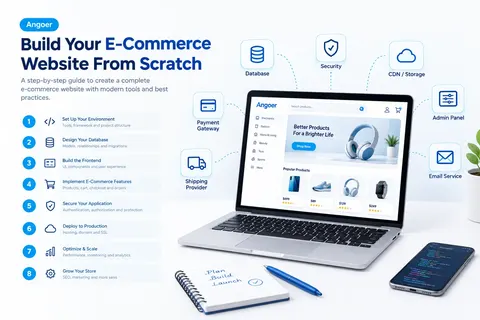
01. How to Build a Complete E-Commerce Website From Scratch
An e-commerce website is an online platform where customers can browse, compare, and purchase products or services directly through the internet. Unlike a regular website that primarily provides information, an e-commerce site is a complete sales channel with product catalogs, shopping carts, secure payments, order management, and customer accounts.
At its core, an e-commerce website does four essential things: it displays products to potential customers, allows them to add items to a cart, processes payments securely, and tracks orders until delivery. Behind the scenes, it manages inventory, customer data, order history, shipping information, and business analytics.
The difference between an e-commerce website and a regular website is purpose and functionality. A news website informs readers. A portfolio website showcases work. A company website provides contact information. An e-commerce website sells products. This means it must handle transactions, store payment information securely, manage inventory in real-time, and handle customer data with strict security standards.
Common examples of e-commerce websites include Amazon (massive marketplace), Shopify stores (small to medium businesses), specialized retailers like Best Buy (electronics), independent brands selling directly to customers, and marketplaces like eBay where multiple sellers operate under one platform. Each operates differently, but they all share the core function of facilitating online sales.
The scale of e-commerce varies widely. A small business might sell 10 products to a local audience. A mid-size retailer might manage thousands of products across multiple categories. A large platform like Amazon manages millions of products, vendors, and daily transactions across dozens of countries. This guide covers principles that apply whether you're building a small boutique store or a large-scale platform.
04. E-commerce ecosystem showing all interconnected components
Why Businesses Need E-Commerce Websites
The shift toward e-commerce isn't just a trend—it is driven by fundamental advantages that make selling online increasingly important for modern businesses. Understanding both the benefits and challenges of e-commerce helps businesses decide whether they need an online store and what level of investment is appropriate.
The Business Advantages of E-Commerce
1. 24/7 Availability and Global Reach
A physical retail store is limited by geography and operating hours. Customers can only shop when the store is open and when they can physically visit the location.
An e-commerce website operates 24 hours a day, 365 days a year. Customers can browse products, compare options, and make purchases at any time, regardless of their location or time zone.
E-commerce also allows businesses to reach customers far beyond their local market. A small business can potentially sell to customers across different cities, countries, and regions without opening physical stores.
2. Lower Operating Costs
Physical retail typically requires significant ongoing expenses, including:
Store rent
Utilities
Staff
Inventory storage
Store maintenance
Physical equipment
An e-commerce business still has operating costs, such as:
Website hosting
Website maintenance
Payment processing fees
Customer service
Marketing
Inventory and fulfillment
However, for many businesses, the operating cost per transaction can be lower than maintaining a physical retail location.
E-commerce can also support leaner inventory models. Businesses may use strategies such as drop-shipping, where products are shipped directly from suppliers to customers, reducing the need for extensive storage facilities.
3. Detailed Customer Data and Analytics
One of the major advantages of e-commerce is access to detailed customer and business data.
An online store can provide insights into:
Which products customers view
How long customers spend on product pages
Which products are added to carts
Which products are purchased
Where customers come from
Which marketing channels generate sales
Which devices customers use
Where customers abandon the purchasing process
This information can help businesses understand customer behavior, improve product pages, optimize marketing campaigns, and make better business decisions.
Physical stores generally provide much less detailed information about individual customer behavior.
4. Better Customer Relationships
E-commerce allows businesses to build direct relationships with their customers.
Depending on the platform and customer permissions, businesses can use customer information and purchase history to provide:
Personalized product recommendations
New product notifications
Loyalty rewards
Special offers
Personalized marketing
Order updates
Customer reviews and feedback opportunities
These tools can help businesses create stronger customer relationships and encourage repeat purchases.
5. Scalability Without Major Infrastructure Investment
Expanding a physical retail business often requires opening additional locations, hiring more employees, increasing storage capacity, and investing in real estate.
E-commerce can provide a more flexible way to scale.
As customer demand increases, businesses can increase their hosting capacity, improve their infrastructure, expand fulfillment operations, and serve more customers without necessarily opening additional physical stores.
6. Easy A/B Testing and Continuous Optimization
E-commerce websites make it easier to test different versions of:
Product pages
Images
Product descriptions
Pricing
Promotions
Page layouts
Calls to action
Businesses can measure how customers respond to different versions and use the results to improve the shopping experience.
This continuous optimization can help businesses improve their conversion rates, customer experience, and overall online performance.
The Challenges and Disadvantages of E-Commerce
Although e-commerce offers many advantages, it also comes with important challenges that businesses should consider.
1. High Initial Development and Maintenance Costs
Building a professional e-commerce website can require significant investment in:
Design
Development
Hosting
Security
Payment integrations
Inventory systems
Marketing tools
Third-party services
Off-the-shelf platforms can reduce the initial development effort, but they may involve monthly fees, transaction fees, and platform limitations.
Custom development can require a larger initial investment but can provide greater flexibility and control.
Businesses must also budget for ongoing maintenance, security updates, bug fixes, payment changes, and new features.
2. No Physical Product Experience
Online customers cannot physically touch, feel, or try a product before purchasing it.
This can be particularly challenging for products where physical experience is important, such as:
Clothing
Shoes
Furniture
Jewelry
Beauty products
Products where size, texture, or physical comfort matters
High-quality product photography, detailed descriptions, specifications, videos, sizing information, and customer reviews can help reduce this limitation.
3. Increased Competition
E-commerce removes many geographical barriers between businesses and customers.
A local business may no longer compete only with nearby stores. It may also compete with businesses from other cities, countries, and regions.
For example, someone searching online for "blue running shoes" may see thousands of products from different businesses.
This makes factors such as branding, product quality, pricing, customer experience, search visibility, and marketing increasingly important.
4. Payment and Fraud Risks
Online businesses must take security and payment protection seriously.
E-commerce businesses may need to manage:
Payment security
Fraud prevention
Chargebacks
Payment disputes
Unauthorized transactions
Customer data protection
Choosing reliable payment providers and implementing appropriate security measures is essential for protecting both the business and its customers.
5. Logistics and Shipping Complexity
Selling online introduces additional fulfillment responsibilities.
Depending on the business model, these may include:
Inventory management
Warehousing
Packaging
Shipping
Delivery tracking
Returns
Exchanges
Refunds
Logistics coordination
A smooth fulfillment process is an important part of the overall customer experience.
6. Dependence on Technology
An e-commerce business depends heavily on technology.
Important systems may include:
The website
Hosting infrastructure
Payment gateways
Inventory databases
Order management systems
Email services
Security systems
A major technical problem can interrupt sales and affect customer experience.
For this reason, businesses should consider reliable hosting, regular backups, monitoring, security measures, and contingency plans.
When E-Commerce Makes Sense
An e-commerce website can be particularly useful when:
You want to reach customers beyond your local geographic area.
Your products have broad appeal or serve a geographically dispersed niche.
You have sufficient inventory or a reliable supply chain.
Your products can be effectively presented through images, descriptions, specifications, and reviews.
Your target customers are comfortable shopping online.
You can invest in website development and ongoing maintenance.
You can provide reliable customer service.
You have a plan for shipping, returns, and fulfillment.
When E-Commerce May Not Be the Right Fit
An e-commerce website may be less suitable when:
Your product fundamentally requires an in-person experience, such as certain custom services or professional consultations.
Your business depends almost entirely on local foot traffic.
Your target market is very small and highly localized.
You have extremely limited inventory.
You currently lack the financial or technical resources required to maintain an online platform.
The cost and complexity of online fulfillment would outweigh the potential benefits.
Conclusion
E-commerce can provide businesses with broader market access, flexible operating hours, customer insights, scalable infrastructure, and new opportunities for customer engagement.
However, building an online store is not simply about creating a website. Successful e-commerce requires investment in technology, security, marketing, customer service, inventory, payments, and fulfillment.
The right approach depends on the business, its products, target customers, resources, and long-term goals.
Key Components of Professional E-Commerce Systems
Building an e-commerce website isn't just about creating a product listing page. A professional e-commerce system consists of multiple interconnected components, each serving a specific purpose.
Understanding these components before you start building helps you plan your architecture, database design, integrations, and overall system structure effectively.
Customer-Facing Components
1. Product Catalog and Search
The product catalog is the core of an e-commerce website. It includes:
Product listings
Detailed product pages
Product descriptions
Product images and videos
Product specifications
Pricing
Inventory status
Customers should be able to:
Browse products by category.
Filter products by attributes such as size, color, price, and brand.
Search products by keyword.
Sort products by relevance, price, or popularity.
A professional catalog also requires powerful search functionality. Simple database queries may not be sufficient for large catalogs containing thousands of products.
Many e-commerce systems use dedicated search engines such as Elasticsearch or Solr to provide fast and relevant search results with complex filtering and sorting.
2. Shopping Cart and Checkout
The shopping cart stores products that customers want to purchase before completing their orders.
A professional shopping cart should allow customers to:
Add products to their cart.
Adjust product quantities.
Remove products.
Apply discount codes.
Save their cart for later.
The cart should also persist between sessions. If a customer closes their browser and returns later, their previously added products should still be available.
Checkout is the critical conversion point. A complicated checkout process can cause customers to abandon their purchases.
A professional checkout should be:
Fast
Simple
Clear
Easy to navigate
It should ask only for essential information, provide a clear pricing breakdown, and support multiple payment methods.
3. User Accounts and Profiles
Customer accounts allow users to manage their information and interact with the store.
A professional user account system can include:
Secure login
Authentication
Password management
Email verification
Password reset
Account settings
Saved addresses
Order history
Wishlists
Saved products
Customers should also be able to save multiple addresses for different shipping locations.
4. Payment Processing
Payment processing securely handles credit cards, PayPal, digital wallets, and other payment methods.
Payment information should not be handled directly by the website's own backend whenever possible. Instead, the website integrates with a payment processor such as Stripe, PayPal, or Square.
The typical process is:
The customer enters payment information through a secure form.
The payment information is sent to the payment processor.
The payment processor processes the transaction.
The website receives a confirmation or denial.
The order status is updated accordingly.
Professional payment systems can also handle:
Declined cards
Fraud detection
3D Secure verification
Currency conversion
Refunds
Payment status changes
Payment providers also commonly provide webhooks, which allow the e-commerce system to automatically receive notifications when payment statuses change.
5. Order History and Tracking
Customers should be able to view their previous orders, current order status, and shipping information.
An order detail page can display:
Products purchased
Quantity
Total amount paid
Shipping address
Order status
Expected delivery date
Tracking information
Tracking information can be integrated with shipping carriers to provide customers with up-to-date delivery information.
6. Reviews and Ratings
Professional e-commerce websites allow customers to leave reviews for products they have purchased.
Reviews can include:
A rating from 1–5 stars
Review title
Written review
Customer photos
Verified purchase badge
Verified purchase badges can increase credibility by indicating that the reviewer actually purchased the product.
Moderation tools are also important for preventing:
Spam
Fake reviews
Inappropriate content
Reviews can improve customer trust, provide valuable feedback, and contribute to SEO and conversion performance.
Administrative Components
7. Admin Dashboard and Product Management
Behind every professional e-commerce website is an administrative system where business users manage products, inventory, orders, customers, and website content.
An admin dashboard can provide overview metrics such as:
Today's sales
Pending orders
Inventory alerts
Customer activity
Product performance
Product management should allow administrators to:
Add products
Edit product information
Upload product images
Update pricing
Manage product variants
Manage colors and sizes
Organize products into categories
For larger stores, bulk operations are essential. These can include editing multiple products at once or uploading inventory through spreadsheets.
8. Order Management
An order management system provides administrators with a complete overview of customer orders.
Staff should be able to:
View all orders.
Filter orders by status.
Update order information.
Generate packing slips.
Track shipments.
Process refunds.
Manage returns.
Common order statuses include:
Pending
Processing
Shipped
Delivered
Cancelled
Refunded
Notifications can also keep relevant people informed, such as sending order confirmations to customers and new-order notifications to warehouse staff.
9. Customer Management
A customer management system provides administrators with information about registered customers.
It can include:
Customer information
Contact details
Account status
Purchase history
Order history
Customer communication
This information can help customer support teams resolve issues and help businesses understand their customers.
10. Inventory Management
An inventory management system tracks product stock levels and helps prevent overselling.
Important inventory functions include:
Tracking current stock levels
Low-stock alerts
Stock adjustments
Handling returned products
Handling damaged products
Preventing overselling
Advanced inventory systems can also manage inventory across multiple warehouses, automate restocking, and integrate with suppliers.
11. Analytics and Reporting
Analytics provide important information about the performance of an e-commerce business.
Common metrics include:
Total revenue
Average order value
Conversion rate
Traffic sources
Product performance
Customer lifetime value
Best-selling products
Reports help businesses identify trends, discover successful products, identify underperforming products, and understand customer behavior.
12. Promotion and Discount Management
A promotion system allows businesses to create and manage discounts, coupons, and special offers.
Common promotion types include:
Percentage discounts
Fixed-amount discounts
Buy-one-get-one offers
Free shipping thresholds
Time-limited promotions
Coupons can require customers to enter a specific code, or discounts can be automatically applied to eligible products.
13. SEO and Content Management
Professional e-commerce websites often include additional content such as:
Blogs
FAQs
Product guides
Buying guides
Educational content
A content management system (CMS) allows administrators to create, edit, and publish content without directly modifying the website's code.
Content can also support SEO by helping the website appear in search engines and providing useful information to customers.
Backend Infrastructure and Services
14. Database
The database stores the structured information required by the e-commerce system.
This can include:
Customers
Products
Orders
Inventory
Prices
Reviews
Addresses
Payments
A well-designed database is essential for:
Performance
Data integrity
Scalability
Reliable data management
15. API Layer
The API, or Application Programming Interface, acts as a bridge between the frontend and backend.
The frontend can use the API to:
Fetch products
Create orders
Update user profiles
Retrieve customer information
Submit other requests
The API validates requests, applies business logic, communicates with the database, and returns the appropriate results.
A well-designed API also allows the frontend and backend to be developed, tested, and scaled independently.
16. Authentication and Authorization
Authentication verifies that a user is who they claim to be.
For example:
"Is this person really the owner of this account?"
Authorization determines what an authenticated user is allowed to do.
For example:
"Is this user allowed to view this order or edit this product?"
Professional systems typically use:
Secure password hashing
Secure sessions or tokens
Access controls
Two-factor authentication (2FA), particularly for administrative accounts
Passwords should never be stored as plain text.
17. Payment Gateway Integration
Beyond the payment form itself, payment gateway integrations are an important part of an e-commerce system.
These integrations can support:
Recurring payments
Subscriptions
Webhooks
Refunds
Payment status updates
Dispute management
Payment providers such as Stripe and PayPal provide SDKs that simplify integration with e-commerce applications.
18. Email Service
E-commerce websites send many different types of emails, including:
Order confirmations
Shipping notifications
Password reset emails
Promotional emails
Customer support responses
Instead of sending emails directly from the application server, professional systems often integrate with dedicated email services such as:
SendGrid
Mailgun
Amazon SES
These services are designed to improve email delivery reliability and can provide additional features such as delivery tracking, open tracking, click tracking, and analytics.
19. File and Media Storage
E-commerce websites need reliable storage for:
Product images
Product videos
Customer-uploaded review photos
Documents
Other media files
Professional systems commonly use cloud storage services such as:
Amazon S3
Google Cloud Storage
Azure Blob Storage
These services can provide redundancy, backups, and integration with content delivery networks.
20. Search Engine
A dedicated search engine is optional but recommended for large e-commerce websites.
When a store contains thousands of products, traditional database searches may not provide the speed and relevance required for a professional shopping experience.
Search engines such as Elasticsearch can provide:
Fast product search
Filtering
Faceted search
Search suggestions
Relevant search results
Search quality can have a direct impact on the customer shopping experience and conversions.
21. CDN — Content Delivery Network
A CDN stores copies of static website assets on servers distributed around the world.
These assets can include:
Product images
CSS files
JavaScript files
Fonts
Other static resources
When a customer requests an asset, the CDN can deliver it from a nearby server location.
This can reduce loading times and improve website performance.
22. Analytics and Monitoring
Analytics systems track customer behavior across the website.
They can measure:
Pages visited
Time spent on pages
Customer interactions
Clicks
Purchases
Conversion rates
Monitoring systems can alert administrators when something goes wrong, such as:
Server downtime
Slow database performance
Payment processor failures
Application errors
Logging systems record detailed information about system events and errors, making troubleshooting easier.
23. Notification System
Beyond email, e-commerce websites can communicate with customers through multiple notification channels.
These may include:
SMS
Push notifications
In-app notifications
Email
A professional notification system can manage multiple channels and send notifications according to customer preferences and system events.
External Integrations
24. Shipping Carriers
Integrating with shipping carriers can automate important parts of the fulfillment process.
Common shipping providers include:
UPS
FedEx
USPS
DHL
Shipping integrations can support:
Automatic shipping label generation
Shipping rate calculation
Tracking number generation
Tracking updates
Delivery notifications
The e-commerce system sends shipping information to the carrier, receives the tracking information, and communicates delivery updates to the customer.
25. Tax Calculation Services
Tax rules can vary significantly depending on the customer's location and the type of product being purchased.
Tax calculation services such as TaxJar and Avalara can help businesses calculate applicable taxes based on factors such as:
Customer location
Product type
Applicable tax rules
26. Email Marketing Platform
Email marketing platforms help businesses manage customer email lists and marketing campaigns.
Platforms such as Mailchimp and Klaviyo can provide features for:
Customer segmentation
Email campaigns
Automated email sequences
Customer lists
Campaign performance tracking
27. Social and Communication Integrations
Social media integrations can connect an e-commerce website with social platforms.
Possible features include:
Product sharing
Social notifications
Social advertising
Customer communication
Social commerce features
Some e-commerce websites also integrate with messaging platforms to provide customer support.
The Complete Picture
No single component of a professional e-commerce system works in isolation.
For example, when a customer browses products, the system uses the product catalog and search functionality.
When the customer adds a product to the cart, the system may communicate with the inventory system to verify stock availability.
When the customer checks out, multiple services can work together, including:
Shopping cart
Payment processor
Tax service
Inventory system
Order management
Email service
After the order is placed, the system can communicate with shipping carriers and send notifications to the customer.
At the same time, administrators use systems such as:
Order management
Inventory management
Customer management
Analytics
Product management
All of these components are connected through the application's database, APIs, and backend services.
Final Takeaway
Understanding these components helps businesses make better technology and architecture decisions when building an e-commerce platform.
Some frameworks and e-commerce platforms provide many of these features out of the box. Other systems require businesses to assemble the components themselves, combining custom development with third-party services.
Regardless of the approach, a professional e-commerce platform requires multiple interconnected systems working together to provide customers with a secure, reliable, scalable, and functional shopping experience.
09. Planning Your E-Commerce Project
Gathering Requirements: The Foundation of Your Project
Before writing a single line of code, you must understand exactly what you're building and why.
Requirements gathering is the foundation of an e-commerce project. It defines your vision, identifies your constraints, clarifies what your customers need, and establishes what success looks like.
Skipping this step can lead to:
Wasted development time
Missing features
Poor technical decisions
Unexpected costs
Frustrated stakeholders
Expensive rework
A well-defined requirements process gives the development team a clear direction before implementation begins.
1. Business Requirements
Start by defining your business goals.
Business Goals and Purpose
Ask why you are building the e-commerce website.
For example:
Are you launching a new business?
Are you moving an existing physical business online?
Are you expanding an existing online presence?
Are you creating a completely new sales channel?
The answers to these questions will influence almost every decision made throughout the project.
Business Model
Document the type of business model you will use.
Possible models include:
B2C — Business to Consumer
B2B — Business to Business
D2C — Direct to Consumer
Marketplace
Other specialized models
Also define:
Revenue goals
Expected growth
Target launch date
Long-term business objectives
For example, are you targeting a launch in 3 months or 12 months?
Do you need the business to become profitable immediately, or can you invest in growth before reaching profitability?
Budget Constraints
Define how much you can invest in:
Development
Design
Hosting and infrastructure
Payment processing
Third-party services
Marketing
Security
Ongoing maintenance
Your budget can significantly influence whether you choose an existing platform such as Shopify or develop a custom e-commerce system.
Competitive Landscape
Identify your main competitors and study their businesses.
Document:
Who your competitors are
What they do well
What customers like about them
Where they have weaknesses
What advantages your business has
What can differentiate your store
Understanding the competitive landscape helps you prioritize features that make your business different.
Regulatory and Compliance Requirements
Identify the legal and regulatory requirements that apply to your business.
Consider:
Tax requirements
Data privacy regulations
International selling requirements
Industry-specific regulations
Customer data protection
Payment-related requirements
If you sell internationally, determine which privacy and regulatory requirements apply to the regions where you operate.
These requirements can affect both your technical architecture and database design.
2. Customer Requirements and Personas
Understanding your customers is essential before designing the website.
Create detailed customer personas that describe:
Who your customers are
What they need
How they shop
What devices they use
What problems they are trying to solve
What influences their purchasing decisions
Example: Luxury Jewelry
If you are selling luxury jewelry, your customers might be affluent professionals who:
Shop on desktop and mobile devices.
Expect high-quality product photography.
Want detailed product specifications.
Expect premium customer service.
Value an elegant shopping experience.
The website should reflect these expectations through:
Elegant design
Fast loading times
Responsive layouts
High-quality product images
Excellent customer support
Example: Industrial Equipment
If you are selling industrial equipment to manufacturers, your customers might be procurement managers who:
Purchase products in large quantities.
Need detailed technical specifications.
Require technical documentation.
Request quotes.
Need account management features.
The website may therefore require:
Bulk ordering
Quote requests
Invoicing
Account hierarchies
Technical documentation
Detailed product specifications
Different customers require different features, so your customer personas should directly influence the design and functionality of the platform.
Customer Discovery
Understand how customers will discover your business.
Potential discovery channels include:
Google search
Social media
Direct traffic
Sales representatives
Referrals
Advertising
The way customers discover your business affects the features and infrastructure you need.
For example:
Search traffic may require strong SEO.
Social traffic may require social media integrations.
Sales-driven businesses may require CRM integration.
Expected Customer Behavior
Document how customers are expected to interact with your store.
Consider:
How many products will customers browse before purchasing?
Will they compare products?
Will they read reviews?
Will they frequently return products?
Will they use filters?
Will they save products for later?
Understanding these behaviors helps inform UX design and feature priorities.
3. Product Requirements
Define exactly what products or services you will sell.
Product Catalog
Create a detailed inventory plan that identifies:
Number of product types
Number of SKUs
Product categories
Product variants
Product attributes
Determine whether products have variations such as:
Sizes
Colors
Materials
Models
Configurations
Product Information
For each product, define what information must be stored.
Depending on the product category, this may include:
Product name
Description
Dimensions
Weight
Materials
Care instructions
Warnings
Technical specifications
Images
Videos
Warranty information
Different product categories require different information.
For example:
Clothing: Size charts and material information
Electronics: Technical specifications
Food: Ingredients and nutritional information
Pricing Model
Define how product pricing works.
Pricing may be:
One fixed price per product
Different prices for different customers
Seasonal pricing
Volume-based discounts
Promotional pricing
A complex pricing model can significantly affect database design and business logic.
Product Management
Determine how products will be added to the system.
Possible methods include:
Manual entry through an admin dashboard
Spreadsheet uploads
Bulk imports
Supplier integrations
Automated product synchronization
If you add large numbers of products regularly, efficient bulk import tools become especially important.
Special Product Features
Determine whether your products require additional functionality, such as:
Product reviews
Product recommendations
Bundle pricing
Product comparisons
Digital downloads
Product customization
Each additional feature introduces additional development and maintenance complexity.
4. Operational Requirements
Define how the business will operate on a daily basis.
Expected Order Volume
Estimate how many orders you expect to process:
At launch
After 6 months
After 1 year
These estimates help determine:
Server capacity
Database requirements
Infrastructure requirements
Performance expectations
Scalability needs
Administrative Users
Determine who will manage the business.
Consider:
How many employees will use the admin system?
Will external contractors have access?
What responsibilities will each person have?
How technically experienced are the users?
This affects the complexity and usability requirements of the admin interface.
Inventory Management
Define how inventory will be managed.
Consider whether you will:
Track stock manually
Use an inventory management system
Integrate with a warehouse
Synchronize inventory with suppliers
Also determine:
Whether backorders are allowed
How returns affect inventory
How damaged products are handled
How stock adjustments are managed
Payment Methods
Determine which payment methods your customers need.
Possible options include:
Credit cards
Debit cards
PayPal
Digital wallets
International payment methods
Each additional payment method may introduce additional integration and maintenance requirements.
Shipping Requirements
Define how products will be delivered.
Possible shipping models include:
Flat-rate shipping
Weight-based shipping
Destination-based shipping
Free shipping
International shipping
Drop-shipping
If you use drop-shipping, determine how suppliers will ship products directly to customers and how tracking information will be managed.
Customer Support
Define how customers will contact your business.
Possible channels include:
Email
Live chat
Phone
Support tickets
Also define your expected response time.
These requirements determine whether customer support functionality needs to be built directly into the e-commerce platform or integrated through an external service.
Analytics Requirements
Determine how much business data you need to track.
Basic analytics might include:
Website traffic
Sales
Orders
Conversion rate
Advanced analytics might include:
Customer lifetime value
Product-level performance
Marketing attribution
Customer behavior
Purchase patterns
The level of analytics required affects the tracking and data infrastructure you need to implement.
Security and Compliance
Define your security and compliance requirements before development begins.
Consider:
Payment security requirements
PCI DSS requirements
GDPR
CCPA
Data privacy
Customer data protection
Secure authentication
These requirements can have a significant impact on infrastructure, application architecture, and database design.
5. Creating a Requirements Document
After gathering all requirements, consolidate them into a single, organized document.
The document does not need to be extremely formal or complicated. A clear and structured list of requirements can be enough.
Your requirements document should include the following sections:
Business Goals
Define:
What you are trying to achieve
Why you are building the platform
Your revenue goals
Your timeline
Your long-term objectives
Customer Personas
Document:
Who your customers are
What they need
How they shop
How they discover your business
What problems you solve for them
Product Catalog
Document:
What you are selling
Number of products
Number of SKUs
Product variants
Required product information
Pricing structure
Key Features
Separate features into three categories:
Must-Have Features
Features required for the initial launch.
Nice-to-Have Features
Useful features that can improve the experience but are not essential for launch.
Future Features
Features that can be developed after the core platform is established.
Technical Constraints
Document:
Budget
Timeline
Technology requirements
Existing systems
Required integrations
Hosting requirements
Infrastructure limitations
Operational Workflow
Document how the business will manage:
Products
Inventory
Orders
Customers
Payments
Shipping
Returns
Customer support
Success Metrics
Define how you will determine whether the project is successful.
Possible metrics include:
Revenue
Website traffic
Conversion rate
Average order value
Customer satisfaction
Customer retention
Number of orders
Customer lifetime value
6. Use the Requirements Document Throughout Development
The requirements document should remain a reference throughout the entire development process.
Whenever the team is deciding whether to build a new feature, ask:
Does this feature align with our requirements and business goals?
If the answer is no, the feature may not need to be included in the current development phase.
This helps prevent unnecessary development and keeps the project focused on its actual objectives.
Final Takeaway
Many projects fail not because of technical problems, but because the requirements were not properly understood before development began.
A strong requirements-gathering process requires time and effort at the beginning of the project, but it can prevent significant amounts of wasted development time, unnecessary features, unexpected costs, and expensive rework.
Investing in clear requirements before writing code is one of the most important steps in building a successful e-commerce platform.
Complete E-Commerce Feature Checklist
1. Product Features
- Product catalog with search and filtering
- Product categories and subcategories
- Product tags
- Product images with multiple angles
- Image zoom capability
- Product videos
- Product descriptions and specifications
- Product pricing and sale pricing
- Product reviews and ratings
- Product ratings summary
- Verified purchase badges
- Product recommendations
- Related products
- Product availability status
- Product variants (size, color, material, etc.)
- Variant-specific pricing
- Variant-specific images
- Variant inventory tracking
- Product FAQ section
- Product comparison tool
- Wishlist / Save for Later
- Stock quantity display
- Low-stock indicators
- Pre-order capability
- Product SEO metadata (title, description, URL)
2. Shopping & Checkout
- Shopping cart with add/remove items
- Quantity adjustment in cart
- Cart persistence when browser closes
- Discount code application
- Cart abandonment recovery
- Shipping method selection
- Shipping cost calculation
- Tax calculation and display
- Order total breakdown
- Guest checkout
- Registered-user checkout
- Saved addresses for logged-in users
- Address book management
- Different billing and shipping addresses
- Multiple payment methods
- Secure payment processing
- Payment failure handling
- Payment retry
- Order confirmation page
- Order confirmation email
- Estimated delivery date
3. User Accounts & Authentication
- User registration
- Email verification
- Secure login
- Password reset
- Profile information management
- Saved addresses
- Order history
- Order tracking with real-time updates
- Wishlist management
- Review management
- Edit/delete own reviews
- Account settings
- Two-factor authentication
- Password strength requirements
4. Shipping & Fulfillment
- Shipping method configuration
- Shipping zone setup
- Regional shipping rules
- Flat-rate shipping
- Weight-based shipping
- Destination-based shipping
- Free-shipping thresholds
- Shipping carrier integration
- Automated shipping-label generation
- Tracking number integration
- Real-time tracking updates
- Packing slip generation
- Returns management
- Return authorization system
- Return shipping labels
- Automatic inventory restocking after returns
5. Payments & Refunds
- Credit/debit card processing
- PayPal integration
- Digital wallets
- Apple Pay
- Google Pay
- Payment verification
- Failed payment notifications
- Refund processing
- Refund status tracking
- Partial refunds
- Recurring payments, if applicable
- PCI compliance measures
- Secure payment-data handling
6. Promotions & Discounts
- Percentage discounts
- Fixed-amount discounts
- BOGO offers
- Volume discounts
- Quantity-based pricing
- Coupon-code system
- Coupon usage limits
- Coupon expiration dates
- Free-shipping promotions
- Seasonal sales
- Flash sales
- Automatic price reductions
- Loyalty rewards
7. Customer Management
- Customer database
- Customer purchase history
- Customer information viewing
- Customer segmentation
- Customer communication tools
- Bulk customer actions
- Account status management
8. Admin Dashboard
- Dashboard overview
- Sales metrics
- Order metrics
- Traffic metrics
- Real-time metrics
- Performance summaries
- Critical issue alerts
- Customizable dashboards
9. Product Management
- Add new products
- Edit product information
- Bulk product upload via CSV/spreadsheet
- Product categorization
- Batch product editing
- Image management
- Image optimization
- Video management
- Inventory tracking per product
- Bulk price updates
- Product status management
- Draft products
- Published products
- Archived products
- Product scheduling
- Scheduled publishing
- Bulk product deletion
10. Order Management
- Order list
- Order filtering
- Order status tracking
- Order detail view
- Order status updates
- Customer communication from order
- Refund processing
- Return management
- Order notes
- Order printing
- Bulk order actions
- Order exports
- Payment status tracking
11. Inventory Management
- Stock quantity tracking
- Stock adjustments
- Low-stock alerts
- Out-of-stock handling
- Reserved stock tracking
- Backorder management
- Stock transfers between locations
- Multi-location inventory
- Inventory history
- Inventory forecasting
- Barcode tracking
- SKU tracking
12. Reviews & Ratings
- Customer review submission
- Review moderation queue
- Review approval/rejection
- Review spam detection
- Review helpfulness voting
- Seller responses
- Review filtering
- Review sorting
- Review photos/images
- Verified-purchase indication
13. Analytics & Reporting
- Traffic analytics
- Page analytics
- Session analytics
- User analytics
- Conversion tracking
- Sales reporting
- Revenue reporting
- Product performance reporting
- Category performance reporting
- Customer acquisition reporting
- Traffic-source analysis
- Device analytics
- Browser analytics
- Geographic analytics
- Search-keyword analytics
- A/B testing
- Custom report builder
- Report exports
- Scheduled reports
- Analytics dashboards
14. SEO & Content
- SEO title editing
- Meta description editing
- Custom URL slugs
- Canonical URL management
- Sitemap generation
- Robots.txt management
- H1/H2/H3 management
- Schema markup
- Product schema
- Review schema
- Open Graph tags
- Internal linking tools
- Keyword optimization suggestions
- Content management system
- Blog/guides
- Blog post publishing
- Blog categories
- Blog tags
- Blog comment moderation
15. Email & Notifications
- Order confirmation emails
- Shipping notification emails
- Delivery confirmation emails
- Password reset emails
- Review-request emails
- Abandoned-cart recovery emails
- Marketing email campaigns
- Email template customization
- SMS notifications
- Push notifications
- Customer notification preferences
16. Security & Compliance
- SSL/HTTPS
- Secure user authentication
- Admin access controls
- Role-based permissions
- Two-factor authentication
- Secure password hashing
- PCI DSS compliance
- GDPR compliance
- CCPA compliance
- Data backup and recovery
- Security logging
- Suspicious-activity monitoring
- Rate limiting
- DDoS protection
17. Customer Support
- Contact form
- Support email integration
- Support ticketing system
- Live chat
- FAQ section
- Help documentation
- Customer communication history
- Support ticket status tracking
18. Integrations & Extensions
- Payment gateway integration
- Shipping carrier integration
- Email service integration
- SMS service integration
- Email marketing platform integration
- Accounting software integration
- CRM integration
- Social media integration
- Google Analytics integration
- Tax calculation service
- Backup and disaster recovery
19. Performance & Optimization
- Mobile-responsive design
- Fast page-load times
- Image optimization
- Caching mechanisms
- CDN integration
- Code minification
- Database query optimization
- Search performance optimization
- Lazy loading
- Asset compression
20. Accessibility
- Mobile-friendly interface
- Touch-friendly buttons and inputs
- Keyboard navigation
- Screen-reader compatibility
- Alternative text for images
- Color-contrast compliance
- Accessible forms
- WCAG 2.1 AA compliance
21. Internationalization
- Multi-language support
- Currency conversion
- Localized pricing
- Regional tax handling
- Localized shipping options
- Translated content
- RTL language support
- Local payment methods
12. E-commerce project planning workflow: from requirements gathering to stakeholder approval
MVP vs. Important vs. Advanced vs. Future Features
One of the most common mistakes in e-commerce projects is trying to build everything at once. A founder may want the perfect store with every possible feature before launch, while a business leader may want every advanced capability from day one. This often leads to missed deadlines, higher costs, unnecessary complexity, and delayed launches.
The solution is clear feature prioritization. Divide features into four categories:
- MVP — Required for launch
- Important — High-value features to add soon
- Advanced — Features added as the business grows
- Future — Optional ideas that may not be worth building
1. What Is an MVP?
An MVP (Minimum Viable Product) is the smallest set of features required to launch and operate a functional e-commerce business.
These are the features needed to:
- Display products
- Accept customer orders
- Process payments
- Manage inventory
- Fulfill orders
- Communicate with customers
- Manage the store from an admin interface
Typical MVP Features
- Product catalog
- Basic product browsing
- Basic product search
- Product categories
- Product images
- Product descriptions
- Product pricing
- Product availability
- Shopping cart
- Quantity management
- Checkout process
- Guest checkout
- Customer accounts
- Payment processing
- Order creation
- Order confirmation
- Basic order tracking
- Basic inventory management
- Product management
- Order management
- Basic customer management
- Basic shipping configuration
- Order confirmation emails
- Shipping notification emails
- Secure authentication
- SSL/HTTPS
- Basic admin dashboard
- Basic responsive design
What Does NOT Need to Be in the MVP?
Features such as:
- Product recommendations
- Wishlists
- Loyalty programs
- Advanced analytics
- AI-powered search
- Advanced personalization
- A/B testing
- Mobile applications
- Multi-warehouse inventory
- Advanced CRM
- Augmented reality
These can provide value later, but they generally don't need to block the initial launch.
Goal: Build a simple, fast, secure, reliable store that can actually sell products.
2. Important Features
Important features significantly improve customer experience, conversion, retention, or operational efficiency, but aren't strictly required to launch.
These should generally be considered shortly after launch, depending on customer feedback and business priorities.
Important Features
- Product reviews and ratings
- Verified purchase reviews
- High-quality product images
- Image zoom
- Multiple product images
- Product videos
- Real-time inventory visibility
- Low-stock indicators
- Advanced order tracking
- Discount codes
- Promotional campaigns
- Free-shipping thresholds
- Wishlist
- Save for Later
- Related products
- Basic product recommendations
- Customer testimonials
- Bestseller indicators
- Basic analytics
- Conversion tracking
- Sales reporting
- Revenue reporting
- Email marketing integration
- Abandoned-cart recovery
- Customer segmentation
- FAQ sections
- Contact/support forms
- Advanced shipping options
- Return management
- Refund management
- Coupon management
- Basic SEO tools
- Sitemap generation
- Schema markup
- Social media integration
Why These Matter
These features can help:
- Increase customer trust
- Improve conversion rates
- Reduce support requests
- Increase repeat purchases
- Improve SEO
- Improve marketing performance
- Provide better business insights
3. Advanced Features
Advanced features improve efficiency, personalization, scalability, or revenue opportunities.
They usually make sense once the business has enough customers, data, orders, or operational complexity to justify them.
Advanced Features
- Personalized product recommendations
- AI-powered search
- Advanced analytics
- Custom report builder
- Advanced customer segmentation
- Customer lifetime-value analysis
- Advanced CRM integration
- Multi-language support
- Multi-currency support
- Regional pricing
- Advanced tax management
- Subscription payments
- Recurring orders
- Multi-warehouse inventory
- Stock transfers between warehouses
- Inventory forecasting
- Advanced shipping automation
- Automated shipping labels
- Advanced promotion rules
- Dynamic pricing
- Advanced loyalty programs
- A/B testing
- Advanced marketing automation
- Push notifications
- Progressive Web App (PWA)
- Advanced fraud detection
- Advanced recommendation systems
- Advanced customer-service automation
These features should generally be driven by an actual business requirement rather than simply being added because they are technically impressive.
4. Future Features
Future features are ideas that may be valuable eventually but don't currently justify their development cost or complexity.
Some may never need to be built.
Possible Future Features
- Native mobile application
- Augmented reality product visualization
- Advanced predictive analytics
- Marketplace functionality
- Customer product customization
- Highly advanced personalization
- Virtual shopping experiences
- AI shopping assistant
- Complex social-commerce features
- Advanced virtual try-on
- Multi-vendor marketplace
- Enterprise-level automation
A feature should remain in the Future category until there is a clear business reason to move it forward.
5. How to Decide Where a Feature Belongs
Use these questions when prioritizing a feature.
Question 1 — Can We Launch Without It?
No → MVP
Yes → Continue evaluating
Question 2 — Will Customers Be Significantly Affected Without It?
Yes → Important
No → Continue evaluating
Question 3 — Does It Have a Significant Revenue or Efficiency Impact?
Yes → Important or Advanced
No → Advanced or Future
Question 4 — Are Customers Actually Asking for It?
Yes → Consider moving it higher based on demand
No → Keep it Advanced or Future
Customer demand should be measured rather than assumed.
Question 5 — Does It Solve a Real Business Problem?
Yes → Prioritize according to its impact
No → Consider postponing it
Question 6 — Is It Expensive or Complex to Build?
If a feature requires significant infrastructure, integrations, maintenance, or development time, make sure its expected value justifies that complexity.
6. Example: Online Electronics Store
FeaturePriorityReasonProduct catalogMVPRequired to sell productsProduct searchMVPCustomers need to find productsProduct imagesMVPCustomers need to see productsShopping cartMVPRequired for purchasingCheckoutMVPRequired to complete ordersPayment processingMVPRequired to accept paymentInventory managementMVPRequired to manage stockOrder managementMVPRequired to fulfill ordersProduct reviewsImportantBuilds customer trustImage zoomImportantImproves product evaluationWishlistImportantSupports future purchasesDiscount codesImportantSupports promotionsAbandoned-cart recoveryImportantCan recover lost salesBasic analyticsImportantProvides business insightsPersonalized recommendationsAdvancedRequires customer/product dataAI searchAdvancedAdds complexity but can improve discoveryMulti-warehouse inventoryAdvancedUseful when operations become complexMulti-languageAdvanced/FutureDepends on target marketsMobile appFutureNot required for most initial launchesAR visualizationFutureHigh complexity and specialized use case
7. Recommended E-Commerce Roadmap
Phase 1 — MVP / Launch
Focus exclusively on the core shopping experience.
Customer Side
- Homepage
- Product catalog
- Categories
- Product detail pages
- Basic search
- Shopping cart
- Checkout
- Payment
- Customer registration/login
- Guest checkout
- Order confirmation
- Basic order tracking
Admin Side
- Dashboard
- Product management
- Category management
- Order management
- Customer management
- Inventory management
- Basic shipping management
Infrastructure
- Authentication
- Payment integration
- Email notifications
- SSL/HTTPS
- Basic security
- Responsive design
- Basic SEO
Goal: Customers can discover → purchase → pay → receive confirmation → receive their order.
Phase 2 — Early Improvements
Add the highest-impact Important features.
- Product reviews
- Ratings
- Wishlist
- Better product galleries
- Image zoom
- Discount codes
- Promotions
- Advanced inventory visibility
- Order tracking
- Returns
- Refunds
- Basic analytics
- SEO improvements
- Email marketing
- Abandoned-cart recovery
- Customer testimonials
- Related products
Goal: Improve conversion, trust, retention, and operational efficiency.
Phase 3 — Growth
Add remaining important features and selected advanced features based on real usage.
- Product recommendations
- Customer segmentation
- Advanced analytics
- Advanced reporting
- Loyalty program
- Advanced promotions
- Marketing automation
- Advanced shipping
- CRM integration
- Accounting integration
- Advanced inventory management
- Multi-language support
- Multi-currency support
Goal: Scale the business and reduce manual work.
Phase 4 — Advanced
Only introduce these when there is a demonstrated need.
- AI-powered search
- Personalized recommendations
- Inventory forecasting
- Multi-warehouse management
- Advanced CRM
- A/B testing
- Dynamic pricing
- Advanced fraud detection
- PWA
- Advanced automation
- Predictive analytics
Goal: Improve scalability, personalization, automation, and efficiency.
Phase 5 — Future
Keep these as potential long-term opportunities.
- Native mobile application
- AR visualization
- Virtual try-on
- Marketplace functionality
- Advanced product customization
- AI shopping assistant
- Virtual shopping experiences
- Advanced social commerce
Goal: Explore new business models and experiences only when justified by the business.
8. The Core Principle
The priority should not be:
"How many features can we build?"
It should be:
"What is the smallest set of features that allows us to launch, learn from customers, and grow?"
A successful e-commerce project should therefore follow:
MVP → Launch → Measure → Learn → Improve → Scale
Instead of:
Build Everything → Delay Launch → Increase Complexity → Increase Cost
Creating a Project Roadmap: From Vision to Execution
A project roadmap translates your prioritized features into a timeline with clear milestones, deliverables, and dependencies.
Without a roadmap, you have no way to answer basic questions:
When will we launch?
What's the current status?
Are we on track?
What needs to happen next?
Why You Need a Roadmap
A roadmap serves multiple purposes.
For Your Team
It provides direction.
Developers know what to build. Designers know what to design. Stakeholders know what's coming. Everyone aligns around the same priorities.
For Stakeholders and Investors
It demonstrates realism.
A thoughtful roadmap shows you've planned carefully and understand the scope. Vague timelines such as "maybe in a few months" inspire doubt. Specific milestones such as "Phase 2 launches January 15" inspire confidence.
For Yourself
It creates accountability.
You can measure whether you're meeting targets. When unexpected issues arise, you can assess the impact and adjust accordingly.
For Customers and the Market
It sets expectations.
Announcing a roadmap, if appropriate, can build anticipation. Customers know what's coming and can plan their own work around your releases.
Elements of a Good Roadmap
A project roadmap should include the following elements.
1. Timeline
Use specific dates or date ranges for each phase or milestone.
Avoid vague descriptions such as:
"Sometime in Q3."
Instead, use:
"July 15 – August 30."
2. Milestones
Milestones should be clear and measurable deliverables that demonstrate progress.
Examples:
Payment processing fully integrated and tested
Admin dashboard deployed and user access enabled
Core product catalog live with 1,000+ products
3. Features
Define which features are included in each phase.
These should connect directly to the feature prioritization established previously.
4. Dependencies
Identify what must happen before another task or feature can begin.
Examples:
Database schema finalized → depends on completing the entity relationship diagram
Payment processing tested → depends on completing the payment gateway integration
5. Resources and Effort
Include rough estimates for:
Number of people required
Development time
Design effort
Testing effort
Infrastructure requirements
6. Risks and Assumptions
Identify what could derail the timeline and what you're assuming will go smoothly.
Identifying these risks upfront helps you prepare contingencies.
Structure Your Roadmap by Phases
Most e-commerce projects can follow a structure similar to the following.
Phase 0 — Planning & Design
Duration: 2–4 weeks
Activities
Complete requirements gathering
Create detailed design mockups
Finalize database schema
Choose technology stack
Set up development environment
Deliverable
Approved specifications and design ready for development
Phase 1 — Core MVP Development
Duration: 8–12 weeks
Activities
Build product catalog and search
Build shopping cart
Implement checkout flow
Integrate payment processing
Set up database and admin interface
Implement inventory management
Deliverable
Full MVP ready for testing and launch
Phase 2 — Testing, Refinement & Pre-Launch
Duration: 2–4 weeks
Activities
Comprehensive functionality testing
Security testing
Performance testing
Bug fixes and refinement
Launch preparation
Domain configuration
Hosting configuration
Backup configuration
Monitoring setup
Staff training
Soft launch to a limited audience
Beta testing with selected users
Deliverable
Production-ready e-commerce site
Phase 3 — Launch
Duration: 1 week
Activities
Perform final checks
Switch to production
Monitor the system closely
Ensure customer support is ready
Monitor orders and payments
Monitor server performance
Deliverable
Live e-commerce site
Phase 4 — Post-Launch Improvements
Duration: Weeks 1–12 after launch
Activities
Monitor performance
Fix urgent issues
Implement important features based on customer feedback
Add basic analytics and reporting
Integrate email marketing
Implement product reviews
Improve customer experience
Deliverable
Enhanced e-commerce site with key missing features
Phase 5 — Growth & Advanced Features
Duration: Months 4–12
Activities
Advanced analytics
Personalization features
Customer loyalty programs
Advanced inventory management
International support, if applicable
Advanced automation
Additional integrations
Deliverable
Feature-rich and scalable e-commerce platform
Realistic Timeline Expectations
How long should each phase actually take?
This depends on several factors.
Team Size and Experience
A senior developer working full-time can build faster than a junior developer working part-time.
An experienced team with established processes can also move faster than a team learning as they go.
Technology Choice
Technology can significantly affect development time.
For example:
Building with Django or Laravel using established packages can be faster than building everything from scratch.
Using Shopify with extensions can be faster than custom development.
Complexity
A straightforward online store with 100 products will generally require less development time than a complex multi-vendor marketplace.
Additional requirements such as:
Multiple currencies
Multiple tax jurisdictions
Multi-language support
Complex shipping rules
Multiple warehouses
Advanced integrations
can significantly increase complexity.
Constraints
Other factors can affect the schedule:
Part-time development
Stakeholder approval delays
Content availability
Design revisions
Third-party integrations
Hosting configuration
Testing requirements
Estimated Timeline: Small Team
For a small team building a straightforward B2C store with a modern framework:
PhaseEstimated DurationPhase 0 — Planning2–3 weeksPhase 1 — MVP Development8–10 weeksPhase 2 — Testing & Pre-Launch2–3 weeksPhase 3 — Launch1 weekTotal to Launch13–17 weeksApproximately 3–4 months
Estimated Timeline: Complex Build
For a more complex build with custom design, many integrations, and strict compliance requirements:
PhaseEstimated DurationPhase 0 — Planning3–4 weeksPhase 1 — MVP Development12–16 weeksPhase 2 — Testing & Pre-Launch3–4 weeksPhase 3 — Launch1–2 weeksTotal to Launch19–27 weeksApproximately 4.5–6 months
Estimated Timeline: Platform-Based Build
For a simple build using a platform such as Shopify:
PhaseEstimated DurationPhase 0 — Planning1–2 weeksPhase 1 — Development2–4 weeksPhase 2 — Testing1 weekPhase 3 — LaunchA few daysTotal to Launch4–8 weeksApproximately 1–2 months
These are estimates. Individual projects vary significantly.
The key is to be realistic about your team's capabilities and account for unknowns.
Building in Contingency
Always add buffer time for unexpected issues.
A common approach is adding 20–30% contingency to your estimates.
For example:
Estimated development time: 10 weeks
With contingency: approximately 12–13 weeks
Why Add a Buffer?
Unexpected issues can arise:
Payment processor integration takes longer than expected
Security vulnerabilities require rework
A team member becomes unavailable
Stakeholder decisions are delayed
Third-party APIs behave unexpectedly
Requirements change
Bugs require additional development time
Good teams track these deviations.
For example:
"This task took 2 weeks longer than estimated because of X, Y, and Z."
Over time, this makes future estimates more accurate.
Communicating Your Roadmap
The way you present your roadmap should depend on your audience.
For Your Team
Create a detailed roadmap containing:
Features
Dependencies
Tasks
Milestones
Effort estimates
Responsible team members
Deadlines
Use a project management platform that everyone can access.
Update it regularly.
For Stakeholders and Investors
Create a simplified roadmap showing:
Major phases
Major milestones
Expected launch date
Key features
Business outcomes
Avoid overwhelming them with technical details.
Focus on outcomes such as:
Launch date → Key features → Expected business impact
For Customers
Only share a roadmap if it makes sense for your business.
For example, an e-commerce company might announce:
"Customer reviews coming next month."
There is usually no need to publish the entire internal development roadmap.
Adjusting the Roadmap
Your roadmap will change.
Something may take longer than expected. New priorities may emerge. Unexpected opportunities may appear.
This is normal.
The important thing is to make conscious adjustments rather than constantly scrambling.
When something changes:
Update the roadmap
Identify the impact
Communicate the change
Adjust deadlines if necessary
Reassign resources when required
Reprioritize affected features
Don't pretend you're on track if you're not.
Regular Roadmap Reviews
Regular reviews keep everyone aligned.
Weekly Team Review
Focus on:
Current progress
Completed work
Blockers
Upcoming tasks
Delayed items
Dependencies
Monthly Stakeholder Review
Focus on:
Overall progress
Major milestones
Timeline changes
Budget/resource impact
Upcoming releases
Major risks
This allows deliberate adjustments instead of unexpected surprises.
Tools for Roadmap Management
Common tools for managing project roadmaps include:
Asana
Visual timelines, task dependencies, and team collaboration.
Good for small to medium-sized teams.
Jira
Powerful project-management capabilities for technical teams, particularly those using Agile methodologies.
Monday.com
User-friendly and visually oriented, with strong support for cross-functional teams.
Notion
Flexible and highly customizable for combining documentation, planning, and roadmap management.
Linear
Minimal and fast, with a strong focus on engineering teams.
Gantt Charts
A classic project-management approach that works particularly well for visualizing dependencies and timelines.
Simple Spreadsheet
For very small projects, a shared spreadsheet containing:
Phases
Dates
Tasks
Responsible people
Status
may be completely sufficient.
The Important Part
The tool matters less than the discipline of:
Updating it → Reviewing it → Using it to guide the project
A Roadmap Is a Promise and a Guide
Your roadmap should be:
Realistic
Clearly communicated
Measurable
Flexible
Regularly updated
A roadmap is not a guarantee. Unexpected problems will occur.
Instead, it represents a commitment to a planned direction while allowing the team to adjust transparently when circumstances change.
Many projects fail not because of technical problems, but because of poor planning, unclear priorities, and weak communication.
A clear roadmap provides protection against:
Scope creep
Project drift
Unrealistic expectations
Missed milestones
Poor communication
Stakeholder frustration
Invest the time to build the roadmap correctly before development begins.
Pre-Development Checklist: Before Writing Code
Before writing any code, make sure the project's requirements, architecture, design, security, infrastructure, team responsibilities, testing strategy, and launch requirements have been clearly defined.
1. Requirements & Planning
Requirements document completed and approved
Customer personas defined
Target audience clearly identified
Business goals and success metrics documented
Competitive analysis completed
Feature prioritization completed (MVP, Important, Advanced, Future)
User stories written for core features
Use cases documented for critical flows (checkout, payment, returns)
Edge cases identified and documented
Regulatory and compliance requirements identified
Data privacy and security requirements documented
Performance and scalability targets defined
2. Technology & Architecture Decisions
Technology stack chosen and approved
Frontend framework selected
Backend framework selected
Database type selected
Hosting provider selected
Payment processor(s) selected
Email service selected
File storage solution selected
Search engine selected, if applicable
CDN provider selected, if applicable
Monitoring and logging tools selected
Authentication and authorization approach decided
3. Design & UX
User flows documented using wireframes or flowcharts
Design mockups created for key pages
Product page
Checkout
Admin dashboard
Mobile responsiveness planned
Accessibility requirements documented
Brand guidelines established
Design system or component library planned
Navigation structure finalized
Admin interface layout designed
Error states and edge cases designed
Loading states and transitions considered
4. Database & Data Architecture
Entity Relationship Diagram (ERD) created
Database schema finalized
Table structures defined with all columns and data types
Primary keys, foreign keys, and indexes planned
Data normalization approach decided
Denormalization requirements identified
Backup and disaster recovery strategy defined
Data retention policies documented
Audit and logging requirements defined
Performance optimization strategy defined
Query optimization
Database indexing
Efficient relationships
5. Security & Compliance
Security requirements documented
Encryption standards identified
HTTPS
Data at rest
Authentication mechanism chosen
Sessions
JWT
OAuth
Authorization model designed
Role-based access control
Attribute-based access control
Password policy defined
Data encryption approach determined
PCI DSS compliance requirements reviewed, if handling payment data
GDPR compliance requirements reviewed, if serving EU customers
CCPA compliance requirements reviewed, if serving California customers
Data backup and recovery procedures documented
Incident response plan drafted
Security testing approach defined
6. Infrastructure & Deployment
Hosting environments configured
Development
Staging
Production
CI/CD pipeline plan documented
Version control system configured
Git repository created
Environment configuration planned
Secret management approach decided
Environment variables
Secret management systems
Vaults
Database backup strategy defined
Monitoring and alerting configured or planned
Logging infrastructure planned
Load-balancing strategy defined, if needed
Auto-scaling policy defined, if using cloud infrastructure
Disaster recovery plan documented
7. Integrations & Third-Party Services
Payment gateway API credentials obtained and tested
Shipping carrier integration plan documented
Email service integration plan documented
Analytics service configured
Google Analytics configured, if applicable
Google Search Console configured
CDN setup plan documented
File storage service access configured
Tax calculation service integration planned, if applicable
Accounting software integration planned, if needed
Email marketing platform selected
Email marketing integration plan created
8. Documentation
API documentation template created
Database documentation started
Architecture documentation created
Development setup guide written
Local development instructions documented
Coding standards documented
Code style guide documented
Deployment procedures documented
Configuration management documentation created
Admin user guide drafted
Customer documentation planned
Help center
FAQ
Guides
9. Team & Roles
Development team assigned
Roles and responsibilities clarified
Communication plan established
Standup schedule defined
Review process defined
Code review process defined
Conflict resolution process established
Project manager or Scrum Master assigned
QA/testing responsibility assigned
Security reviewer assigned
DevOps/infrastructure responsibility assigned
Decision-making authority clarified
Ownership of major technical and business decisions defined
10. Testing & Quality Assurance
Testing strategy documented
Unit testing approach defined
Integration testing plan created
End-to-end testing approach defined
Performance testing plan created
Security testing plan created
Accessibility testing plan created
Browser compatibility requirements documented
Device compatibility requirements documented
Test data preparation plan created
11. Deployment & Launch Preparation
Domain name registered and configured
SSL certificate ordered or provisioned
Hosting account configured
Database server configured
Server configuration documented
Backup and recovery tested
Monitoring dashboards created
Alert thresholds configured
Rollback plan documented
Launch-day checklist created
Post-launch monitoring plan created
12. Documentation & Knowledge Transfer
Installation and setup documentation created
API documentation template created
Database schema documentation created
Code documentation standards defined
Deployment guide created
Troubleshooting guide created
Admin user manual created
Customer support documentation created
Knowledge-base structure planned
13. Business & Organizational
Budget finalized and approved
Timeline and milestones agreed upon
Stakeholder communication plan established
Risk register created
Potential project issues identified
Change-request process defined
Sprint structure and length decided, if using Agile
Meeting schedule established
Approval authorities clarified
Success metrics and KPIs defined
Post-launch support plan established
14. Legal & Compliance
Terms of Service drafted, if needed
Privacy Policy drafted
Return policy documented
Shipping policy documented
Warranty policy documented, if applicable
Refund policy documented
Payment processor contract reviewed
Hosting provider contract reviewed
Insurance requirements reviewed, if applicable
Cookie consent policy drafted
Tracking and analytics policies documented
15. Communication
Team communication channels established
Slack
Discord
Microsoft Teams
Other communication tools
Project management tool configured
Asana
Jira
Linear
Monday.com
Documentation repository configured
Notion
Wiki
Internal documentation system
Code repository access provided to all developers
Stakeholder update schedule established
Customer communication plan drafted
Support contact information finalized
Escalation procedures documented
Final Pre-Development Review
Before writing the first line of production code, the project should have:
Requirements → Architecture → Design → Database → Security → Infrastructure → Integrations → Documentation → Team → Testing → Deployment → Legal → Communication
The goal is not to eliminate every possible unknown before development starts. The goal is to eliminate avoidable uncertainty and ensure the team has enough information to begin development with a clear direction.
16. Choosing Your E-Commerce Technology Stack
Why Technology Choice Matters for E-Commerce
Choosing your technology stack is arguably the most important technical decision you'll make. The wrong choice can lock you into a platform that's expensive to maintain, hard to scale, difficult to extend, or fundamentally misaligned with your business needs.
The right choice provides a foundation that supports growth, allows rapid iteration, and remains cost-effective as you scale.
Impact on Development Speed and Time to Market
Different technologies have vastly different learning curves and levels of maturity. Some frameworks come with built-in tools and libraries that accelerate development. Others require you to build many things from scratch.
For example, Django comes with an admin panel, authentication, ORM, and migrations built-in. A team can build a functional e-commerce MVP in 8–10 weeks using Django with existing packages.
Building the same site from scratch with Node.js and Express might take 12–16 weeks because you're assembling more components yourself.
Shopify, conversely, lets you launch an e-commerce store in 2–4 weeks because most infrastructure is already built. You're not writing code; you're configuring an existing platform.
If you need to launch quickly to test a market or meet a deadline, technology choice directly affects whether you succeed or miss your window.
Impact on Costs
Technology choice affects both development costs and ongoing operational costs.
Development Costs
A team building with a mature framework and existing packages costs less and moves faster than a team building custom infrastructure.
This translates to fewer developer-hours and lower upfront investment.
Infrastructure Costs
A platform like Shopify charges monthly fees ($29–$299 depending on plan) plus payment processing fees (2.9% + $0.30 per transaction or similar).
At scale, this can be expensive.
Custom-built sites hosted on cloud infrastructure such as AWS, Google Cloud, or DigitalOcean might be cheaper at scale but require DevOps expertise.
Maintenance Costs
A site built with a framework that has a large ecosystem, such as Django or Laravel, has more third-party packages and community support, meaning lower maintenance costs.
A custom-built solution requires more internal expertise to maintain.
A small business might save money using Shopify ($50–$100/month) versus hiring a developer to maintain a custom site ($5,000–$10,000/month).
A large business with high transaction volume might save money with custom infrastructure despite higher development costs.
Impact on Scalability and Performance
Some technologies scale more easily than others.
A platform like Shopify handles scalability for you—they manage servers, databases, and CDN. If you go from 100 to 10,000 orders per day, Shopify handles it. You pay a bit more, but infrastructure doesn't become your problem.
Custom-built sites require more planning for scalability.
Choosing a database that scales, such as PostgreSQL or MongoDB, versus one that doesn't scale as easily, such as SQLite, is a crucial early decision.
Choosing cloud infrastructure that auto-scales, such as AWS or Google Cloud, versus fixed servers also matters.
Node.js, for example, handles high-concurrency scenarios with many simultaneous connections well, making it suitable for real-time features.
Django handles high-traffic scenarios very well when deployed with proper caching and load balancing.
If you expect to scale significantly, technology choice affects whether you'll be rearchitecting in two years or whether you chose something that grows with you.
Impact on Search Engine Optimization (SEO)
Search engine visibility is critical for e-commerce success—most customers discover you through search.
Technology choice affects SEO in subtle but important ways.
Frameworks with built-in SEO features, such as next-generation Django solutions and Next.js, can make SEO easier. Shopify provides basic SEO tools. Custom-built sites require explicit SEO implementation.
Technologies that support server-side rendering, such as Django, Laravel, and Next.js, provide better SEO foundations than pure client-side rendering, such as React without Next.js.
Search engines can more easily crawl and index server-rendered content.
Some technologies make it easier to implement structured data, such as:
Product schema
Review schema
Organization schema
Breadcrumb schema
These can improve search visibility when implemented correctly.
Other technologies require manual JSON-LD implementation.
For a site where organic search is your primary customer acquisition channel, technology choice directly affects your ability to rank and your cost to acquire customers.
Impact on Security
E-commerce sites handle sensitive data, including:
Customer information
Payment details
Financial transactions
Authentication credentials
Order information
Some technologies have better security foundations than others.
Mature frameworks such as Django and Laravel include built-in protections against common vulnerabilities, including:
CSRF protection
Password hashing
SQL injection prevention
Secure authentication mechanisms
Newer or lighter frameworks may require more manual security implementation.
Payment processing also involves PCI compliance (Payment Card Industry Data Security Standard).
Some platforms handle much of this responsibility for you, such as Shopify and external payment processors.
Custom solutions require more stringent security measures and auditing.
If you're storing payment card data—which you generally should avoid—technology choice and infrastructure design become critical.
Improper handling can lead to data breaches, legal consequences, financial losses, and business failure.
A secure technology foundation helps prevent expensive security incidents.
Impact on Team Skills and Hiring
Your technology choice affects who you can hire.
If you build with Django, you need Django developers.
If you use Shopify, you need people who know Shopify.
If you build with Laravel, you need Laravel developers.
The availability and cost of developers varies.
JavaScript/Node.js developers are abundant and often less expensive. Experienced Django or Laravel developers may be less common but can be highly productive.
Specialized technologies such as Elixir or Rust have smaller talent pools and may have higher hiring costs.
If you already have a team with specific skills, choosing a technology they know is pragmatic.
If you're hiring new talent, choose a technology with a large talent pool so you're not locked into a small group of expensive specialists.
Impact on Flexibility and Future Growth
Different technologies have different limitations.
A platform like Shopify is flexible for the majority of use cases but can become restrictive if you need very custom features, such as:
Complex pricing rules
Unique business logic
Highly customized workflows
Custom integrations
Specialized marketplace functionality
Django and Laravel are highly flexible and allow custom features but require more development effort.
Node.js is also flexible but moves quickly and requires careful architecture.
Knowing whether your future requirements—the advanced features from your planning—are realistic with your chosen technology can prevent costly rebuilds.
Impact on Long-Term Maintenance and Support
Frameworks with large communities and commercial or organizational backing, such as Django, Laravel, and React, generally have strong documentation, community support, and ongoing security updates.
Smaller or niche frameworks may have smaller communities or may eventually receive less maintenance.
Choosing a well-established technology means:
Security vulnerabilities are more likely to receive timely patches.
You can find developers familiar with the technology.
Documentation and tutorials are widely available.
Third-party libraries and integrations are easier to find.
The technology is less likely to become obsolete quickly.
Evaluating Your Technology Decision
When choosing technology, consider the following factors.
1. Alignment With Your Requirements
Does this technology handle everything on your requirements list?
Can it scale to your projected business size?
2. Team Expertise
Does your team—or can you hire people who—know this technology?
How steep is the learning curve?
3. Time to Market
How quickly can you build with this technology?
Do you need to launch quickly?
4. Cost
What are the:
Development costs?
Hosting costs?
Infrastructure costs?
Maintenance costs?
Third-party service costs?
Compare the total cost of ownership, not just the initial development cost.
5. Scalability
Can this technology handle your expected growth?
At what point might you need to rearchitect the system?
6. Flexibility
Does this technology support the custom features you might need?
Or will you eventually encounter limitations?
7. Ecosystem
How mature is the ecosystem?
Are there libraries and tools that can accelerate development?
Can you hire people who already know the technology?
8. Security
Does this technology have strong security foundations?
Are security updates and patches released promptly?
9. Long-Term Viability
Is this technology likely to remain maintained and relevant over the next five years?
Or is it a relatively new technology that may have an uncertain future?
10. Integration Capabilities
Can this technology integrate with third-party services such as:
Payment processors
Shipping carriers
Email providers
Analytics platforms
Search services
Marketing platforms
Accounting software
There Is No Universally "Best" Technology
There is no universally "best" technology.
The right choice depends on your specific situation, requirements, budget, team, timeline, and expected growth.
A startup with a small team might choose Shopify or a low-code platform.
A venture-backed company building a unique marketplace might choose a custom Django or Node.js stack.
A traditional business adding e-commerce might choose WordPress/WooCommerce.
The important thing is to choose technology based on your actual requirements and constraints rather than simply choosing the most popular or newest technology.
The following sections compare specific technologies to help you make an informed decision based on your requirements and constraints.
18. Technology comparison matrix for e-commerce platforms
E-Commerce Technology Comparison Matrix
Create a professional technology comparison matrix / heatmap for common e-commerce technologies.
The matrix should allow users to quickly compare different technologies across important technical and business criteria. Each cell should be color-coded according to the technology's relative performance in that category.
Technologies
Use the following technologies as rows:
Django
Laravel
Node.js + Express
React (Frontend)
Next.js
WordPress + WooCommerce
Shopify
Evaluation Criteria
Use the following criteria as columns:
Development Speed
Scalability
Development Cost
Operational Cost
SEO Support
Security
Flexibility
Learning Curve
Community / Ecosystem
Heatmap Color Scale
Each matrix cell should use a background color representing the relative strength of the technology for that criterion.
ColorHex CodePerformance LevelDeep Green#10B981Excellent / Best-in-ClassLight Green#D1FAE5Good / StrongYellow#FCD34DModerate / AverageLight Orange#FED7AAWeak / Below AverageLight Red#FCA5A5Poor / Significant WeaknessThe text inside each cell should remain highly readable against the selected background.
Suggested Evaluation Matrix
Use the following as a starting point. Scores should be adjusted when necessary based on the specific context and intended use case.
TechnologyDevelopment SpeedScalabilityDevelopment CostOperational CostSEO SupportSecurityFlexibilityLearning CurveCommunity / EcosystemDjango🟨 Moderate🟩 Excellent🟨 Moderate🟩 Good🟩 Good🟩 Excellent🟩 Excellent🟨 Moderate🟩 ExcellentLaravel🟩 Good🟩 Excellent🟨 Moderate🟩 Good🟩 Good🟩 Excellent🟩 Excellent🟨 Moderate🟩 ExcellentNode.js + Express🟩 Good🟩 Excellent🟩 Good🟩 Good🟨 Moderate🟨 Moderate🟩 Excellent🟨 Moderate🟩 ExcellentReact (Frontend)🟩 Good🟩 Excellent🟩 Good🟩 Good🟨 Moderate🟩 Good🟩 Excellent🟨 Moderate🟩 ExcellentNext.js🟩 Excellent🟩 Excellent🟩 Good🟩 Good🟩 Excellent🟩 Good🟩 Excellent🟨 Moderate🟩 ExcellentWordPress + WooCommerce🟩 Excellent🟨 Moderate🟩 Good🟩 Good🟩 Good🟨 Moderate🟩 Good🟩 Easy🟩 ExcellentShopify🟩 Excellent🟩 Excellent🟩 Good*🟩 Good*🟨 Moderate🟩 Excellent🟧 Limited🟩 Easy🟩 Excellent* Cost depends heavily on store size, plan, transaction volume, apps, customization requirements, and operational needs.
Design Requirements
Overall Layout
Use a clean, modern, professional layout designed specifically for technical comparison.
Background: White
Primary text: Black / near-black
Secondary text: Dark gray
Technology column: Slightly darker or contrasting background
Matrix cells: Color-coded according to the heatmap scale
Borders: Thin, subtle borders
Typography: Professional sans-serif font
Spacing: Comfortable padding and consistent row height
Alignment: Technology names left-aligned; evaluation cells centered
Header Row
The evaluation criteria should appear across the top of the matrix.
Because the criteria names are relatively long, use one of the following approaches:
Rotate column headers approximately 45 degrees
Use vertically oriented headers
Use shortened labels with tooltips
Increase column width where sufficient space is available
The technology names should remain horizontal and easy to read.
Technology Column
The first column should visually distinguish the technology names from the evaluation cells.
For example:
Technology
Django
Laravel
Node.js + Express
React
Next.js
WordPress + WooCommerce
Shopify
Use a slightly darker background for this column while maintaining strong contrast and readability.
Legend
Place a clear legend above or below the matrix.
Performance Level
Deep Green — Excellent / Best-in-Class
Light Green — Good / Strong
Yellow — Moderate / Average
Light Orange — Weak / Below Average
Light Red — Poor / Significant Weakness
The legend should use the exact same colors as the matrix cells.
Visual Design Guidelines
The matrix should feel like a professional technical decision-making tool rather than a simple spreadsheet.
Recommended Characteristics
Clean white canvas
Strong typographic hierarchy
Minimal visual clutter
Consistent cell dimensions
Rounded outer container corners
Subtle border around the matrix
Very light shadows
Clear separation between technology names and criteria
Strong color contrast
Consistent color meaning throughout the matrix
Responsive layout for smaller screens
Important Interpretation Notes
The heatmap represents general comparative characteristics, not absolute measurements.
Technology performance can vary significantly depending on:
Developer experience
Project architecture
Hosting infrastructure
Traffic volume
Number of products
Number of integrations
Custom business requirements
Third-party services
Development practices
Caching and CDN configuration
Database architecture
Security implementation
For example, React is primarily a frontend library rather than a complete e-commerce platform, so its evaluation should be interpreted in the context of frontend development.
Similarly, Shopify is a hosted e-commerce platform, while Django, Laravel, Node.js, and Next.js can be components of custom application architectures. Therefore, the comparison should be treated as a technology-selection reference, not a direct one-to-one platform benchmark.
Goal of the Matrix
The primary goal is to provide a quick visual comparison of common e-commerce technologies.
The matrix should help a project team evaluate:
How quickly each technology can be developed
How well it can scale
Development and operational cost considerations
SEO capabilities
Security foundations
Flexibility for custom requirements
Learning difficulty
Ecosystem and developer availability
The matrix should support technology selection based on the project's specific requirements, team capabilities, budget, timeline, and long-term goals rather than presenting one technology as universally superior.
20. Backend Frameworks: Building Your E-Commerce Engine
Django: The Batteries-Included Framework for E-Commerce
What Is Django?
Django is a Python-based web framework created in 2005 and maintained by the Django Software Foundation.
It's described as "batteries included" because it comes with many built-in features rather than requiring you to assemble components from various libraries.
Django includes:
ORM (Object-Relational Mapping): Interact with databases using Python objects instead of writing SQL.
Admin interface: Allows non-technical staff to manage application data.
Authentication and authorization: Built-in systems for users, permissions, and access control.
Form handling and validation: Tools for processing and validating user input.
Security features: Including CSRF protection and password hashing.
Database migrations: Tools for managing database schema changes.
For a Python developer, starting a Django project means having a solid foundation immediately.
Django's philosophy emphasizes convention over configuration. There is usually a recommended way to accomplish common tasks, which can speed up development for developers who follow these conventions.
Advantages of Django for E-Commerce
1. Strong Foundation and Built-In Features
Django comes with:
Admin interface
Authentication
ORM
Database migrations
Form handling
Validation
Security features
This means less from-scratch coding.
A Django development team can focus on business logic and customer-facing features rather than rebuilding basic infrastructure.
2. Excellent ORM
Django's ORM makes it easy to:
Define models as Python classes
Query data
Manage relationships
Optimize database access
Reduce common SQL-related mistakes
Developers can write Python code instead of manually writing SQL for many common operations.
3. Massive Ecosystem
Django has a large and mature community.
Third-party packages exist for many common requirements, including:
REST API development with Django REST Framework
Stripe integrations
PayPal integrations
Image optimization
Caching
Email handling
Analytics
Search
Authentication
Background tasks
This ecosystem can significantly accelerate development.
4. Strong Security Fundamentals
Django includes protections against common web vulnerabilities, including:
CSRF (Cross-Site Request Forgery)
XSS (Cross-Site Scripting)
SQL injection
Weak password storage
Session-related security issues
Password hashing, session management, and permission systems are built into the framework.
Django also has an established security process and regularly publishes security updates.
For an e-commerce site handling sensitive customer information, these security foundations are valuable.
5. Great for Server-Side Rendering
Django can render HTML on the server, which provides a strong foundation for SEO.
Search engines can crawl and index server-rendered content without relying entirely on client-side JavaScript.
Django works well with template systems such as its built-in template engine and Jinja2.
This is particularly useful for:
Product pages
Category pages
Search pages
Landing pages
Blog content
6. Scalability
Django can scale well when properly architected.
Companies such as Instagram, Spotify, and Pinterest have used Django in their technology stacks at significant scale.
With appropriate:
Caching
Database optimization
Load balancing
Horizontal scaling
CDN usage
Monitoring
Django can support high-traffic applications.
The database choice also matters. PostgreSQL is a common choice for Django applications and can scale significantly when properly configured.
7. Good for Rapid Development
Django's batteries-included approach and mature ecosystem allow teams to build features quickly.
An experienced Django team can potentially build an e-commerce MVP in approximately 8–10 weeks, depending on requirements, team size, integrations, and project complexity.
8. Strong Admin Interface
One of Django's major advantages for e-commerce is its built-in admin interface.
Business users can manage:
Products
Categories
Inventory
Orders
Customers
Promotions
Content
without requiring a completely separate administration system.
The admin interface is also highly customizable.
This can significantly reduce the amount of custom admin development required.
Disadvantages and Limitations of Django
1. Steeper Learning Curve
Django has many concepts to understand, including:
Models
Views
URLs
Forms
Migrations
Signals
Middleware
Templates
Authentication
Admin customization
For someone completely new to programming, Django can be more complex than simpler frameworks.
For someone who already understands Python and basic web development, however, Django is generally more approachable.
2. Monolithic Architecture
Django applications can become large monoliths if they are not carefully structured.
At very large scale, this can make:
Testing
Deployment
Development
Scaling
Team coordination
more complex.
Microservices architectures are possible, but they require deliberate architectural decisions and additional operational complexity.
3. Python Performance
Python is generally slower than compiled languages such as Go or Rust for CPU-intensive workloads.
However, typical e-commerce applications spend significant time waiting for:
Database operations
Network requests
External APIs
File storage
Cache operations
Therefore, Python's performance is usually sufficient for many web applications when the system is properly optimized.
4. Requires Python Hosting
Django requires hosting that supports Python.
You cannot deploy a typical Django application to static hosting such as GitHub Pages.
You generally need:
A VPS
A Platform as a Service
A cloud platform
Containers
Another Python-compatible hosting environment
This introduces more operational complexity compared with static websites.
5. Not Ideal for Real-Time Applications
If real-time functionality is a core requirement—for example:
Live notifications
Real-time inventory updates
Real-time chat
Live collaboration
Django's traditional request-response architecture may require additional components.
Django can support real-time functionality using technologies such as Django Channels, but this adds complexity.
For some real-time-heavy applications, Node.js and WebSocket-based architectures may be more natural.
6. Database Scaling Requires Planning
Django applications commonly use relational databases.
For extremely large systems, a single database can eventually become a bottleneck.
Advanced techniques such as:
Read replicas
Database partitioning
Sharding
Caching layers
Specialized data stores
may become necessary.
These approaches require additional architectural work.
Performance Characteristics
Django applications can be very fast when properly optimized.
Several areas require particular attention.
Database Queries
Django's ORM can generate inefficient queries if it is used incorrectly.
One common issue is the N+1 query problem, where additional database queries are executed repeatedly inside a loop.
Django provides tools such as:
select_related()
prefetch_related()
to reduce unnecessary database queries.
Caching
Caching is important for high-traffic e-commerce applications.
Redis is commonly used for:
Frequently accessed data
Sessions
Caching
Background task infrastructure
Django provides strong caching support.
Static Files
CSS, JavaScript, images, and other static assets should generally be served through a CDN or dedicated static-file infrastructure rather than directly from the Django application server.
Django provides tools for managing static files.
High-Traffic Applications
With appropriate architecture, caching, database optimization, load balancing, and infrastructure, Django can support high request volumes.
Actual performance depends heavily on:
Application architecture
Database queries
Hardware
Caching
Traffic patterns
Third-party services
Deployment configuration
SEO Considerations
Django provides a strong foundation for e-commerce SEO.
Server-Side Rendering
Django renders HTML on the server, allowing search engines to receive complete page content directly.
This provides a straightforward SEO foundation compared with applications that rely entirely on client-side rendering.
URL Structure
Django's URL routing makes it easy to create clean and descriptive URLs.
For example:
example.com/products/blue-running-shoesinstead of relying on less descriptive or hash-based URLs.
Metadata Control
Django templates can be used to control:
Page titles
Meta descriptions
Canonical URLs
Open Graph metadata
Other SEO-related information
Structured Data
Product pages can implement structured data such as:
Product schema
Review schema
Breadcrumb schema
Organization schema
JSON-LD can be generated dynamically using Django templates or application logic.
Sitemaps and Robots.txt
Django provides tools for generating XML sitemaps.
Developers can also manage robots.txt and other search-engine-related configuration.
Important SEO Limitation
Django does not automatically make a website SEO-friendly.
Developers still need to implement SEO best practices correctly.
Django provides the tools and architecture; the development team must use them effectively.
Security Considerations
Django has strong security fundamentals.
CSRF Protection
Django includes built-in middleware to help protect against Cross-Site Request Forgery (CSRF) attacks.
XSS Protection
Django's template system provides automatic escaping that helps reduce the risk of Cross-Site Scripting (XSS) vulnerabilities.
SQL Injection Prevention
Django's ORM uses parameterized database queries for normal ORM operations, helping protect against SQL injection.
Password Security
Django's authentication system supports secure password hashing mechanisms, including algorithms such as:
PBKDF2
Argon2
bcrypt
depending on the configured password hasher.
HTTPS
Django applications can be deployed securely over HTTPS with appropriate server and application configuration.
Security Is Not Automatic
Django's built-in security features do not eliminate the need for secure development practices.
Developers still need to:
Validate user input
Use HTTPS
Keep dependencies updated
Configure permissions correctly
Protect sensitive information
Secure API endpoints
Configure production settings correctly
Monitor security vulnerabilities
Django provides the tools, but developers must use them correctly.
Scalability
Django can scale effectively when architected properly.
Horizontal Scaling
Multiple Django application instances can run behind a load balancer to handle increased traffic.
Caching
Redis or Memcached can reduce database load and improve response times.
Database
PostgreSQL is a common database choice for Django applications.
Proper:
Indexing
Query optimization
Connection management
Database configuration
are important as traffic increases.
CDN
Static files and images should generally be delivered through a CDN to reduce application-server load and improve global performance.
Monitoring
Tools such as:
New Relic
Datadog
Django Debug Toolbar
can help identify performance issues and bottlenecks.
Large-Scale Architecture
At very large scale, an organization may eventually introduce:
Microservices
Specialized search engines
Dedicated caching layers
Read replicas
Distributed data stores
Background processing systems
However, Django can remain the core application framework for large platforms when properly designed.
Development Complexity
Django has a learning curve, but it is well documented.
Important concepts include:
Models
Database schemas represented as Python code.
Views
Request handlers responsible for application logic and responses.
URL Routing
Maps incoming URLs to views.
Templates
Used to generate HTML.
Forms
Handle user input and validation.
Admin Interface
Provides an administrative interface for managing application data.
Migrations
Manage database schema changes over time.
For someone with Python experience, learning the core Django concepts may take approximately 1–2 weeks.
For someone completely new to web development, the learning process may take approximately 4–6 weeks or more, depending on previous programming experience and study time.
Hosting Requirements
Django requires a server or platform that supports Python.
VPS (Virtual Private Server)
Examples include:
DigitalOcean
Linode
AWS EC2
With a VPS, you typically manage the operating system, Python environment, application deployment, web server, security configuration, and updates.
Platform as a Service (PaaS)
Examples include:
Heroku
PythonAnywhere
Railway
These platforms abstract much of the underlying server management.
Cloud Platforms
Django can also run on:
AWS
Google Cloud
Microsoft Azure
Applications can be deployed using containers such as Docker or other cloud-native approaches.
Hosting Costs
Hosting costs vary significantly based on traffic, resources, architecture, provider, and managed services.
A small VPS may start around $5–$20/month, while managed platforms and production environments can cost substantially more.
Database hosting may also be separate, such as managed PostgreSQL through AWS, DigitalOcean, or another provider.
Actual costs should be calculated based on the expected workload rather than using a fixed monthly estimate.
Maintenance and Updates
Django releases new versions regularly.
Django also provides Long-Term Support (LTS) releases with extended security support.
Upgrading Django is generally manageable when projects:
Follow Django's recommended practices
Keep dependencies updated
Avoid abandoned packages
Read upgrade documentation
Test upgrades before production deployment
Third-party packages also require maintenance.
Popular packages are generally maintained actively, while inactive or niche packages can become outdated.
When a Beginner Should Use Django
If you're learning web development with Python and want to build an e-commerce application, Django can be a strong learning and development option.
The batteries-included approach means you don't have to make hundreds of decisions about which libraries to use.
The admin interface also allows you to manage application data without immediately building a completely custom administration system.
Django's documentation is extensive and widely used.
However, Django assumes that you have—or are willing to learn—Python fundamentals.
If you're completely new to programming, learning Python first may make the Django learning process easier.
When a Professional Team Should Use Django
Professional teams should consider Django when:
You have Python expertise on your team.
You need to launch relatively quickly.
You're building a traditional e-commerce platform with a catalog, cart, checkout, and administration system.
You want strong security foundations.
You want server-rendered pages and a strong SEO foundation.
You're comfortable with server-based hosting and DevOps.
You want a framework that can support growth from small to large applications.
You value built-in features rather than selecting every component individually.
When NOT to Use Django
Consider other technologies if:
Real-time functionality is a core part of the business.
Your team has no Python expertise and you cannot reasonably hire Django developers.
You need to launch in only 2–4 weeks and a hosted platform would satisfy your requirements.
You're building a primarily static website or simple marketing site.
Your requirements strongly conflict with Django's conventions.
You're building an extremely latency-sensitive, CPU-intensive application where another technology is better suited to the workload.
Django for E-Commerce: Real-World Applicability
Django has been used in large-scale web applications and provides a solid foundation for custom e-commerce platforms.
Its ecosystem includes mature tools and integrations for areas such as:
Payment processing
Stripe integration
Image processing
Inventory management
Authentication
APIs
Search
Caching
Background tasks
Django can support projects ranging from small boutique stores to large e-commerce platforms when the architecture, database, infrastructure, and operations are designed appropriately.
A custom e-commerce application built by a team with Python expertise can use Django as the core framework while adding specialized services where necessary.
Final Assessment
Django is particularly well suited to teams that want a custom, secure, flexible, and maintainable e-commerce application without having to build every fundamental web-development component from scratch.
Its biggest strengths are:
Built-in functionality
Strong security foundations
Excellent ORM
Powerful admin interface
Mature ecosystem
Server-side rendering
Flexible architecture
Strong Python ecosystem
Good scalability when properly engineered
Its main trade-offs include:
A larger learning curve than simpler platforms
More infrastructure responsibility than hosted solutions such as Shopify
Additional work for real-time functionality
The need for careful architecture as applications become very large
For a custom e-commerce project where the team has Python expertise and wants significant control over the application, Django provides a strong foundation.
Laravel & PHP: The Developer-Friendly Backend Framework
What Is Laravel?
Laravel is a PHP web framework created in 2011 by Taylor Otwell. PHP is one of the oldest and most widely-used web languages, powering roughly 77% of all websites with a known server-side programming language (according to W3Techs). Laravel modernizes PHP development with elegant syntax, powerful tools, and a focus on developer experience.
Laravel is heavily inspired by Ruby on Rails and brings similar philosophies to PHP: convention over configuration, emphasis on productivity, and beautiful, expressive code. While PHP has a reputation for older, messy code (legacy PHP from the 1990s), modern Laravel is clean, maintainable, and fully capable of powering large platforms.
Laravel includes Eloquent (an ORM similar to Django's ORM), migrations for schema versioning, an excellent routing system, templating engine (Blade), authentication and authorization, and a command-line tool (Artisan) that accelerates development.
Advantages of Laravel for E-Commerce
Excellent Developer Experience
Laravel prioritizes beautiful, readable code. Developers typically find Laravel enjoyable to work with. The syntax is expressive and often reads close to natural English. This improves code quality and team satisfaction.
Mature and Battle-Tested Ecosystem
Laravel has been around for 12+ years and powers millions of websites. The ecosystem is mature with excellent third-party packages. Major platforms built with Laravel include Slack, Netflix, TripAdvisor, and many e-commerce stores.
Powerful Eloquent ORM
Eloquent is a highly expressive ORM that makes writing database queries intuitive. Relationships (one-to-many, many-to-many) are simple and readable. Query optimization is easier than with many other ORMs.
Built-In Authentication and Authorization
Laravel includes ready-to-use authentication (login, registration, password reset) and authorization (permissions and roles). This saves significant development time for features every e-commerce site needs.
Excellent for Server-Side Rendering
Like Django, Laravel renders HTML on the server, which is good for SEO. The Blade templating engine is powerful and intuitive. Product pages, category pages, and dynamic content are rendered server-side, making content easily crawlable by search engines.
Large Talent Pool
PHP developers are abundant and generally less expensive than specialists in niche languages. Finding Laravel developers is easier than finding Django developers. This matters for hiring and team expansion.
Strong Hosting Ecosystem
PHP hosting is ubiquitous and inexpensive. Shared hosting ($5-15/month), managed WordPress hosting ($20-50/month), and cloud platforms all support PHP. This means lower operational costs and more hosting options than Python.
Rapid Development
Laravel's batteries-included approach and mature ecosystem support rapid development. An experienced Laravel team can build an e-commerce MVP in 8-10 weeks, similar to Django.
Comprehensive Documentation
Laravel's documentation is excellent: clear, thorough, and regularly updated. Learning Laravel is easier than learning many other frameworks.
Modern PHP Features
Laravel leverages modern PHP (7.4+, 8.0+) which brought major improvements: type declarations, named arguments, attributes, and more. Modern PHP is a capable language despite its reputation.
Disadvantages and Limitations of Laravel
Slightly Less Performant Than Compiled Languages
Like Python, PHP is interpreted rather than compiled. While modern PHP is fast, it's slower than compiled languages like Go or Rust. However, for typical web applications, PHP performance is acceptable.
Smaller Community Than Django or Node.js
While Laravel has a large community, it's smaller than Django's or Node.js's. Finding specialized expertise (e.g., Laravel + Elasticsearch integration) might be harder than with more common technologies.
Less Suitable for Real-Time Features
Like Django, Laravel's traditional request-response model isn't ideal for real-time features. You can add real-time functionality (using tools like Laravel Echo with WebSockets), but it requires extra implementation.
Requires PHP Hosting
You need web hosting that supports PHP. While very common, it's another operational consideration. You can't deploy to static hosting.
Mixed Perception of PHP
Despite modern PHP being excellent, PHP has a poor reputation from legacy code and old practices. Some developers dismiss PHP without recognizing modern improvements. This can affect hiring and team morale.
Learning Curve for Non-PHP Developers
If your team has no PHP experience, there's a learning curve. However, PHP is relatively easy to learn—easier than Python or Java for many people.
Performance Characteristics
Modern Laravel applications can be very fast. Key considerations:
- Eloquent Query Optimization: Like Django's ORM, Eloquent can generate inefficient queries if not careful. Eager loading (
with,load) prevents N+1 query problems. - Caching: Redis and Memcached integration is excellent. Session caching and application-level caching significantly improve performance.
- Database: PostgreSQL or MySQL both work well. Query optimization and proper indexing are essential.
For a properly optimized Laravel application, performance is comparable to Django. Both can handle thousands of requests per second.
SEO Considerations
Laravel is excellent for SEO:
- Server-Side Rendering: HTML is rendered on the server, so search engines get complete content.
- URL Routing: Laravel's routing makes clean URLs trivial (
example.com/products/blue-running-shoes). - Blade Templates: Implementing metadata (title, description), structured data (Product schema), and SEO best practices is straightforward.
- Sitemap and Robots.txt: Easy to implement.
However, like Django, SEO isn't automatic. Good SEO requires implementing best practices, which Laravel supports but doesn't enforce.
Security Considerations
Laravel includes strong security features:
- CSRF Protection: Middleware automatically includes CSRF tokens in forms.
- XSS Protection: Blade templates auto-escape output by default.
- SQL Injection Prevention: Eloquent uses parameterized queries.
- Password Hashing: Uses bcrypt or Argon2 by default.
- Authentication: Built-in authentication system with secure password handling.
- Authorization: Policies and gates control what authenticated users can do.
However, security requires developer diligence. Framework tools must be used correctly.
Scalability
Laravel scales well:
- Horizontal Scaling: Multiple Laravel instances behind a load balancer handle increased traffic.
- Caching Layers: Redis and Memcached reduce database load.
- Database Optimization: PostgreSQL scales well with proper indexing and query optimization.
- CDN: Static assets through CDN.
- Queuing: Laravel includes queue systems for background jobs, preventing slow operations from blocking requests.
Laravel is used at scale by platforms like Slack, so it's proven for large applications.
Development Complexity
Laravel has concepts to learn:
- Routes (URL mapping)
- Controllers (request handlers)
- Models (database objects)
- Migrations (schema versioning)
- Views (template files using Blade)
- Eloquent relationships
- Authentication and authorization
- Middleware
For a PHP developer, this usually takes 1-2 weeks. For someone new to web development, 3-4 weeks.
Hosting Requirements
PHP hosting is abundant:
- Shared Hosting: Cheap ($5-15/month) but limited. Good for learning or small sites.
- Managed Hosting: Services like Kinsta, Forge, or Laravel Forge handle deployment, scaling, and updates. Cost: $50-200+/month depending on scale.
- Cloud Platforms: AWS, Google Cloud, Azure with containers or serverless. More control but more complexity.
- VPS: Digital Ocean, Linode. More affordable than managed hosting but requires more setup.
PHP hosting is generally cheaper than Python hosting because it's ubiquitous.
Database hosting: MySQL or PostgreSQL on managed services or separate servers.
Ecosystem and Packages
Laravel has an excellent ecosystem:
- Laravel Sanctum: API authentication
- Laravel Passport: OAuth 2.0 implementation
- Stripe and PayPal packages: Payment integration
- Laravel Queue: Background job processing
- Laravel Broadcasting: Real-time features
- Spatie packages: Popular Laravel utilities
- Statamic, Filament: Admin panels and CMS
For e-commerce, packages exist for payments, inventory, shipping, and more.
When a Beginner Should Use Laravel
If you're learning web development and want to build e-commerce, Laravel is an excellent choice. PHP is relatively easy to learn. Laravel's documentation is excellent. The community is helpful. The barrier to entry is low.
If you're coming from a PHP background (WordPress, legacy PHP), Laravel is the natural upgrade.
When a Professional Team Should Use Laravel
Professional teams should consider Laravel when:
- You have PHP expertise or can hire PHP developers (easier and cheaper than other specializations).
- You need rapid development (8-12 weeks to MVP).
- You're building traditional e-commerce.
- You want strong security and SEO foundations.
- You value developer experience and code readability.
- Cost is a factor (PHP hosting is cheaper than alternatives).
- You're comfortable with server-based hosting.
- You want a framework that scales.
When NOT to Use Laravel
Consider alternatives if:
- Real-time features are core to your application.
- Your team has no PHP expertise and can't hire.
- You need to launch in 2-4 weeks (use a platform).
- You have extremely high-performance requirements for CPU-intensive operations (use compiled languages).
- Your team strongly prefers a different language ecosystem.
Laravel vs. Django: The Comparison
Both are excellent for e-commerce:
- Developer Experience: Laravel often wins here. Developers find Laravel code more readable and enjoyable.
- Performance: Nearly identical when optimized.
- Scalability: Both scale well. Django might scale slightly better at extreme scale.
- Hosting Costs: Laravel typically cheaper (PHP hosting is ubiquitous and inexpensive).
- Hiring: Laravel developers are easier to find and usually cheaper.
- SEO: Both excellent for server-side rendering.
- Security: Both have strong foundations.
- Ecosystem: Both have mature ecosystems. Laravel's is slightly smaller but sufficient.
- Real-World Applicability: Both are production-ready and used by large platforms.
The choice between Django and Laravel often comes down to team preference and expertise. If your team knows Python, choose Django. If they know PHP, choose Laravel. Both will serve you well.
Laravel for E-Commerce: When to Choose It
Choose Laravel for e-commerce when:
- Your team has PHP expertise.
- Cost is an important factor.
- You want rapid development.
- You value elegant, readable code.
- You want a large talent pool for hiring.
- You're building a traditional product-based e-commerce site.
- You want strong server-side rendering for SEO.
- You prefer the Laravel community and philosophy.
Laravel is absolutely suitable for building e-commerce from small boutique stores to large multi-vendor platforms. The ecosystem supports all necessary features.
Node.js & Express: JavaScript on the Backend
What Is Node.js and Express?
Node.js is a JavaScript runtime that lets you run JavaScript outside the browser, on servers. Created in 2009 by Ryan Dahl, Node.js brought JavaScript to backend development. Before Node.js, JavaScript was exclusively a frontend language.
Express is a minimal, flexible web framework built on Node.js. It's the most popular Node.js framework and provides routing, middleware, templating, and other basic tools for building web applications. Express is lightweight—you assemble components (authentication, validation, database drivers) from various packages rather than getting everything built-in like Django or Laravel.
Node.js uses an event-driven, non-blocking I/O model. This means it handles many concurrent connections efficiently. When code needs to wait (database query, file read), Node.js doesn't block—it handles other requests while waiting. This architecture is excellent for I/O-heavy applications like web servers.
Advantages of Node.js & Express for E-Commerce
JavaScript Everywhere
With Node.js, you can write JavaScript on both frontend and backend. This means a full-stack JavaScript team can build both client-side and server-side code. This can reduce context switching and simplify hiring (one language across the stack).
Excellent for Real-Time Features
Node.js with WebSockets handles real-time features exceptionally well. Live inventory updates, real-time notifications, and live chat are natural with Node.js. If real-time is core to your business, Node.js is a strong choice.
High Concurrency and Performance
The non-blocking I/O model means Node.js handles many simultaneous connections efficiently. For high-traffic scenarios with many concurrent users, Node.js often performs better than traditional request-response models.
Rich Ecosystem
npm (Node Package Manager) has millions of packages. Whatever you need—payment processing, image optimization, database drivers, email—there's usually a package. However, this abundance means choosing quality packages is important (not all packages are well-maintained).
Rapid Development
Express is minimal, and assembling components with packages is fast. Experienced Node.js developers can build quickly. Full-stack JavaScript teams might build especially fast (sharing code between frontend and backend).
Modern JavaScript Features
Node.js uses modern JavaScript (ES6+, async/await) natively. These features make asynchronous code (crucial for Node.js's non-blocking model) readable and maintainable.
Serverless-Friendly
Node.js is popular for serverless architectures (AWS Lambda, Google Cloud Functions). If you want to minimize operations and scale automatically, Node.js is excellent.
Good Performance Out of the Box
Node.js is fast. For I/O-bound applications (most web applications), it performs very well without extensive optimization.
Disadvantages and Limitations of Node.js & Express
Callback Complexity (Callback Hell)
Asynchronous programming in JavaScript can become complex. Nested callbacks (callback hell) can make code hard to read. Modern async/await mitigates this, but it requires careful architecture.
Less Batteries-Included Than Django or Laravel
Express is minimal. You need to choose and integrate components for authentication, validation, error handling, and more. This provides flexibility but requires more decisions and integration work. Projects can become fragmented if not carefully structured.
Single-Threaded Event Loop
Node.js runs on a single thread (though multiple processes can share load). CPU-intensive operations block the event loop. For heavy computation, you need worker threads or separate processes. This is fine for most e-commerce, but CPU-heavy operations (image processing at scale, complex calculations) are less ideal.
Younger Ecosystem
While Node.js is 14 years old, its ecosystem is newer and more fragmented than Django's or Laravel's. Some packages are less mature. Package quality varies—not all popular packages are well-maintained.
Requires More Decisions
With Express, you decide on authentication library, validation library, ORM or query builder, templating engine, error handling, logging, and more. Django and Laravel make many of these decisions for you. For experienced teams, this is flexibility. For less experienced teams, it's decision paralysis.
Client-Side Rendering Default
Express naturally leads to client-side rendering (building SPAs with React). Client-side rendering is worse for SEO than server-side rendering. You can do server-side rendering with Node.js (using Next.js), but it's not the default pattern. This requires deliberate architecture for good SEO.
Performance Characteristics
Node.js excels at I/O-heavy, concurrent scenarios:
Concurrent Connections: Node.js handles thousands of concurrent connections with a single process. Django or Laravel might need multiple processes/servers for the same load.
I/O Operations: Database queries, API calls, file operations are handled efficiently due to non-blocking I/O.
CPU Operations: If heavy processing is needed, Node.js struggles. You need worker threads or separate processes.
For typical e-commerce (I/O-bound), Node.js performance is excellent. At scale with proper caching and optimization, Node.js handles very high traffic.
However, for simple requests (no complex logic, just database reads), Django or Laravel might be slightly faster due to lower overhead. The difference is usually negligible.
SEO Considerations
Node.js with Express has SEO challenges:
Client-Side Rendering Problem: Express naturally encourages building SPAs with client-side rendering (React, Vue). This is bad for SEO because search engines don't fully execute JavaScript.
Solution 1 - Server-Side Rendering (SSR): Using Next.js or a similar framework provides SSR, making content crawlable. This requires more setup than Django or Laravel.
Solution 2 - Hybrid Approach: Render on the server initially, then hydrate with client-side JavaScript. Next.js handles this well.
Metadata Control: With proper setup, controlling title tags, meta descriptions, and structured data is possible but requires deliberate implementation.
If SEO is critical (and it usually is for e-commerce), use Next.js rather than plain Express for server-side rendering.
Security Considerations
Node.js security requires diligence:
No Built-In CSRF Protection: Express doesn't include CSRF middleware by default. You must add it (csurf package).
No Built-In Password Hashing: You must choose and implement (bcrypt, Argon2 packages).
Dependency Management: With millions of packages, dependency security is critical. Regularly audit dependencies using npm audit.
Asynchronous Errors: Improper error handling in async code can leave errors unhandled. This requires careful architecture.
Common Vulnerabilities: SQL injection (with raw queries), XSS (if escaping output), are possible if not careful. Using ORMs and template engines helps.
Node.js is secure when developers follow best practices, but it requires more explicit implementation than Django or Laravel.
Scalability
Node.js scales excellently:
Horizontal Scaling: Multiple Node.js processes behind a load balancer handle increased traffic.
Clustering: Node.js cluster module lets multiple processes share a single port.
Non-Blocking I/O: Handles many concurrent connections without blocking.
Database: PostgreSQL or MongoDB work well. Optimization is important.
Caching: Redis integration is common and effective.
Queues: Background job processing with Bull, RabbitMQ, or similar.
Node.js handles very high traffic when architected properly. Companies like Netflix use Node.js at scale.
Development Complexity
Node.js requires understanding:
Asynchronous Programming: Callbacks, promises, async/await. This is fundamental to Node.js.
Express Basics: Routing, middleware, request/response handling.
Choosing Packages: Evaluating and selecting quality packages for each concern.
Middleware: Understanding Express middleware chain and custom middleware.
Error Handling: Proper error handling in asynchronous code.
For a JavaScript developer, Node.js is natural. For someone without JavaScript experience, learning JavaScript and Node.js concepts takes 2-4 weeks.
Hosting Requirements
Node.js hosting is common:
PaaS: Heroku, Render, Railway. Simple deployment but less control and higher cost at scale.
Cloud: AWS, Google Cloud, Azure with containers (Docker) or serverless (Lambda, Cloud Functions).
VPS: Digital Ocean, Linode. More control, moderate cost.
Serverless: AWS Lambda, Google Cloud Functions. Pay per execution, automatic scaling.
Node.js hosting is generally more expensive than PHP hosting but cheaper than some Python options.
Database hosting: PostgreSQL or MongoDB managed services.
Ecosystem and Packages
npm's package ecosystem is vast. Popular e-commerce-related packages:
Express.js: Web framework Sequelize or TypeORM: ORMs Passport: Authentication Stripe, PayPal SDKs: Payment processing Multer: File uploads Nodemailer: Email Redis client: Caching Bull: Job queues Next.js: Server-side rendering
Package quality varies. Popular doesn't always mean well-maintained. Community vetting is important.
TypeScript Integration
Many Node.js projects use TypeScript (typed JavaScript). TypeScript adds type safety, improving code quality and catching errors early. However, it adds complexity. Many successful Node.js projects don't use TypeScript.
When a Beginner Should Use Node.js
If you're learning web development with JavaScript and want to build e-commerce, Node.js is possible but challenging. Node.js's asynchronous model is non-intuitive for beginners. However, if you're already comfortable with JavaScript, Node.js is approachable.
A full-stack JavaScript developer (knowing React or Vue on frontend) benefits from Node.js because it's the same language. Context switching is eliminated.
When a Professional Team Should Use Node.js
Professional teams should consider Node.js when:
You have JavaScript expertise (especially full-stack).
Real-time features are important.
You need to handle very high concurrency.
You want serverless/auto-scaling architectures.
You're comfortable with assembling components (not batteries-included).
You're willing to implement server-side rendering (Next.js) for SEO.
You want rapid development with a modern JavaScript team.
You're building a SPA-heavy application where client-side code is complex.
When NOT to Use Node.js
Consider alternatives if:
You need traditional server-side rendering as default (use Django, Laravel, or Next.js).
Your team has no JavaScript expertise.
You need absolute beginner-friendliness and batteries-included (use Django or Laravel).
You have heavy CPU-intensive operations.
You prefer explicit structure (Django/Laravel) over flexible assembly (Node.js).
You want the absolute easiest path to launch (use a platform like Shopify).
Node.js vs. Django vs. Laravel
Comparison:
Real-Time Features: Node.js wins decisively.
Developer Experience: Laravel > Django > Node.js (Laravel's code is often more readable; Node.js requires more decisions).
SEO (without extra work): Django and Laravel > Node.js (server-side rendering is default).
SEO (with proper setup): All equal (use Next.js with Node.js).
Performance: Node.js slightly better for high concurrency; Django and Laravel sufficient for most cases.
Scalability: All three scale well. Node.js shines under high concurrent load.
Hiring Ease: Laravel > Django > Node.js (Laravel developers more abundant and cheaper; JavaScript developers abundant but frontend-focused; backend Node.js expertise is more specialized).
Ecosystem: Node.js (abundance of choice) > Laravel > Django (community size).
Node.js for E-Commerce: When to Choose It
Choose Node.js for e-commerce when:
Your team is JavaScript-focused (full-stack developers).
Real-time features are important to your business.
You expect very high concurrent traffic (though Django and Laravel handle normal traffic fine).
You want a serverless or auto-scaling architecture.
You're building a complex SPA where client-side logic is substantial.
You're willing to use Next.js for proper server-side rendering and SEO.
You want maximum flexibility in component selection.
Node.js is absolutely suitable for e-commerce from small to large scale. The ecosystem supports all necessary features. Success depends on architecture choices and team expertise.
The complexity trade-off: Node.js gives you flexibility but requires more architectural decisions. Django and Laravel provide more structure but less flexibility.
24. Frontend & Full-Stack Options: Beyond Backend Frameworks
React: Building Interactive E-Commerce Frontends
What Is React?
React is a JavaScript library for building user interfaces created by Facebook in 2011. Unlike Django, Laravel, or Node.js, React is frontend-only. It runs in the browser and handles the visual interface and user interactions.
React is component-based. You build reusable components (like a ProductCard, ShoppingCart, or CheckoutForm) and compose them into complex interfaces. This component-based approach promotes code reuse and maintainability.
React uses a virtual DOM (a JavaScript representation of the actual DOM) to efficiently update only the parts of the page that changed. When state changes, React figures out what DOM elements need updating and updates only those, not the entire page. This is faster than naive DOM manipulation.
Important: React is only the frontend. You still need a backend API to handle data, business logic, and database operations. A typical e-commerce architecture using React would be React frontend + Django/Laravel/Node.js backend + database.
Advantages of React for E-Commerce
Excellent User Experience
React enables highly interactive, responsive interfaces. Adding items to cart can update instantly without page reload. Filters can apply without refreshing. Form validation can happen in real-time. These interactions build a smooth, modern user experience that encourages conversions.
Large Ecosystem and Community
React has the largest community of any frontend framework. Thousands of third-party libraries exist: state management (Redux, Zustand), routing (React Router), server-side rendering (Next.js), animations, form handling, and more.
For e-commerce specifically, libraries exist for product galleries, shopping carts, checkout flows, and payment processing.
Component Reusability
Building components once and reusing them across pages reduces code duplication. A ProductCard component used on the product list, homepage, and search results is built once and used everywhere.
Developer Productivity
The React developer ecosystem is large. Finding developers is easier than for other frontend frameworks (though still challenging relative to vanilla JavaScript). The learning resources are extensive.
Modern JavaScript and Features
React uses modern JavaScript (ES6+) natively. Developers write expressive, maintainable code using modern language features.
Excellent for Complex, Dynamic Interfaces
If your e-commerce site needs complex interactions (interactive product builders, virtual try-ons, real-time inventory updates), React excels. The component model and state management make complex UIs manageable.
Strong Tooling
Tools like Create React App, Vite, and Next.js make setting up React projects straightforward. Bundling, transpilation, and development servers are handled automatically.
Great for SPAs (Single Page Applications)
React is the de facto standard for building SPAs—applications where navigation happens client-side without full page reloads. For highly interactive applications, SPAs provide excellent user experiences.
Disadvantages and Limitations of React
SEO Problems (Without Next.js)
React applications render client-side. This means the browser receives mostly empty HTML, then JavaScript loads and renders content. Search engines might not fully execute JavaScript, missing product information, descriptions, and content.
For e-commerce, where search engines drive significant traffic, this is a major problem. The solution is Next.js (which adds server-side rendering to React), but that's an additional framework on top of React.
Requires a Separate Backend
React doesn't include backend functionality. You need a separate backend API (Django, Laravel, Node.js, etc.). This adds complexity: two separate codebases to maintain, API design decisions, potential security issues at the API boundary.
Steeper Learning Curve
React requires understanding JavaScript concepts (functions, closures, async programming) and React-specific concepts (components, state, hooks, virtual DOM). For someone new to programming, React is challenging.
Bundle Size and Performance
React applications require shipping JavaScript to the browser. Large React bundles increase load time. Code splitting and lazy loading help, but client-side rendering is inherently slower than server-rendered HTML.
JavaScript Required
Users with JavaScript disabled can't use React applications (though this is rare now). More importantly, search engines, monitoring tools, and performance analysis tools sometimes struggle with JavaScript-heavy applications.
Decision Fatigue
React itself is minimal. Decisions about state management (Redux? Zustand? Context?), routing, form handling, and data fetching fall to you. This provides flexibility but requires many decisions.
Community and Package Quality
While React's community is large, package quality varies. Popular doesn't always mean well-maintained. Evaluating packages requires care.
Performance Considerations
React application performance depends on implementation:
- JavaScript Bundle Size: Shipping large JavaScript bundles increases initial load time. Code splitting and lazy loading help. For mobile users on slow networks, JavaScript-heavy sites struggle.
- Server-Side Rendering (with Next.js): Properly implemented SSR provides fast initial page loads and good SEO. However, it adds complexity.
- Client-Side Rendering: Initial HTML is minimal; JavaScript renders content. This is slower for initial load but enables very fast subsequent interactions. Good for logged-in users but bad for first-time visitors and SEO.
- Caching: Client-side caching (in memory or localStorage) can improve perceived performance.
For e-commerce, performance is critical. A slow site loses conversions. React can be very fast when properly optimized, but it requires deliberate optimization effort.
SEO Considerations
Pure React (client-side rendering) is problematic for SEO:
- No Server-Side Content: Search engines see empty HTML and might not fully execute JavaScript to see content. Product descriptions, titles, and content might not be indexed.
- No Meta Tags: You can't set unique title tags and meta descriptions for different pages in pure client-side rendering.
Solution: Use Next.js, which provides server-side rendering (SSR) for e-commerce pages. Product pages, category pages, and other SEO-critical pages are rendered on the server, providing crawlable content and unique metadata.
With Next.js, React can have excellent SEO.
Security Considerations
React (frontend) security concerns:
- Sensitive Data in JavaScript: Never put API keys, passwords, or sensitive logic in frontend code. Browsers expose all JavaScript.
- API Security: React communicates with a backend API. The API must be secure. Authentication, authorization, and data validation happen on the backend, not the frontend (frontend validation is for UX only).
- XSS Prevention: React auto-escapes output by default, preventing XSS attacks. However, using
dangerouslySetInnerHTMLbypasses this protection.
Frontend security is mostly about not exposing sensitive data. The backend API is where real security happens.
When to Use React
Use React when:
- You're building a highly interactive application with complex client-side logic.
- User experience and responsiveness matter more than initial load speed.
- Your users are mostly returning users (logged in) who benefit from fast interactions.
- You're willing to use Next.js for server-side rendering (for SEO and initial load performance).
- You have a dedicated backend API (Django, Laravel, Node.js, etc.) and can maintain two codebases.
- Your team has JavaScript expertise.
- You're building a SPA (Single Page Application).
- You're not concerned about users without JavaScript (increasingly reasonable).
When NOT to Use React
Avoid React if:
- SEO is critical and you won't use Next.js.
- Your team has no JavaScript expertise.
- You need rapid prototyping (consider a simpler tool).
- You want a batteries-included solution (use Django, Laravel, or a platform).
- You're building a simple, static site.
- Performance is critical and you can't optimize a JavaScript bundle.
- Your backend is just a simple API you can't control (you're integrating with third-party APIs).
React for E-Commerce Frontend
React is excellent for the e-commerce frontend when paired with a proper backend:
- Product Browsing: Interactive filtering, sorting, searching with instant feedback.
- Product Page: Image galleries, variant selection, quantity input, real-time stock updates.
- Shopping Cart: Add/remove items, quantity updates without page reload.
- Checkout: Multi-step checkout with real-time validation and previews.
- Account Pages: Order history, wishlists, saved addresses, real-time order tracking.
- Admin Dashboard: Complex data visualization, multi-step workflows, real-time updates.
However, critical pages (product page, category page) should be server-rendered using Next.js for SEO. The rest can be pure React SPAs for users already on the site.
React + Next.js: The Better Approach for E-Commerce
Next.js is built on React and adds server-side rendering, static generation, and other features critical for e-commerce:
- Server-Side Rendering (SSR): Product pages, category pages, and search results are rendered on the server, providing complete HTML that search engines can crawl.
- Static Generation (SSG): High-traffic pages can be pre-rendered and cached, providing excellent performance.
- Image Optimization: Built-in image optimization improves performance and Core Web Vitals.
- API Routes: Build simple backend endpoints without a separate backend.
- File-Based Routing: URL structure emerges naturally from file structure.
With Next.js, React becomes very suitable for e-commerce. The SEO problems are solved, and initial load performance improves dramatically.
React Alone vs. React + Next.js
React Alone (Pure SPA):
- Pros: Fast interactions after load, complex client-side logic possible
- Cons: Poor SEO, slow initial load, requires separate backend
React + Next.js:
- Pros: Great SEO (SSR), fast initial load (SSG), built-in optimization, can include API routes
- Cons: Slightly more complex to set up, server resources needed for SSR
For e-commerce, React + Next.js is nearly always better than React alone.
Learning Curve and Developer Skills
Learning React requires JavaScript knowledge. Concepts to understand:
- Components (functional, class)
- JSX (JavaScript + XML syntax)
- State and props
- Hooks (
useState,useEffect,useContext) - Conditional rendering
- Lists and keys
- Event handling
- Forms
- API integration
For someone with JavaScript experience, learning React takes 2-4 weeks. For someone new to programming, 6-8 weeks.
Hosting and Deployment
React applications can be deployed to:
- Static Hosting: GitHub Pages, Netlify, Vercel (for pure SPAs, but requires separate backend for API calls).
- Platforms: Vercel (excellent for Next.js), Netlify, AWS Amplify.
- Server: Traditional VPS or cloud (needed for Next.js SSR).
Vercel is especially popular for Next.js because it's optimized for the framework.
React in the E-Commerce Ecosystem
React is the dominant frontend framework. Many e-commerce platforms support React integrations:
- Shopify provides React libraries and headless commerce APIs.
- Stripe, PayPal, and payment processors have React components and libraries.
- Analytics (Google Analytics, Segment) have React-specific integrations.
The ecosystem is mature and well-supported.
React Alone vs. Batteries-Included Frameworks
Comparison:
- React Alone: Flexibility, interactive UX, but requires assembling backend + frontend + decisions.
- Django + React: Backend handles business logic, React handles UI. Clean separation. Requires two codebases.
- Laravel + React: Same as Django + React.
- Next.js: Bridges React frontend and backend, providing full-stack capability. Simplifies the two-codebase problem.
For e-commerce, many teams choose Next.js (full-stack JavaScript) or a backend framework + React frontend.
React for E-Commerce: Recommendation
Use React (with Next.js) when:
- Your team has JavaScript expertise.
- You want a modern, interactive e-commerce experience.
- You're willing to maintain server-side rendering for SEO.
- You want a component-based, reusable approach to UI.
- Your business justifies the additional complexity.
For many modern e-commerce builds, React + Next.js is an excellent choice. However, it adds complexity compared to a batteries-included framework like Django or Laravel alone.
Evaluate your team's expertise and business needs before committing to React.
Next.js: The Full-Stack React Framework for Modern E-Commerce
What Is Next.js?
Next.js is a React framework created by Vercel that adds backend capabilities to React. It's a full-stack framework—you write both frontend (React components) and backend (API routes) in a single codebase.
Unlike pure React (frontend-only), Next.js includes:
- Server-Side Rendering (SSR): Pages are rendered on the server, sending complete HTML to browsers. This solves React's SEO problem.
- Static Generation (SSG): Pages can be pre-rendered at build time and served as static files, providing excellent performance.
- Incremental Static Regeneration (ISR): Pages can be regenerated incrementally after deployment, keeping static pages fresh.
- API Routes: Backend endpoints live in the same codebase as the frontend (in the
api/folder). No separate backend repository needed. - File-Based Routing: URLs are derived from file structure. Create
pages/products/[id].jsand you automatically get/products/:idroutes. - Image Optimization: Built-in image optimization improves performance and Core Web Vitals.
- Middleware: Custom logic runs on requests before reaching routes.
Next.js brings modern, full-stack capability to React without needing a separate Django or Laravel backend.
Advantages of Next.js for E-Commerce
Solves React's SEO Problem
Server-side rendering means search engines receive complete HTML with product information, descriptions, and metadata. E-commerce pages are fully crawlable and indexable. This is a massive advantage over pure client-side React.
Each product page can have unique title tags, meta descriptions, and structured data—critical for SEO.
Excellent Performance
Static Generation (SSG) allows pre-rendering product pages at build time. These are served as static files, providing CDN-like speed without CDN complexity.
Incremental Static Regeneration (ISR) allows pages to regenerate periodically (e.g., every hour), keeping inventory and prices fresh while maintaining performance.
Server-side rendering is still fast because Next.js optimizes rendering, caching, and asset delivery.
Image Optimization
Next.js's Image component automatically optimizes images: responsive sizing, modern formats (WebP, AVIF), lazy loading, and proper aspect ratios. This significantly improves Core Web Vitals and performance.
Full-Stack Simplicity
With API routes, you don't need a separate backend. Product endpoints, cart operations, and checkout logic live in the api/ folder. One codebase, one deployment, simpler architecture.
For small to medium e-commerce sites, this eliminates the complexity of maintaining two separate systems.
Excellent Developer Experience
Fast development with hot module replacement (changes reflect instantly). File-based routing reduces configuration. Built-in optimization means less manual tuning.
For React developers, the learning curve is minimal—it's React with additional features.
Modern React Features
Uses latest React features and best practices. Hooks, functional components, and modern patterns are native.
Flexible Deployment
Next.js deploys to Vercel (optimized hosting), but also works on traditional VPS, cloud platforms, or even serverless.
Large Ecosystem
As React's most popular framework, Next.js has a large ecosystem of libraries and integrations for e-commerce features.
Incremental Adoption
You can start with simple pages and gradually add complexity. SSR and SSG can be mixed—some pages pre-rendered, others rendered on-demand.
Built-In Optimization
Font optimization, CSS optimization, script loading strategies all happen automatically. Performance is excellent without extensive manual optimization.
Disadvantages and Limitations of Next.js
Less Batteries-Included Than Django or Laravel
Next.js doesn't include admin interfaces, user authentication systems, or an ORM. You assemble these from packages. For complex applications, you'll add libraries for authentication (NextAuth.js), database queries (Prisma, Drizzle), and more.
Server Resources Required for SSR
While static generation is cheap, server-side rendering requires server resources. Pages rendered on-demand use server CPU and memory. At extreme scale, SSR costs exceed simple static hosting.
However, Next.js caching and optimization strategies minimize this. With proper architecture, SSR is cost-effective.
Database Separation
API routes can't directly access databases in the same way Django or Laravel models can. You need a database driver (Prisma, Drizzle, direct SQL client) and write raw queries or use an ORM.
This is more manual than Django's ORM but more flexible than being forced into one approach.
Single Language (JavaScript)
The entire stack is JavaScript. If your team prefers Python or PHP, Next.js isn't suitable.
Learning Curve for Non-React Developers
If your team doesn't know React, learning React + Next.js is more work than learning Django or Laravel.
Smaller Than Django/Laravel for Backend Features
While Next.js's ecosystem is large, it's smaller than Django's or Laravel's for backend-specific features (complex permission systems, advanced admin interfaces, etc.).
For building intricate admin dashboards, Django's admin interface might save more time.
Deployment Complexity Compared to Pure Frontend
While simpler than managing separate frontend and backend, Next.js deployment is more complex than deploying pure React to static hosting or pure Node.js.
Vercel hosting simplifies this, but cost scales with usage (they charge for Serverless Functions and ISR).
Performance Characteristics
Next.js with proper optimization is very fast:
- Static Generation (SSG): Pre-rendered pages are served as static files. Performance is excellent (millisecond response times).
- Server-Side Rendering (SSR): Rendered on-demand. Performance depends on server resources and page complexity. With caching, still very fast.
- Incremental Static Regeneration (ISR): Best of both worlds—static performance with periodic freshness.
- Image Optimization: Automatic optimization significantly improves Core Web Vitals (LCP, CLS).
- Client-Side Navigation: After initial load, navigating between pages uses client-side transitions, providing SPA-like responsiveness.
For e-commerce, Next.js performance is excellent. Combining SSG for product pages, ISR for inventory updates, and SSR for dynamic pages provides both speed and freshness.
SEO Considerations
Next.js is excellent for SEO:
- Server-Side Rendering: Complete HTML sent to search engines. Content is immediately crawlable.
- Metadata Management:
next/headandnext/imagecomponents make managing title tags, meta descriptions, and images straightforward. - Structured Data: Product schema, Review schema, and other structured data are easy to implement.
- Sitemaps and Robots.txt: Can be dynamically generated.
- Canonical URLs: Easy to implement to avoid duplicate content.
- Open Graph and Twitter Tags: Automatic for sharing on social media.
- Performance Signals: Core Web Vitals improvements from image optimization directly impact SEO.
Next.js removes React's SEO disadvantage and provides excellent SEO foundations.
Security Considerations
Next.js security considerations:
- API Route Security: Endpoints in
api/must be secured like any API. Authentication, authorization, input validation are your responsibility. - Environment Variables: Sensitive data (database credentials, API keys) go in environment variables, not code.
- Authentication: NextAuth.js is a popular library for secure authentication. You can also implement custom authentication.
- Database Queries: Direct database access requires protection against SQL injection. Use prepared statements or ORMs (Prisma, Drizzle).
- Server-Side Logic: Logic running on the server is secure by default (API keys, database credentials not exposed). Logic running on the client must not rely on security.
Next.js doesn't include built-in CSRF protection like Django or Laravel. You need middleware or NextAuth.js.
Overall, Next.js is secure when developers follow best practices, but it requires more explicit implementation than batteries-included frameworks.
Scalability
Next.js scales well:
- Static Pages: Static files scale effortlessly. A CDN can serve millions of requests per second.
- Serverless Functions: API routes can run on serverless platforms (AWS Lambda, Vercel Functions) that auto-scale.
- Database: Scaling depends on the database (PostgreSQL, MongoDB, etc.), not Next.js.
- Caching: Redis caching layer handles high traffic.
For e-commerce, Next.js with proper database and caching architecture scales to very large traffic levels.
Development Complexity
Next.js requires understanding:
- React Fundamentals: Components, state, hooks.
- Pages and Routing: File-based routing, dynamic routes, catch-all routes.
- Data Fetching:
getStaticProps(SSG),getServerSideProps(SSR), incremental static regeneration. - API Routes: Creating backend endpoints.
- Deployment Concepts: Understanding SSG vs SSR vs ISR trade-offs.
- Authentication: Setting up user authentication (using NextAuth.js or custom).
- Database: Connecting to a database, running queries.
For a React developer, this usually takes 2-4 weeks to fully grasp. For someone new to web development, 6-10 weeks.
Hosting and Deployment
Next.js has excellent hosting options:
- Vercel: Owned by Next.js creators. Optimized hosting with automatic deployments. Excellent DX. Cost scales with usage.
- Traditional VPS: AWS EC2, Digital Ocean, Linode. Full control, more manual setup.
- Cloud Platforms: AWS, Google Cloud, Azure with containers or serverless.
- Serverless: AWS Lambda, Google Cloud Run. Auto-scaling but more complex.
Vercel is the default choice for Next.js because it handles deployments, caching, and optimization automatically.
Database Hosting
Next.js needs a database:
- Managed PostgreSQL: AWS RDS, DigitalOcean, Heroku. Easy to use, decent cost.
- MongoDB: Cloud-hosted MongoDB Atlas.
- Firebase/Supabase: Database + authentication + real-time features. Easier setup for smaller projects.
Prisma and Drizzle (ORMs) work well with Next.js, simplifying database interactions.
Ecosystem and Packages
Popular e-commerce packages with Next.js:
- NextAuth.js: Authentication
- Prisma: Database ORM
- Stripe, PayPal SDKs: Payment integration
- next-image-export-optimizer: Image optimization
- Tailwind CSS: Styling (commonly paired with Next.js)
- React Query: Data fetching and caching
- Redux, Zustand: State management
- Formik, React Hook Form: Form handling
The ecosystem is large and well-suited for e-commerce.
TypeScript Integration
Next.js has excellent TypeScript support. Many Next.js projects use TypeScript. It adds type safety without significant overhead.
Next.js vs. React: The Key Differences
Pure React (SPA):
- Pros: Client-side routing is instant, complex UX possible
- Cons: Poor SEO, slow initial load, requires separate backend
Next.js:
- Pros: Great SEO (SSR/SSG), fast initial load, full-stack, single codebase
- Cons: Server resources needed for SSR, slightly more complex deployment
For e-commerce, Next.js is almost always better than pure React because SEO is critical.
Next.js vs. Django/Laravel: The Comparison
Next.js:
- Pros: Single codebase, excellent SEO out of the box, fast initial setup
- Cons: Less batteries-included, smaller backend ecosystem, JavaScript-only, less mature admin interfaces
Django/Laravel:
- Pros: Batteries-included (admin, auth, ORM), larger backend ecosystem, better for very complex backends
- Cons: Requires separate frontend, less integrated, more setup for modern UX
For traditional e-commerce (catalog, cart, checkout), both work well. Choose based on:
- Team expertise: React developers? Next.js. Python developers? Django. PHP developers? Laravel.
- Complexity: Very complex admin needs? Django/Laravel. Modern, interactive UX? Next.js.
- Scale: Extreme backend complexity? Django/Laravel. Traditional e-commerce at any scale? Next.js works well.
When to Use Next.js
Use Next.js when:
- You want full-stack JavaScript (frontend and backend in one language).
- SEO is critical (it is for e-commerce).
- You want rapid development with a single codebase.
- You're building a modern, interactive e-commerce site.
- Your team has React expertise.
- You want excellent developer experience.
- You prefer front-end-first development (build frontend, add backend gradually).
- You want a framework that scales from tiny projects to large platforms.
When NOT to Use Next.js
Consider alternatives if:
- Your team has no JavaScript expertise.
- You need a very mature backend ecosystem (complex auth, admin interfaces, permissions).
- You're building a simple static site (use a simpler tool).
- You want batteries-included with minimal decisions (use Django or Laravel).
- Your backend and frontend are completely separate (microservices). Next.js blurs this line.
Next.js for E-Commerce: Strong Recommendation
Next.js is an excellent choice for e-commerce. It solves React's SEO problem, provides full-stack capability, and enables rapid development. The ecosystem has mature packages for payments, authentication, and other e-commerce features.
For a team with JavaScript expertise and modern tech preferences, Next.js is arguably the best choice for e-commerce in 2024. It bridges the gap between the simplicity of platforms like Shopify and the flexibility of custom Django/Laravel builds.
The learning curve is moderate (if you know React, Next.js is easy; if you don't, you're learning React + Next.js concepts). The payoff in productivity and SEO is significant.
Next.js has displaced pure React as the dominant framework for building e-commerce frontends. It's a mature, production-ready choice used by companies of all sizes.
WordPress + WooCommerce: The Ready-Made E-Commerce Platform
What Is WordPress + WooCommerce?
WordPress is a content management system (CMS) created in 2003, originally for blogging. It has evolved into a general-purpose website builder. WooCommerce is a free e-commerce plugin for WordPress that transforms a WordPress site into a functional online store.
Unlike Django, Laravel, or Next.js (which are frameworks you build with), WordPress + WooCommerce is a pre-built platform. You don't write code to build it; you configure it through a web interface, install plugins, and choose themes.
WordPress runs on PHP and stores data in MySQL. WooCommerce handles products, inventory, shopping carts, orders, and payments. You extend functionality through plugins (thousands exist) rather than writing custom code.
This is the "no-code" or "low-code" approach: you get a working e-commerce site with minimal technical knowledge.
Advantages of WordPress + WooCommerce for E-Commerce
Ease of Setup
WordPress sites can be set up in minutes. Hosting providers (Bluehost, SiteGround, Kinsta) often provide one-click WordPress installation. Adding WooCommerce is a single plugin installation. Non-technical users can build functional e-commerce sites.
No Coding Required
You don't need developers or coding knowledge to build a WordPress + WooCommerce site. Drag-and-drop page builders (Elementor, Divi) let you design without code. This dramatically lowers barriers to entry.
Low Startup Cost
WordPress hosting is cheap ($5-15/month for basic). WooCommerce is free. Many quality plugins are free or inexpensive. For a bootstrapped business, WordPress + WooCommerce costs far less than hiring developers.
Massive Ecosystem
WordPress powers 43% of all websites (according to W3Techs). This dominance means:
- Enormous plugin ecosystem (58,000+ free plugins)
- Huge developer community
- Tons of documentation and tutorials
- Easy to find freelancers or agencies
For e-commerce specifically, plugins exist for payments, shipping, inventory, emails, and almost anything you need.
Easy Customization Without Coding
Page builders, theme customization, and plugin settings let you customize without touching code. Want to change colors? Use the theme customizer. Want to add a custom field? Install a plugin. Want email automation? Use a plugin.
This accessibility is WordPress's greatest strength for non-technical users.
SEO-Friendly by Default
WordPress was originally built for blogging and has excellent SEO foundations. Plugins like Yoast SEO and Rank Math provide guidance and automation for SEO best practices. Title tags, meta descriptions, sitemaps, and structured data are handled easily.
WooCommerce provides good SEO for product pages. Product pages are crawlable, indexable, and can have unique metadata.
Familiar Interface
Millions of people know WordPress. Many have existing WordPress sites. The interface is familiar, reducing learning curve.
Extensive Documentation and Support
Due to WordPress's popularity, documentation is abundant. Questions usually have answers. Forums, YouTube tutorials, and courses are plentiful.
Built-In Media Library
WordPress has an excellent media library for managing images. Folders, tags, and search make organizing assets easy.
Disadvantages and Limitations of WordPress + WooCommerce
Performance Issues at Scale
WordPress + WooCommerce can be slow, especially with many plugins installed. Each plugin adds code and database queries. A site with 50+ plugins can be sluggish.
Optimization requires:
- Caching plugins (WP Super Cache, W3 Total Cache)
- CDN (Cloudflare, BunnyCDN)
- Image optimization plugins
- Database cleanup
- Good hosting
Performance is possible but requires maintenance effort and optimization plugins.
Plugin Dependency and Conflicts
Functionality depends on plugins. Conflicts between plugins are common. When plugins don't update together, conflicts arise. Troubleshooting can be difficult for non-technical users.
Version compatibility issues: WooCommerce updates, plugins don't update immediately, conflicts occur. Managing dependencies is an ongoing task.
Security Vulnerabilities
WordPress's popularity makes it a target for attacks. Outdated plugins, poorly-coded plugins, and unpatched vulnerabilities are common security issues.
Security requires:
- Regular updates for WordPress, plugins, and themes
- Security plugins (Wordfence, Sucuri)
- Strong passwords and user management
- Regular backups
- Monitoring
WordPress is secure when properly maintained, but the burden falls on site owners.
Customization Limitations
While customization is easy for simple changes, complex customizations require coding. If you need unique business logic (complex pricing rules, custom workflows, integrations), you hit limitations. Either you hire a developer (expensive) or you use workarounds and plugins (clunky).
At some point, WordPress + WooCommerce becomes more expensive than custom development because you're fighting the platform.
Technical Debt Accumulation
Over time, outdated plugins, code from multiple plugin developers, and accumulated customizations create technical debt. Migrations (moving to a new hosting, upgrading major versions) become painful.
Flexibility Limitations
WordPress's architecture (page templates, post types, taxonomies) is optimized for blogs and simple sites. Complex e-commerce systems sometimes feel forced into WordPress's structure.
Database Performance at Scale
WordPress doesn't scale as well as custom-built databases. At very high traffic or with massive product catalogs (millions of items), WordPress struggles. Optimization becomes complex.
Hosting Constraints
WordPress sites require PHP hosting. Shared hosting often limits resources. As traffic grows, you need better hosting, increasing costs.
Vendor Lock-In
Switching from WordPress means rebuilding your site elsewhere. Content, customizations, and plugin-specific data might not migrate cleanly. This lock-in makes migration painful.
Plugin Quality Variance
Not all plugins are well-coded or actively maintained. Bad plugins can introduce security vulnerabilities, conflicts, or performance issues. Evaluating plugin quality requires care.
Limited Admin Interface Customization
WooCommerce's admin interface is good but not as customizable as Django's. If you need a highly tailored admin experience, you might hit limitations.
Performance Characteristics
WordPress + WooCommerce performance depends heavily on setup:
- Unoptimized: Can be slow. Large product catalogs and heavy plugin loads lead to second-long page loads.
- Properly Optimized: With caching, CDN, and lightweight plugins, can be quite fast. Page loads under 2-3 seconds are achievable.
Comparison:
- Django/Laravel/Next.js (optimized): Can be faster, especially for complex queries.
- WordPress (optimized): Good enough for most e-commerce. Not as fast as heavily-optimized custom builds, but sufficient.
For typical e-commerce (up to 10,000-100,000 products, thousands of daily visitors), WordPress performs fine. At extreme scale, custom builds have advantages.
SEO Considerations
WordPress + WooCommerce is very good for SEO:
- Crawlability: Product pages are server-rendered, crawlable by search engines.
- Metadata Control: Easy to set unique title tags, meta descriptions, and metadata per product.
- Plugins: Yoast SEO, Rank Math provide SEO guidance and automation.
- Structured Data: Product schema, review schema handled automatically.
- URL Structure: Clean URLs are default.
- Sitemaps: Automatically generated.
- Performance: With optimization, Core Web Vitals are achievable.
WordPress is actually excellent for SEO. Many successful e-commerce sites rank well on WordPress + WooCommerce.
Security Considerations
WordPress security requires diligence:
- Updates: Keep WordPress, plugins, and themes updated. This is critical and ongoing.
- Plugins: Poorly-coded plugins introduce vulnerabilities. Evaluate plugins carefully.
- Passwords: Use strong passwords and limit admin access.
- Backups: Regular automated backups are essential. If hacked, you need clean backups to recover.
- Security Plugins: Wordfence or Sucuri add extra monitoring and protection.
- HTTPS: Essential and usually simple to set up.
With proper maintenance, WordPress can be secure. However, security lapses are common with WordPress sites.
Scalability
WordPress doesn't scale as easily as custom builds:
- Database: Scaling reads is possible (caching), but writes still hit the database. Very high write load (high order volume) can strain the database.
- Code: Plugin code quality varies. Some plugins don't scale well.
- Hosting: Shared hosting isn't scalable. Managed WordPress hosting (Kinsta, WP Engine) scales better but costs more.
For most e-commerce (up to thousands of daily orders), WordPress scales fine. For extreme scale (high-frequency trading, millions of daily orders), custom builds scale better.
Customization Complexity
- Simple Customizations (change colors, add text, reorder sections): Easy, no coding required.
- Medium Customizations (new product field, automated workflow): Possible with plugins or minor code changes.
- Complex Customizations (unique business logic, complex integrations): Difficult and expensive. Requires hiring developers or extensive plugin configuration.
If you need custom features beyond what plugins provide, WordPress becomes expensive.
Development Complexity
WordPress + WooCommerce can be used without coding knowledge. However:
- Basic Understanding: Understanding WordPress concepts (posts, pages, post types, taxonomies, plugins) helps.
- Troubleshooting: If something breaks, understanding WordPress helps diagnose the issue.
- Advanced Customization: Requires PHP, JavaScript, and WordPress-specific knowledge.
For non-technical users: WordPress is approachable. Setting up a store is possible without coding.
For technical users: WordPress can feel limiting. You can extend it with custom code, but the learning curve is different than building from scratch.
Hosting and Deployment
WordPress hosting options:
- Shared Hosting: $5-15/month. Limited resources, not suitable for high traffic.
- Managed WordPress Hosting: $30-300+/month. Kinsta, WP Engine, DreamPress. Handles updates, backups, security, and scaling.
- VPS or Cloud: Digital Ocean, AWS. More control but more management responsibility.
Cost is usually lower than custom development hosting because WordPress hosting overhead is minimal.
Ecosystem and Plugins
Popular e-commerce plugins for WordPress + WooCommerce:
- WooCommerce: Core e-commerce functionality (free)
- Elementor: Page builder for product page customization
- Yoast SEO, Rank Math: SEO optimization
- Stripe, PayPal plugins: Payment processing
- ShipStation: Shipping management
- Google Shopping Feed: Product feed for Google
- Subscription Plugins: For subscription/recurring payments
- Inventory management plugins: Track stock across channels
- Email automation: Klaviyo, Mailchimp integrations
The ecosystem is mature and comprehensive.
When to Use WordPress + WooCommerce
Use WordPress + WooCommerce when:
- You're non-technical or have a small budget.
- You want to launch quickly (days to weeks, not months).
- You need a straightforward product catalog (hundreds to thousands of products).
- You're comfortable installing plugins to extend functionality.
- You don't need highly custom business logic.
- You want SEO out of the box.
- You want easy content marketing (blogging, guides) alongside your store.
- You value the familiar WordPress interface.
- You have low to moderate traffic (thousands to tens of thousands of daily visitors).
When NOT to Use WordPress + WooCommerce
Consider alternatives if:
- You need complex custom functionality (unique pricing, workflows, integrations).
- You expect millions of products or extremely high traffic.
- Security is paramount and you can't maintain updates and monitoring.
- You want the absolute best performance at scale.
- You plan to eventually migrate away (vendor lock-in is painful).
- You have a large development team that would be more efficient with a framework.
- Your requirements are very unique and don't fit WordPress's model.
WordPress + WooCommerce vs. Custom Builds
WordPress:
- Pros: Fast setup, no coding, low cost, good SEO, large ecosystem
- Cons: Plugin dependencies, less customizable, potential performance issues, security requires vigilance
Custom (Django, Laravel, Next.js):
- Pros: Complete control, optimal performance, custom logic possible, cleaner architecture
- Cons: Slower development, requires developers, higher cost, more responsibility for everything
When to Choose Each:
- Small budget, need to launch fast? WordPress.
- Custom requirements, large budget, technical team? Custom build.
- Medium complexity, need customization? Depends on the nature of customization.
WordPress + WooCommerce in the E-Commerce Landscape
WordPress + WooCommerce powers roughly 30-40% of all e-commerce sites. It's extremely popular for small and medium businesses. Major brands use it too, though often customized heavily.
WordPress + WooCommerce is absolutely viable for building a successful e-commerce business. Many multi-million-dollar stores run on WooCommerce.
The cost advantage of WordPress is significant for bootstrapped businesses. You can launch for $100-500/month instead of hiring developers.
WordPress + WooCommerce: Realistic Assessment
Strengths:
- Rapid deployment
- Low upfront cost
- Accessible to non-technical users
- Good SEO
- Large community
- Easily extensible
Weaknesses:
- Performance requires optimization and plugins
- Security requires ongoing maintenance
- Complex customization is expensive
- Vendor lock-in makes migration difficult
- Scalability limitations at extreme scale
For most small to medium e-commerce businesses, WordPress + WooCommerce is a pragmatic, cost-effective choice. It gets you to market quickly without requiring significant technical investment.
As your business grows and you need custom features or performance improvements, you might eventually migrate to a custom build. But that's a problem for future you—for now, WordPress + WooCommerce lets you validate your business model quickly and cheaply.
E-Commerce Technology Comparison
Development Speed
Technology Time to MVP Notes Django 8-10 weeks Batteries-included, lots of built-in features Laravel 8-10 weeks Similar to Django, elegant syntax Node.js + Express 10-14 weeks More manual assembly, more decisions React (alone) 12-16 weeks Frontend only, requires backend + decisions Next.js 8-12 weeks Full-stack, SSR/SSG adds capabilities WordPress + WooCommerce 2-4 weeks Configuration-based, not coding Shopify 1-2 weeks Platform hosted, minimal setupScalability & Performance
Technology Rating Notes Django Excellent At scale with proper architecture (Instagram, Spotify use it) Laravel Excellent At scale with proper optimization (Slack uses it) Node.js + Express Excellent For high concurrency (handles many simultaneous connections) React (alone) Depends on backend React is frontend only Next.js Excellent With SSG and ISR (static generation scales infinitely) WordPress + WooCommerce Moderate Optimizable but hits limits at extreme scale Shopify Excellent Scaling is Shopify's responsibilityCost (Development)
Technology Level Notes Django Moderate Developers needed, Python talent readily available Laravel Moderate Developers needed, PHP talent abundant and cheaper Node.js + Express Moderate to High More decisions mean more development time React (alone) Moderate to High Frontend + separate backend = more code Next.js Moderate Full-stack reduces total code, good developer productivity WordPress + WooCommerce Low to None Non-technical setup possible, plugins instead of developers Shopify Low to None Configuration-based, no development requiredCost (Operations)
Technology Monthly Cost Notes Django $50-500 Depending on scale Laravel $30-300 PHP hosting is cheap Node.js + Express $100-1000+ Depending on architecture React (alone) Depends on backend Plus hosting costs Next.js $50-500+ Vercel or traditional hosting WordPress + WooCommerce $20-200+ For managed hosting Shopify High at scale $29-299/month + 2.9% + $0.30 per transactionSEO Support
Technology Rating Notes Django Excellent Server-side rendering, easy metadata control, good for search Laravel Excellent Server-side rendering, easy metadata control, good for search Node.js + Express Good if SSR implemented Otherwise poor for client-side rendering React (alone) Poor Client-side rendering, SEO disadvantage without Next.js Next.js Excellent SSR/SSG, built-in optimization, Product schema support WordPress + WooCommerce Excellent SEO plugins, good defaults, easy optimization Shopify Good Built-in SEO tools, limitations on customizationSecurity Foundations
Technology Rating Notes Django Strong CSRF, XSS, SQL injection protection built-in Laravel Strong CSRF, XSS, SQL injection protection built-in Node.js + Express Moderate Requires explicit implementation, third-party libraries React (alone) Depends on backend Frontend security limited Next.js Moderate Good defaults, API routes need explicit security, NextAuth.js available WordPress + WooCommerce Moderate Popular target for attacks, requires vigilant updates Shopify Strong PCI compliance handled, security responsibility minimizedFlexibility & Customization
Technology Level Notes Django Very High Write any custom logic, complete control Laravel Very High Write any custom logic, complete control Node.js + Express Very High Full flexibility, minimal constraints React (alone) High for UI Component-based, very flexible for frontend Next.js High Write custom API routes, extend as needed WordPress + WooCommerce Moderate to High Plugins for most, coding for complex Shopify Low to Moderate Limited to apps and theming, limited customizationLearning Curve (for New Developers)
Technology Level Notes Django Moderate Need Python, understand Django concepts Laravel Moderate PHP is easier to learn, Laravel conventions help Node.js + Express Moderate to High JavaScript, asynchronous programming challenging React (alone) Moderate JavaScript required, JSX and hooks to learn Next.js Moderate React + Next.js concepts, not too steep WordPress + WooCommerce Low No coding required for basic setup Shopify Very Low Point-and-click, no technical knowledge neededCommunity & Ecosystem Size
Technology Size Notes Django Very Large 18+ years, 58,000+ packages on PyPI, massive community Laravel Large 12+ years, 50,000+ packages on Packagist, very active Node.js + Express Massive Millions of npm packages, largest ecosystem React (alone) Massive Millions use React, thousands of libraries Next.js Large and Growing Rapidly becoming dominant React framework WordPress + WooCommerce Massive WordPress powers 43% of websites, 58,000+ plugins Shopify Large Growing app ecosystem, good documentationHosting Requirements
Technology Requirement Django Python hosting required (VPS, cloud, managed platforms) Laravel PHP hosting (very common, cheap, widely available) Node.js + Express Node.js hosting or serverless React (alone) Static hosting possible (GitHub Pages, Netlify, Vercel) Next.js Traditional hosting or Vercel (SSR requires server resources) WordPress + WooCommerce PHP hosting (ubiquitous, cheapest option) Shopify Shopify hosting (no management needed)Real-Time Features
Technology Support Django Possible but requires extra work (Django Channels) Laravel Possible but requires extra work (Laravel Broadcasting) Node.js + Express Natural and efficient (WebSockets native to Node.js) React (alone) Requires backend support Next.js Possible with API routes + WebSockets WordPress + WooCommerce Limited (not built for real-time) Shopify Not supportedBest For Use Case
Technology Best Fit Django Custom e-commerce, complex backends, strong security needed, Python team Laravel Custom e-commerce, elegant code preferred, PHP team, cost-conscious Node.js + Express Real-time features needed, JavaScript team, high concurrency React (alone) Interactive frontend, doesn't suit e-commerce alone Next.js Modern e-commerce, JavaScript team, SEO critical, full-stack preferred WordPress + WooCommerce Small business, low budget, quick launch, non-technical Shopify Very quick launch, minimal technical knowledge, scaled shopping cartTypical Project Timeline to Launch
Technology Timeline Django 13-17 weeks (3-4 months) for custom build Laravel 13-17 weeks (3-4 months) for custom build Node.js + Express 14-18 weeks (3-4.5 months) for custom build React (alone) 16-20 weeks (4-5 months) with separate backend Next.js 12-16 weeks (3-4 months) for full-stack build WordPress + WooCommerce 4-8 weeks (1-2 months) with plugins Shopify 1-2 weeks with basic themeLong-Term Maintenance
Technology Burden Django Ongoing (updates, security patches, dependency management) Laravel Ongoing (updates, security patches, dependency management) Node.js + Express Ongoing (more dependencies, more updates) React (alone) Ongoing + backend maintenance Next.js Ongoing (Vercel handles some if hosted there) WordPress + WooCommerce High (plugin updates, security patches, constant vigilance) Shopify Minimal (Shopify handles most)Ownership & Control
Technology Level Django Complete ownership, full control Laravel Complete ownership, full control Node.js + Express Complete ownership, full control React (alone) Complete ownership (frontend), backend ownership depends Next.js Complete ownership, full control WordPress + WooCommerce Ownership but limited by plugin ecosystem Shopify Platform ownership, limited customization controlVendor Lock-In Risk
Technology Risk Django None (open-source, you own everything) Laravel None (open-source, you own everything) Node.js + Express None (open-source, you own everything) React (alone) None (open-source, you own everything) Next.js Low (open-source but Vercel hosting is proprietary) WordPress + WooCommerce Moderate (plugin dependencies, migration is difficult) Shopify High (complete lock-in, migration rebuilds entire site)Best Team Makeup
Technology Team Django Python developers (1-3 for MVP) Laravel PHP developers (1-3 for MVP) Node.js + Express JavaScript/Node.js developers (2-4 for full stack) React (alone) React developers + separate backend team Next.js Full-stack JavaScript developers (1-2 for MVP) WordPress + WooCommerce Non-technical business owner (possible) or WordPress dev Shopify Non-technical business owner (no developers needed)Typical Total Cost to Launch
Technology Cost Django $20,000-80,000 (developer time + infrastructure) Laravel $20,000-80,000 (developer time + infrastructure) Node.js + Express $30,000-100,000 (more development decisions) React (alone) $40,000-120,000 (frontend + separate backend) Next.js $25,000-80,000 (full-stack reduces some overhead) WordPress + WooCommerce $2,000-10,000 (developers or freelancers + setup) Shopify $1,000-5,000 (minimal setup cost)Hosting Considerations for Each Technology Stack
Your technology choice determines where and how you can host your e-commerce site. Hosting decisions impact cost, performance, security, and operational burden. Understanding hosting implications before choosing technology prevents expensive surprises later.
Hosting Fundamentals
Before diving into specific technologies, understand hosting options:
- Shared Hosting: Multiple websites share one server and resources. Very cheap ($5-15/month) but limited. Suitable for WordPress, not for custom builds requiring significant resources.
- VPS (Virtual Private Server): You have a virtual server with dedicated resources. Moderate cost ($10-50/month) and flexibility. You manage the server, install software, handle updates.
- Managed Cloud Platforms: Services like Heroku, Railway, or Fly.io manage servers for you. You push code and they handle deployment, scaling, and maintenance. Higher cost ($50-500+/month) but less operational burden.
- Cloud Infrastructure (IaaS): AWS, Google Cloud, Azure give you complete control over virtual machines, databases, and networking. Flexible and scalable but more responsibility. Cost varies widely.
- Serverless: Pay per execution rather than per server. AWS Lambda, Google Cloud Functions, Vercel Functions scale automatically. Good for variable traffic but more expensive at scale.
- Managed Services: For databases, email, CDN, and other services, managed options (AWS RDS, Heroku Postgres, SendGrid) handle operations for you.
Django Hosting Considerations
Django requires Python hosting. Options:
- Shared Hosting: Usually not suitable. Django requires specific server configuration. Some shared hosts support Django poorly or not at all.
- VPS with Python: Digital Ocean, Linode, Vultr. Install Python, Django, database, manage everything. $5-20/month for basic setup, but requires server management knowledge.
- Managed Django Hosting: Heroku has built-in Django support ($7-50+/month). Others like PythonAnywhere ($5-50/month) specialize in Python. Simple deployment but higher cost.
- Docker + Cloud: Build a Docker container with Django, deploy to AWS ECS, Google Cloud Run, or similar. Scalable and flexible but more complex setup.
- Database: PostgreSQL recommended. Options include AWS RDS ($15+/month), Heroku Postgres, managed services, or self-hosted on your VPS.
- CDN: Use Cloudflare (free tier available) or AWS CloudFront for static files and images.
Cost: $50-300+/month depending on scale and whether you use managed services.
Operational Burden: Moderate (especially with managed platforms like Heroku that handle deployment).
Laravel Hosting Considerations
Laravel requires PHP hosting, which is ubiquitous and cheap:
- Shared Hosting: Laravel works on shared hosting. Many hosts support Laravel specifically. $5-15/month. Suitable for small sites but not for high traffic.
- Managed Laravel Hosting: Services like Laravel Forge ($10/month) pair with your own VPS on Digital Ocean, Linode, or AWS. Forge handles deployment, SSL, and server management. Popular choice for Laravel developers.
- Traditional VPS: Install PHP, Laravel, database on a VPS. More manual but gives you full control.
- Cloud Platforms: Heroku supports Laravel. Google Cloud and AWS can run Laravel in containers.
- Database: MySQL or PostgreSQL. Managed options cheaper than self-hosting ($10-50/month typically).
- CDN: Cloudflare (free) or AWS CloudFront for static assets.
Cost: $20-150+/month (Laravel Forge on Digital Ocean is popular and affordable).
Operational Burden: Low to Moderate (Forge automates much; you still manage database and CDN).
Node.js Hosting Considerations
Node.js has many hosting options:
- Shared Hosting: Usually not available. Most hosts are optimized for PHP, not Node.js.
- VPS: Digital Ocean, Linode, Vultr. Install Node.js, your application, manage everything. $5-20/month but requires server knowledge.
- Managed Node Platforms: Heroku ($7-50+/month), Railway, Render. Simple deployment, automatic scaling.
- Serverless: AWS Lambda, Google Cloud Functions, Vercel Functions. Pay per execution. Good for low-traffic applications or variable traffic patterns.
- Docker: Containerize your Node.js app, deploy to AWS ECS, Kubernetes, or other orchestration platforms.
- Database: PostgreSQL, MongoDB, or managed services.
- CDN: Cloudflare or AWS CloudFront.
Cost: $50-300+/month (comparable to Django, maybe slightly higher).
Operational Burden: Moderate (Node.js platforms like Vercel simplify deployment).
React (Frontend-Only) Hosting Considerations
Pure React applications are static files after build. Hosting is simple and cheap:
- Static Hosting: GitHub Pages, Netlify, Vercel, Surge. Deploy your built React application (HTML, CSS, JS) to static hosting. $0-50/month.
- CDN: Static hosting includes CDN by default. Files are served from edge locations globally.
- Separate Backend: Your backend API (Django, Laravel, Node.js) is hosted elsewhere. React communicates with backend via API calls.
Cost: $0-20/month for React frontend (often free tier available); backend hosting separate.
Operational Burden: Low (static files are simple to host and scale infinitely).
Issue: Static hosting doesn't help with backend API. Your backend still needs proper hosting and management.
Next.js Hosting Considerations
Next.js can be deployed multiple ways:
- Vercel: Owned by Next.js creators. Optimized for Next.js with automatic deployments, caching, and ISR. $0-200+/month (free tier available, pay-as-you-go).
- Traditional Server: Deploy Next.js to a VPS or cloud platform running Node.js. Requires Node.js server.
- Docker: Containerize Next.js, deploy to cloud platforms.
- Serverless: Deploy Next.js to AWS Lambda or similar (more complex setup).
- Static Export: For static-only Next.js sites (no server-side features), deploy to static hosting.
- Database: Separate database hosting (PostgreSQL, MongoDB).
- CDN: Built-in with Vercel; otherwise use Cloudflare or AWS CloudFront.
Cost: $20-200+/month (Vercel pricing depends on usage; Vercel is recommended and simplifies much).
Operational Burden: Low with Vercel (deployment and scaling handled); Moderate if self-hosting.
Advantage: Next.js on Vercel combines the ease of static hosting with dynamic server capabilities. Highly recommended.
WordPress + WooCommerce Hosting Considerations
WordPress + WooCommerce needs PHP hosting:
- Shared Hosting: Inexpensive WordPress hosts like Bluehost, SiteGround, Dreamhost. $5-15/month. Works fine for small sites. Often includes automatic WordPress installation and one-click WooCommerce.
- Managed WordPress Hosting: Kinsta, WP Engine, DreamPress specialize in WordPress. $30-300+/month. Handle updates, backups, security, optimization. Recommended for e-commerce.
- WP-Specific Services: Services like WordPress.com managed hosting, though limited for e-commerce.
- Self-Hosted VPS: Install WordPress yourself on a VPS. Cheapest but requires management.
- Database: MySQL or MariaDB usually included with hosting.
- Backups: Critical for e-commerce. Managed hosts handle this; self-hosted requires manual setup.
- CDN: Cloudflare (free) highly recommended for WordPress performance.
- SSL: Most hosts include free SSL (Let's Encrypt).
Cost: $20-200+/month depending on traffic and whether you use managed hosting.
Operational Burden: Moderate to High (updates, plugin management, security require ongoing attention; managed hosts reduce burden).
Shopify Hosting Considerations
Shopify is fully hosted. No hosting decisions needed:
- Shopify Hosting: Shopify manages all servers, databases, scaling, security. You pay for plans ($29-$299/month) + payment processing fees.
- No Server Management: Shopify handles infrastructure, updates, security, backups, uptime.
- No Database Management: Shopify manages your data.
- No Deployment: Changes are live immediately after you save them.
- Automatic Scaling: Traffic spikes are handled by Shopify's infrastructure.
- Built-In CDN: Images and assets are served globally.
Cost: Plan fee ($29-$299/month) + 2.9% + $0.30 per transaction (or lower percentages with higher plans). At scale, transaction fees add up.
Operational Burden: Minimal (Shopify does everything).
Trade-Off: You pay for convenience. At high transaction volumes, Shopify becomes expensive compared to self-hosted solutions.
Comparing Hosting Costs
Startup Phase (100-1,000 monthly orders):
- Django/Laravel/Node.js (self-hosted VPS): $30-80/month
- Next.js on Vercel: $0-50/month (often free tier)
- WordPress on managed hosting: $50-100/month
- Shopify: $100-150/month
Growth Phase (10,000-50,000 monthly orders):
- Django/Laravel/Node.js: $200-500+/month (scaling servers, database optimization)
- Next.js: $100-500/month (depends on traffic)
- WordPress: $200-500+/month (needs better hosting)
- Shopify: $500-2,000+/month (transaction fees accumulate)
At Scale (100,000+ monthly orders):
- Custom builds: Can be cheaper than Shopify due to lower transaction fees
- Shopify: Becomes very expensive; merchants often migrate off
Database Hosting
Every option except Shopify requires separate database hosting:
- Managed Database Services: AWS RDS, Google Cloud SQL, DigitalOcean Managed Databases. $15-100+/month. Handles backups, replication, security.
- Self-Hosted Database: On your VPS. Cheapest but requires management and backup responsibility.
- PostgreSQL vs MySQL: Both are free and open-source. PostgreSQL is more advanced; MySQL is widely supported. Performance is similar for most applications.
- Database Cost Scales with Data: At small scale, databases are cheap. As data grows, costs increase.
For e-commerce, proper database hosting is essential. Database failures mean lost orders and data loss. Invest in reliable database hosting.
Static Files and CDN
All options require hosting images and static assets:
- CDN (Content Delivery Network): Cloudflare (free tier available), AWS CloudFront, BunnyCDN. Caches images and static files globally. Dramatically improves performance.
- S3-Compatible Storage: AWS S3, DigitalOcean Spaces, Linode Object Storage. Store images separately from your web server. $5-50+/month depending on storage and bandwidth.
- Serving from Web Server: Possible but not recommended for scale. Uses server resources and is slower.
For e-commerce with product images, proper asset hosting (CDN + object storage) is essential.
Email Hosting
E-commerce sites send many emails. Don't send from your application server:
- Email Services: SendGrid, Mailgun, AWS SES. Reliable delivery, tracking, and analytics. $10-100+/month. Essential for order confirmations, notifications, and marketing.
- Server Email: Technically possible but unreliable. Emails might be marked as spam. Not recommended.
- Email + Marketing Automation: Klaviyo, Mailchimp integrate with e-commerce. Higher cost but valuable for marketing.
Backup and Disaster Recovery
Hosting decisions must include backups:
- Managed Hosting Backups: Managed platforms (Heroku, managed WordPress hosts) handle automatic backups.
- Database Backups: Essential. Automated daily backups to separate storage (AWS S3, DigitalOcean Spaces). Your responsibility with self-hosted.
- Full-Site Backups: Regular snapshots of your entire site in case of disaster.
- Recovery Testing: Periodically test that you can recover from backups. Untested backups are useless.
For e-commerce, losing data means losing customer orders and revenue. Backups are not optional.
Monitoring and Alerts
Set up monitoring regardless of hosting choice:
- Uptime Monitoring: Services like Pingdom, UptimeRobot alert you if your site goes down. Catch issues quickly.
- Performance Monitoring: Tools like New Relic, Datadog track performance metrics and alert on slowdowns.
- Error Tracking: Sentry, Rollbar catch application errors and alert your team.
- Log Monitoring: Centralized logging (ELK stack, Datadog) helps diagnose issues.
E-commerce sites can't afford downtime. Monitoring is essential.
Choosing Hosting Based on Technology
- Django or Laravel: Use managed platforms (Heroku) for simplicity or VPS for cost. Digital Ocean + Heroku Postgres + Cloudflare is popular.
- Node.js: Vercel for Next.js (highly recommended), Heroku for Express, or traditional VPS.
- WordPress: Managed WordPress hosting (Kinsta, WP Engine) balances cost and convenience.
- React (Pure SPA): Vercel or Netlify for the frontend; manage backend API separately.
- Shopify: No hosting decision; all included.
General Recommendation
For custom e-commerce builds:
- Use managed platforms (Heroku, Vercel, managed DB) initially. Cost is higher but operations are simpler.
- As you scale and understand your needs, optimize by moving to VPS or more granular cloud services.
- Always invest in monitoring, backups, and CDN regardless of size.
For WordPress:
- Use managed WordPress hosting (Kinsta, WP Engine) for stress-free operations.
- Add Cloudflare (free) for performance.
- Set up automated backups immediately.
For Shopify:
- All hosting is managed. Focus on design and marketing.
- Monitor transaction fees and migration if/when costs become prohibitive.
Hosting is not a one-time decision. As your business grows, revisit hosting choices. What works at 1,000 orders/month might not work at 100,000.
Making Your Final Technology Decision
You've learned about Django, Laravel, Node.js, React, Next.js, WordPress + WooCommerce, and Shopify. You understand hosting implications. Now: which do you choose?
There is no universally "best" technology. The right choice depends on your specific situation. Use this framework to decide.
Step 1: Answer These Questions
1. What is your budget?
- Very limited ($0-5,000)? WordPress or Shopify.
- Moderate ($5,000-30,000)? WordPress, Laravel, or Shopify.
- Adequate ($30,000+)? Any option.
2. What is your timeline?
- Need to launch in 1-2 weeks? Shopify.
- Need to launch in 1-2 months? WordPress or Shopify.
- Can wait 3-4 months? Custom builds (Django, Laravel, Next.js).
3. Do you have a technical team?
- No developers available? WordPress or Shopify.
- Have Python developers? Django.
- Have PHP developers? Laravel.
- Have JavaScript developers? Next.js or Node.js.
- Have no preference? Any (hire accordingly).
4. How technically complex is your business?
- Simple (products, cart, checkout)? Any option.
- Moderately complex (custom pricing, workflows)? Django, Laravel, or Next.js.
- Very complex (unique logic, integrations)? Custom build (Django, Laravel).
5. How important is SEO?
- Critical (you rely on search traffic)? Django, Laravel, Next.js, or WordPress.
- Nice to have? Any option (Shopify has basic SEO).
6. Do you need real-time features?
- Yes (inventory updates, chat, notifications)? Node.js or Next.js.
- No? Any option.
7. How much do you value ongoing control?
- Complete ownership essential? Custom builds (Django, Laravel, Next.js).
- Comfortable with some lock-in? WordPress, Shopify.
8. What's your expected scale?
- Small (100-1,000 orders/month)? Any option.
- Medium (10,000 orders/month)? Django, Laravel, Next.js, or WordPress.
- Large (100,000+ orders/month)? Custom builds (Django, Laravel) likely cheaper than Shopify.
Step 2: Match Your Answers to Technology
If budget is very limited AND timeline is tight: → Shopify or WordPress + WooCommerce
If you have Python developers AND want custom control: → Django
If you have PHP developers AND want elegant code: → Laravel
If you have JavaScript developers AND want full-stack: → Next.js (recommended)
If you have JavaScript developers AND want real-time features: → Node.js + custom frontend
If you have no developers AND want flexibility: → WordPress + WooCommerce (use freelancers for customization)
If you want the fastest, easiest launch: → Shopify
If you want the best balance of speed, control, and modernity: → Next.js (if you have JavaScript team)
Step 3: Reality Check
After matching, ask yourself:
- Can we afford this? (Development time, hosting, ongoing maintenance)
- Can we build this? (Do we have or can hire the necessary talent?)
- Is this the best use of our time and money? (Should we use a platform and focus on marketing instead?)
- Will this work at our projected scale? (Will we hit limitations in 2 years?)
- Do we understand the hosting implications? (Are we prepared for operational complexity?)
If you answer "no" to any of these, reconsider.
Decision Tree: Quick Reference
START
├─ Need to launch in 1-2 weeks?
│  └─ YES → Shopify
│  └─ NO → Continue
├─ Have technical team available?
│  └─ NO → WordPress or Shopify
│  └─ YES → Continue
├─ Need extreme customization or unique logic?
│  └─ YES → Django or Laravel (custom build)
│  └─ NO → Continue
├─ Do you prefer modern, full-stack approach?
│  └─ YES → Next.js (if JavaScript team)
│  └─ NO → Continue
├─ Have Python developers?
│  └─ YES → Django
│  └─ NO → Continue
├─ Have PHP developers?
│  └─ YES → Laravel
│  └─ NO → Continue
└─ Default → WordPress + WooCommerce (flexible, cost-effective)
Common Scenarios
Scenario 1: Bootstrapped Startup, No Developers
- Use WordPress + WooCommerce
- Hire freelance WordPress developers for customization
- Launch in 4-8 weeks with $5,000-15,000 investment
- Evaluate custom build if needs exceed WordPress capabilities
Scenario 2: Well-Funded Startup, Experienced Team
- Use Django or Laravel for custom control
- Hire experienced developers in your chosen technology
- Plan 3-4 month timeline
- Invest $50,000-150,000 in initial build
- Plan for ongoing maintenance and team growth
Scenario 3: Small Business with JavaScript Developers
- Use Next.js for modern, full-stack approach
- Build custom API routes + Next.js frontend
- Launch in 8-12 weeks
- Easily scale with additional JavaScript developers
- Good balance of control and developer productivity
Scenario 4: Established Business, No Current Developers
- Use Shopify to launch quickly
- Hire marketing and growth team instead of developers
- Focus on customer acquisition, not building infrastructure
- Scale as business grows; migrate if needed later
Scenario 5: High-Traffic Anticipated, Complex Requirements
- Use Django or Laravel for proven scalability
- Hire experienced team (3-5 developers)
- Build for scale from day one (caching, CDN, database optimization)
- Invest $100,000-200,000+ in initial build
- Long timeline (6+ months) but superior performance at scale
What NOT to Do
Don't choose a technology because:
- "It's trendy" (trends change; fundamentals matter)
- "Everyone is using it" (wrong reason; needs matter)
- "I want to learn it" (learning should be secondary to business needs)
- "It's the newest" (newer doesn't mean better)
Do choose a technology because:
- Your team has expertise in it
- It matches your timeline and budget
- It handles your complexity requirements
- You understand the hosting and operational implications
- It allows you to validate your business model quickly
The Most Important Decision: Speed vs. Control
This is the real trade-off in technology selection:
Speed (Shopify, WordPress): Launch fast, validate business model quickly, minimal operational burden.
- Best for: Validating ideas, MVP, capital constraints
Control (Django, Laravel, Next.js): More flexibility, custom features, better long-term, more operational burden.
- Best for: Unique business models, long-term vision, adequate resources
Many successful businesses start with Shopify or WordPress, validate their model, then migrate to custom builds as complexity justifies the investment.
Starting with the fastest, easiest option (validate market) is often smarter than spending months building custom (risk wasting effort if market doesn't want your product).
Final Thoughts
Your technology choice matters, but it's not fate. You can migrate later. What matters most is:
- Choosing something good enough for your current needs
- Launching and getting real customers
- Making decisions based on actual data, not hypotheticals
Many successful e-commerce businesses started with "suboptimal" technology choices. They succeeded because they focused on customers, not technology.
Pick a technology, make a decision, and move forward. Analysis paralysis (endlessly comparing options) is the real enemy, not technology choice.
Once you've chosen your technology stack, you're ready for the next phase: architecting your application and designing your database. That's where the real technical work begins.