













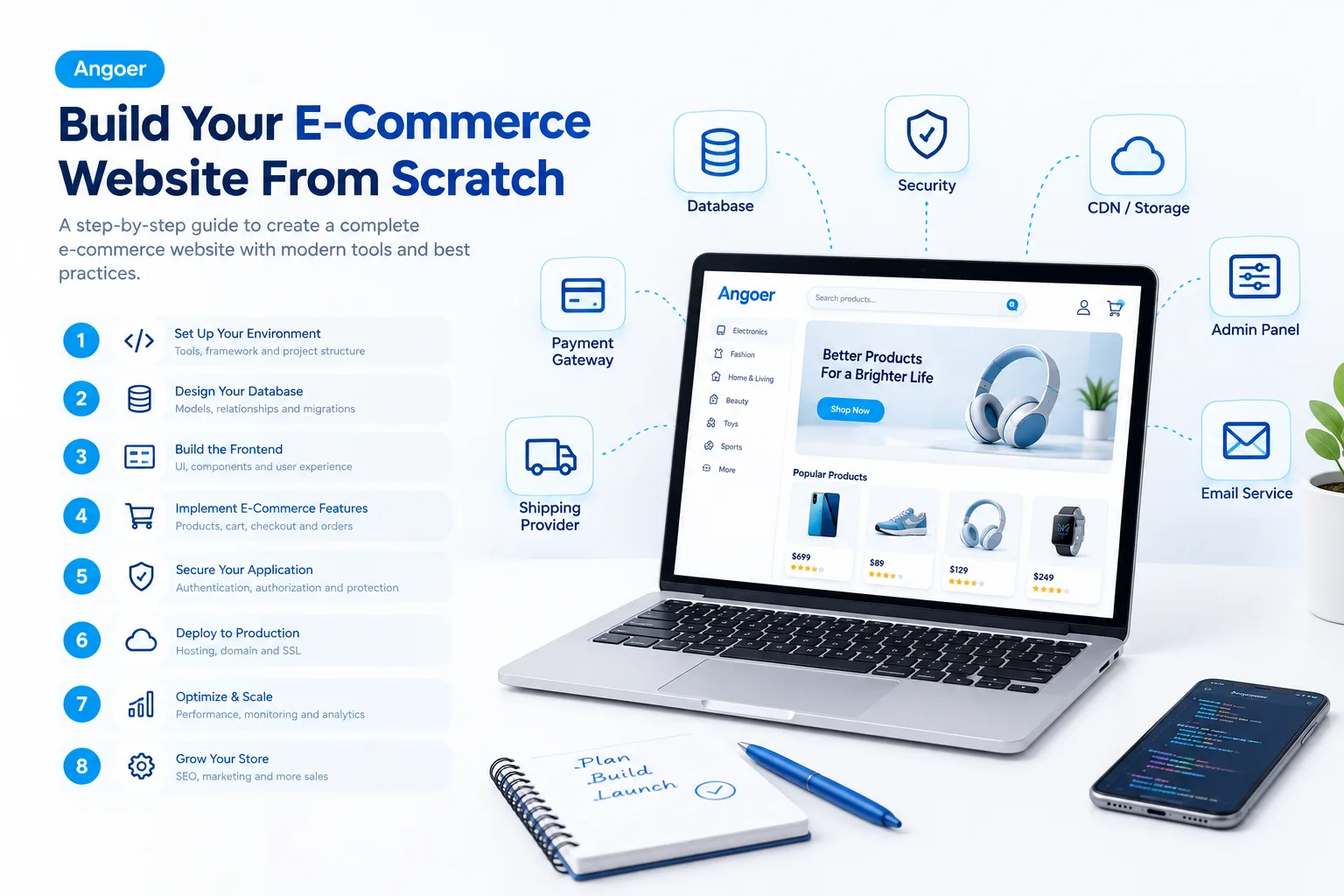
01. How to Build a Complete E-Commerce Website from Scratch
An e-commerce website is an online platform where customers can browse, compare, and purchase products or services directly over the internet. Unlike an ordinary website that mainly provides information, an e-commerce website is a complete sales channel with product catalogs, shopping carts, secure payments, order management, and customer accounts.
At its core, an e-commerce website does four essential things: it displays products to potential customers, lets them add items to a cart, processes payments securely, and tracks orders through delivery. Behind the scenes, it manages inventory, customer data, order history, shipping information, and business analytics.
The difference between an e-commerce website and an ordinary website is purpose and functionality. A news site informs readers. A portfolio site showcases work. A company site provides contact information. An e-commerce site sells products. This means it must handle transactions, store payment information securely, manage inventory in real time, and handle customer data under strict security standards.
Common examples of e-commerce websites include Amazon (a massive marketplace), Shopify stores (small and medium businesses), specialty retailers like Best Buy (electronics), independent brands selling directly to customers, and marketplaces like eBay where multiple sellers operate under one platform. Each works differently, but they all share the core function of facilitating online sales.
The scale of e-commerce varies widely. A small business might sell 10 products to a local audience. A mid-sized retailer might manage thousands of products across multiple categories. A large platform like Amazon manages millions of products, sellers, and daily transactions across dozens of countries. This guide covers the principles that apply whether you're building a small store or a large-scale platform.
Why Businesses Need E-Commerce Websites
The shift toward e-commerce isn't just a trend — it's driven by fundamental advantages that make selling online more important for modern businesses. Understanding both the benefits and the challenges of e-commerce helps businesses decide whether they need an online store and the right level of investment.
Business Advantages of E-Commerce
1. 24/7 Availability and Global Reach
A physical retail store is limited by geography and opening hours. Customers can only shop when the store is open and when they can physically visit.
An e-commerce website operates 24 hours a day, 365 days a year. Customers can browse products, compare options, and make purchases at any time, regardless of their location or time zone.
E-commerce also lets businesses reach customers far from their local market. A small business can sell to customers across different cities, countries, and regions without opening physical stores.
2. Lower Operating Costs
Physical retail typically requires significant ongoing expenses, including:
Store rent
Utilities
Staff
Inventory storage
Store maintenance
Physical equipment
An e-commerce business still has operating costs, such as:
Website hosting
Website maintenance
Payment processing fees
Customer service
Marketing
Inventory and fulfillment
However, for many businesses, the operating cost per transaction can be lower than maintaining a physical retail location.
E-commerce can also support leaner inventory models. Businesses may use strategies like dropshipping, where products ship directly from suppliers to customers, reducing the need for extensive storage facilities.
3. Detailed Customer and Business Data and Analytics
One of the key advantages of e-commerce is access to detailed customer and business data.
An online store can provide insights into:
Which products customers view
How long customers spend on product pages
Which products are added to carts
Which products are purchased
Where customers come from
Which marketing channels generate sales
Which devices customers use
Where customers abandon the purchase process
This information can help businesses understand customer behavior, improve product pages, optimize marketing campaigns, and make better business decisions.
Physical stores typically provide far less information about individual customer behavior.
4. Better Customer Relationships
E-commerce allows businesses to build direct relationships with their customers.
Depending on the platform and customer permissions, businesses can use customer information and purchase history to offer:
Personalized product recommendations
New product notifications
Loyalty rewards
Special offers
Personalized marketing
Order updates
Customer reviews and feedback opportunities
These tools can help businesses create stronger customer relationships and encourage repeat purchases.
5. Scalability Without Major Infrastructure Investment
Expanding a physical retail business often requires opening additional locations, hiring more staff, increasing storage capacity, and investing in real estate.
E-commerce can offer a more flexible way to scale.
As customer demand increases, businesses can increase hosting capacity, improve their infrastructure, expand fulfillment operations, and serve more customers without necessarily needing to open additional physical stores.
6. Easy A/B Testing and Continuous Optimization
E-commerce websites make it easy to test different versions of:
Product pages
Images
Product descriptions
Pricing
Promotions
Page layouts
Calls to action
Businesses can measure how customers respond to different versions and use the results to improve the shopping experience.
This continuous improvement can help businesses improve conversion rates, customer experience, and overall online performance.
Challenges and Disadvantages of E-Commerce
Although e-commerce offers many advantages, it also comes with important challenges that businesses must consider.
1. High Initial Development and Maintenance Costs
Building a professional e-commerce website may require significant investment in:
Design
Development
Hosting
Security
Payment integrations
Inventory systems
Marketing tools
Third-party services
Ready-made platforms can reduce initial development effort, but they may involve monthly fees, transaction fees, and platform limitations.
Custom development may require a larger upfront investment but can offer more flexibility and control.
Businesses should also budget for ongoing maintenance, security updates, bug fixes, payment changes, and new features.
2. No Physical Product Experience
Online customers can't physically touch, feel, or try a product before buying it.
This can be especially challenging for products where the physical experience matters, such as:
Clothing
Shoes
Furniture
Jewelry
Beauty products
Products where size, texture, or physical comfort matter
High-quality product photos, detailed descriptions, specifications, videos, sizing information, and customer reviews can help reduce this limitation.
3. Increased Competition
E-commerce removes many of the geographic barriers between businesses and customers.
A local business may no longer compete only with nearby stores. It may also compete with companies from other cities, countries, and regions.
For example, someone searching online for "blue running shoes" may see thousands of products from different companies.
This makes factors such as branding, product quality, pricing, customer experience, search visibility, and marketing even more important.
4. Payment and Fraud Risks
Online businesses must take security and payment protection seriously.
E-commerce businesses may need to manage:
Payment security
Fraud prevention
Disputed chargebacks
Payment disputes
Unauthorized transactions
Customer data protection
Choosing reliable payment providers and implementing appropriate security measures is essential to protect both the business and its customers.
5. Logistics and Shipping Complexity
Selling online introduces additional fulfillment responsibilities.
Depending on the business model, these may include:
Inventory management
Warehousing
Packaging
Shipping
Delivery tracking
Returns
Exchanges
Refunds
Logistics coordination
A smooth fulfillment process is an important part of the overall customer experience.
6. Dependence on Technology
An e-commerce business depends heavily on technology.
Critical systems may include:
The website
Hosting infrastructure
Payment gateways
Inventory databases
Order management systems
Email services
Security systems
A major technical issue can interrupt sales and affect the customer experience.
For this reason, businesses should consider reliable hosting, regular backups, monitoring, security measures, and contingency plans.
When E-Commerce Makes Sense
An e-commerce website can be especially useful when:
You want to reach customers outside your local geographic area.
Your products have broad appeal or serve a geographically distributed niche.
You have sufficient inventory or a reliable supply chain.
Your products can be presented effectively through images, descriptions, specifications, and reviews.
Your target customers are comfortable shopping online.
You can invest in website development and ongoing maintenance.
You can provide reliable customer service.
You have a plan for shipping, returns, and fulfillment.
When E-Commerce May Not Be the Right Choice
An e-commerce website may be less suitable when:
Your product fundamentally requires an in-person experience, such as certain personalized services or professional consultations.
Your business relies almost entirely on local foot traffic.
Your target market is very small and highly localized.
You have extremely limited inventory.
You currently lack the financial or technical resources required to maintain an online platform.
The cost and complexity of online fulfillment would outweigh the potential benefits.
Conclusion
E-commerce can give businesses wider market access, flexible operating hours, customer insights, scalable infrastructure, and new opportunities for customer engagement.
However, building an online store isn't just about creating a website. Successful e-commerce requires investment in technology, security, marketing, customer service, inventory, payments, and fulfillment.
The right approach depends on the business, its products, its target customers, its resources, and its long-term goals.
Key Components of Professional E-Commerce Systems
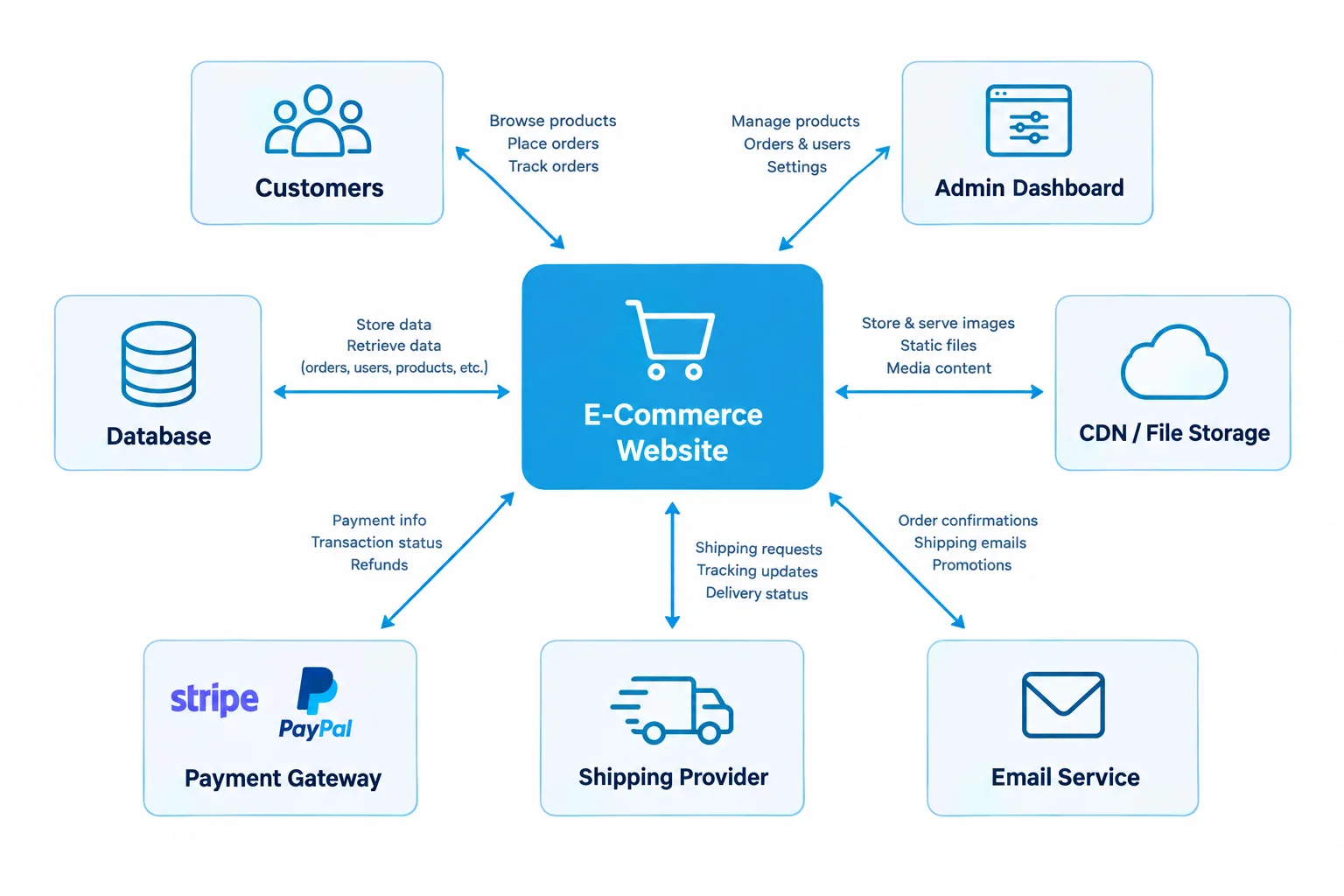
Building an e-commerce website isn't just about creating a product listing page. A professional e-commerce system consists of multiple interconnected components, each serving a specific purpose.
Understanding these components before you start building helps you plan your architecture, database design, integrations, and overall system structure effectively.
Customer-Facing Components
1. Product Catalog and Search
The product catalog is the core of an e-commerce website. It includes:
Product listings
Detailed product pages
Product descriptions
Product images and videos
Product specifications
Pricing
Stock status
Customers should be able to:
Browse products by category.
Filter products by attributes such as size, color, price, and brand.
Search for products by keyword.
Sort products by relevance, price, or popularity.
A professional catalog also requires strong search functionality. Simple database queries may not be sufficient for large catalogs with thousands of products.
Many e-commerce systems use dedicated search engines such as Elasticsearch or Solr to provide fast, relevant search results with complex filtering and sorting.
2. Shopping Cart and Checkout
The shopping cart stores the products customers want to buy before they complete their orders.
A professional shopping cart should allow customers to:
Add products to their cart.
Adjust product quantities.
Remove products.
Apply discount codes.
Save their cart for later.
The cart should also persist between sessions. If a customer closes their browser and returns later, previously added products should still be available.
Checkout is the critical conversion point. A complicated checkout process can drive customers to abandon their purchases.
A professional checkout process should be:
Fast
Simple
Clear
Easy to navigate
It should ask only for essential information, provide a clear price breakdown, and support multiple payment methods.
3. User Accounts and Profiles
Customer accounts allow users to manage their information and interact with the store.
A professional user account system can include:
Secure login
Authentication
Password management
Email verification
Password reset
Account settings
Saved addresses
Order history
Wishlists
Saved products
Customers should also be able to save multiple addresses for different shipping locations.
4. Payment Processing
Payment processing securely handles credit cards, PayPal, digital wallets, and other payment methods.
Payment information should not be handled directly by the site's backend wherever possible. Instead, the site integrates with a payment processor such as Stripe, PayPal, or Square.
The typical process is:
The customer enters payment information through a secure form.
The payment information is sent to the payment processor.
The payment processor processes the transaction.
The site receives a confirmation or a decline.
The order status is updated accordingly.
Professional payment systems can also handle:
Declined cards
Fraud detection
3D Secure verification
Currency conversion
Refunds
Payment status changes
Payment providers also typically offer webhooks, which allow the e-commerce system to receive automatic notifications when payment statuses change.
5. Order History and Tracking
Customers should be able to view their past orders, current order status, and shipping information.
An order details page can display:
Products purchased
Quantity
Total amount paid
Shipping address
Order status
Estimated delivery date
Tracking information
Tracking information can be integrated with shipping carriers to provide customers with up-to-date delivery information.
6. Reviews and Ratings
Professional e-commerce websites allow customers to leave reviews for the products they purchased.
Reviews can include:
A rating from 1 to 5 stars
A review title
A written review
Customer photos
A verified purchase badge
Verified purchase badges can increase credibility by indicating that the reviewer actually purchased the product.
Moderation tools are also important to prevent:
Spam
Fake reviews
Inappropriate content
Reviews can improve customer trust, provide valuable feedback, and contribute to SEO and conversion performance.
Administrative Components
7. Admin Dashboard and Product Management
Behind every professional e-commerce website is an administrative system where business users manage products, inventory, orders, customers, and site content.
The admin dashboard can provide overview metrics such as:
Today's sales
Pending orders
Inventory alerts
Customer activity
Product performance
Product management should allow administrators to:
Add products
Edit product information
Upload product images
Update pricing
Manage product variants
Manage colors and sizes
Organize products into categories
For larger stores, bulk operations are essential. These can include editing multiple products at once or uploading inventory through spreadsheets.
8. Order Management
The order management system gives administrators a complete overview of customer orders.
Staff should be able to:
View all orders.
Filter orders by status.
Update order information.
Generate packing slips.
Track shipments.
Process refunds.
Manage returns.
Common order statuses include:
Pending
Processing
Shipped
Delivered
Canceled
Refunded
Notifications can also keep the relevant people informed, such as sending order confirmations to customers and new order notifications to warehouse staff.
9. Customer Management
The customer management system gives administrators information about registered customers.
It can include:
Customer information
Contact details
Account status
Purchase history
Order history
Customer communication
This information can help customer support teams resolve issues and help businesses understand their customers.
10. Inventory Management
The inventory management system tracks product stock levels and helps prevent overselling.
Important inventory functions include:
Tracking current stock levels
Low-stock alerts
Inventory adjustments
Handling returned products
Handling damaged products
Preventing overselling
Advanced inventory systems can also manage stock across multiple warehouses, automate restocking, and integrate with suppliers.
11. Analytics and Reporting
Analytics provide important information about the performance of an e-commerce business.
Common metrics include:
Total revenue
Average order value
Conversion rate
Traffic sources
Product performance
Customer lifetime value
Best-selling products
Reports help businesses identify trends, spot successful products, identify underperforming ones, and understand customer behavior.
12. Promotions and Discount Management
A promotion system allows businesses to create and manage discounts, coupons, and special offers.
Common promotion types include:
Percentage discounts
Fixed-amount discounts
Buy-one-get-one offers
Free shipping thresholds
Limited-time promotions
Coupons may require customers to enter a specific code, or discounts can be applied automatically to eligible products.
13. SEO and Content Management
Professional e-commerce websites often include additional content such as:
Blogs
FAQs
Product guides
Buying guides
Educational content
A content management system (CMS) allows administrators to create, edit, and publish content without directly modifying the site's code.
Content can also support SEO by helping the site appear in search engines and providing useful information to customers.
Infrastructure and Backend Services
14. Database
The database stores the structured information that an e-commerce system requires.
This can include:
Customers
Products
Orders
Inventory
Prices
Reviews
Addresses
Payments
A well-designed database is essential for:
Performance
Data integrity
Scalability
Reliable data management
15. API Layer
The application programming interface (API) acts as a bridge between the frontend and the backend.
The frontend can use the API to:
Fetch products
Create orders
Update user profiles
Retrieve customer information
Send other requests
The API validates requests, applies business logic, communicates with the database, and returns the appropriate results.
A well-designed API also allows the frontend and backend to be developed, tested, and scaled independently.
16. Authentication and Authorization
Authentication verifies that a user is who they claim to be.
For example:
"Is this person really the owner of this account?"
Authorization determines what an authenticated user is allowed to do.
For example:
"Is this user allowed to view this order or edit this product?"
Professional systems typically use:
Secure password hashing
Secure sessions or tokens
Access controls
Two-factor authentication (2FA), especially for administrative accounts
Passwords should never be stored as plain text.
17. Payment Gateway Integration
In addition to the payment form itself, payment gateway integrations are an important part of an e-commerce system.
These integrations can support:
Recurring payments
Subscriptions
Webhooks
Refunds
Payment status updates
Dispute management
Payment providers like Stripe and PayPal offer software development kits (SDKs) that simplify integration with e-commerce applications.
18. Email Service
E-commerce websites send many different types of emails, including:
Order confirmations
Shipping notifications
Password reset emails
Promotional emails
Customer support replies
Instead of sending emails directly from the application server, professional systems often integrate with dedicated email services such as:
SendGrid
Mailgun
Amazon SES
These services are designed to improve email delivery reliability and can provide additional features such as delivery tracking, open tracking, click tracking, and analytics.
19. File and Media Storage
E-commerce websites need reliable storage for:
Product images
Product videos
Customer-uploaded review photos
Documents
Other media files
Professional systems typically use cloud storage services such as:
Amazon S3
Google Cloud Storage
Azure Blob Storage
These services can provide redundancy, backup, and integration with content delivery networks.
20. Search Engine
A dedicated search engine is optional but recommended for large e-commerce websites.
When a store has thousands of products, traditional database searches may not provide the speed and relevance required for a professional shopping experience.
Search engines like Elasticsearch can provide:
Fast product search
Filtering
Faceted search
Search suggestions
Relevant search results
Search quality can have a direct impact on the customer's shopping experience and conversions.
21. CDN — Content Delivery Network
A CDN stores copies of a website's static assets on servers distributed around the world.
These assets can include:
Product images
CSS files
JavaScript files
Fonts
Other static resources
When a customer requests an asset, the CDN can deliver it from a nearby server location.
This can reduce loading times and improve site performance.
22. Analytics and Monitoring
Analytics systems track customer behavior across the site.
They can measure:
Pages visited
Time customers spend on pages
Customer interactions
Clicks
Purchases
Conversion rates
Monitoring systems can alert administrators when something goes wrong, such as:
Server downtime
Slow database performance
Payment processor failures
Application errors
Logging systems record detailed information about system events and errors, making troubleshooting easier.
23. Notification System
In addition to email, e-commerce websites can communicate with customers through multiple notification channels.
These may include:
SMS
Push notifications
In-app notifications
Email
A professional notification system can manage multiple channels and send notifications according to customer preferences and system events.
External Integrations
24. Shipping Carriers
Integrating with shipping carriers can automate important parts of the fulfillment process.
Common shipping providers include:
UPS
FedEx
USPS
DHL
Shipping integrations can support:
Automatic shipping label generation
Shipping rate calculation
Tracking number generation
Tracking updates
Delivery notifications
The e-commerce system sends shipping information to the carrier, receives tracking information, and delivers delivery updates to the customer.
25. Tax Calculation Services
Tax rules can vary significantly depending on the customer's location and the type of product purchased.
Tax calculation services such as TaxJar and Avalara can help businesses calculate applicable taxes based on factors such as:
Customer location
Product type
Applicable tax rules
26. Email Marketing Platform
Email marketing platforms help businesses manage customer email lists and marketing campaigns.
Platforms like Mailchimp and Klaviyo can provide features for:
Customer segmentation
Email campaigns
Automated email sequences
Customer lists
Campaign performance tracking
27. Social Media and Communication Integrations
Social media integrations can connect an e-commerce website to social platforms.
Possible features include:
Product sharing
Social notifications
Social advertising
Customer communication
Social commerce features
Some e-commerce websites also integrate with messaging platforms to provide customer support.
The Complete Picture
No single component of a professional e-commerce system works in isolation.
For example, when a customer browses products, the system uses the product catalog and search functionality.
When the customer adds a product to the cart, the system may communicate with the inventory system to verify stock availability.
When the customer checks out, multiple services may work together, including:
The shopping cart
The payment processor
The tax service
The inventory system
Order management
The email service
After the order is placed, the system can communicate with shipping carriers and send notifications to the customer.
At the same time, administrators use systems such as:
Order management
Inventory management
Customer management
Analytics
Product management
All of these components are connected through the application database, APIs, and backend services.
Final Takeaway
Understanding these components helps businesses make better technical and architectural decisions when building an e-commerce platform.
Some e-commerce frameworks and platforms provide many of these features out of the box. Other systems require businesses to assemble the components themselves, combining custom development with third-party services.
Regardless of the approach, a professional e-commerce platform requires multiple interconnected systems working together to deliver a secure, reliable, scalable, and practical shopping experience for customers.
02. Planning Your E-Commerce Project
Requirements Gathering: The Foundation of Your Project
Before writing a single line of code, you need to understand exactly what you're building and why.
Requirements gathering is the foundation of an e-commerce project. It defines your vision, identifies your constraints, clarifies what your customers need, and determines what success looks like.
Skipping this step can lead to:
Wasted development time
Missing features
Poor technical decisions
Unexpected costs
Frustrated stakeholders
Costly rework
A well-defined requirements process gives the development team clear direction before implementation begins.
1. Business Requirements
Start by defining your business goals.
Business Goals and Purpose
Ask why you're building the e-commerce website.
For example:
Are you launching a new business?
Are you taking an existing physical business online?
Are you expanding an existing online presence?
Are you creating an entirely new sales channel?
The answers to these questions will influence almost every decision made throughout the project.
Business Model
Document the type of business model you'll use.
Possible models include:
B2C — Business to Consumer
B2B — Business to Business
D2C — Direct to Consumer
Marketplace
Other specialized models
Also define:
Revenue targets
Expected growth
Target launch date
Long-term business goals
For example, are you aiming to launch in 3 months or 12 months?
Does the business need to become profitable immediately, or can you invest in growth before reaching profitability?
Budget Constraints
Determine how much you can invest in:
Development
Design
Hosting and infrastructure
Payment processing
Third-party services
Marketing
Security
Ongoing maintenance
Your budget can significantly influence whether you choose an existing platform like Shopify or develop a custom e-commerce system.
Competitive Landscape
Identify your main competitors and study their businesses.
Document:
Who your competitors are
What they do well
What customers like about them
Where their weaknesses are
What advantages your business has
What could differentiate your store
Understanding the competitive landscape helps you prioritize the features that make your business different.
Regulatory and Compliance Requirements
Identify the legal and regulatory requirements that apply to your business.
Consider:
Tax requirements
Data privacy regulations
International selling requirements
Industry-specific regulations
Customer data protection
Payment-related requirements
If you sell internationally, identify the privacy and regulatory requirements that apply to the regions where you operate.
These requirements can affect both your technical architecture and your database design.
2. Customer Requirements and Personas
Understanding your customers is essential before designing the website.
Create detailed customer personas describing:
Who your customers are
What they need
How they shop
What devices they use
What problems they're trying to solve
What influences their purchasing decisions
Example: Luxury Jewelry
If you sell luxury jewelry, your customers might be affluent professionals who:
Shop on computers and mobile phones.
Expect high-quality product images.
Want detailed product specifications.
Expect excellent customer service.
Appreciate an elegant shopping experience.
The website should reflect these expectations through:
Elegant design
Fast loading times
Responsive layouts
High-quality product images
Excellent customer support
Example: Industrial Equipment
If you sell industrial equipment to manufacturers, your customers might be procurement managers who:
Purchase products in large quantities.
Need detailed technical specifications.
Request technical documentation.
Request price quotes.
Need account management features.
The website may therefore require:
Bulk ordering
Quote requests
Invoicing
Account hierarchies
Technical documentation
Detailed product specifications
Different customers need different features, so your customer personas should directly influence the platform's design and functionality.
Customer Discovery
Understand how customers will discover your business.
Possible discovery channels include:
Google search
Social media
Direct visits
Sales representatives
Referrals
Advertising
How customers discover your business affects the features and infrastructure you need.
For example:
Search traffic may require strong SEO.
Social media traffic may require social media integrations.
Sales-driven businesses may require CRM integration.
Expected Customer Behavior
Document how customers are expected to interact with your store.
Consider:
How many products will customers browse before purchasing?
Will they compare products?
Will they read reviews?
Will they frequently return products?
Will they use filters?
Will they save products for later?
Understanding these behaviors helps inform UX design and feature priorities.
3. Product Requirements
Define exactly which products or services you'll sell.
Product Catalog
Create a detailed inventory plan defining:
The number of product types
The number of SKUs
Product categories
Product variants
Product attributes
Determine whether products have variations such as:
Sizes
Colors
Materials
Models
Configurations
Product Information
For each product, define what information must be stored.
Depending on the product category, this may include:
Product name
Description
Dimensions
Weight
Materials
Care instructions
Warnings
Technical specifications
Images
Videos
Warranty information
Different product categories require different information.
For example:
Clothing: size charts and material information
Electronics: technical specifications
Food: ingredients and nutritional information
Pricing Model
Define how product pricing works.
Pricing may be:
A single fixed price per product
Different prices for different customers
Seasonal pricing
Volume-based discounts
Promotional pricing
A complex pricing model can significantly affect database design and business logic.
Product Management
Define how products will be added to the system.
Possible methods include:
Manual entry through the admin dashboard
Spreadsheet uploads
Bulk import
Supplier integrations
Automated product synchronization
If you're adding large numbers of products regularly, effective bulk import tools become especially important.
Special Product Features
Determine whether your products require additional functionality, such as:
Product reviews
Product recommendations
Bundle pricing
Product comparisons
Digital downloads
Product customization
Each additional feature introduces extra development and maintenance complexity.
4. Operational Requirements
Define how the business will operate on a daily basis.
Expected Order Volume
Estimate how many orders you expect to process:
At launch
After 6 months
After 1 year
These estimates help determine:
Server capacity
Database requirements
Infrastructure requirements
Performance expectations
Scalability needs
Administrative Users
Define who will manage the business.
Consider:
How many staff members will use the admin system?
Will external contractors have access?
What responsibilities will each person have?
How technical are the users?
This affects the complexity and usability requirements of the admin interface.
Inventory Management
Define how inventory will be managed.
Consider whether you will:
Track inventory manually
Use an inventory management system
Integrate with a warehouse
Synchronize inventory with suppliers
Also define:
Whether backorders are allowed
How returns affect inventory
How damaged products are handled
How inventory adjustments are managed
Payment Methods
Define the payment methods your customers need.
Possible options include:
Credit cards
Debit cards
PayPal
Digital wallets
International payment methods
Each additional payment method may introduce extra integration and maintenance requirements.
Shipping Requirements
Define how products will be delivered.
Possible shipping models include:
Flat-rate shipping
Weight-based shipping
Destination-based shipping
Free shipping
International shipping
Dropshipping
If you use dropshipping, define how suppliers will ship products directly to customers and how tracking information will be managed.
Customer Support
Define how customers will contact your business.
Possible channels include:
Email
Live chat
Phone
Support tickets
Also define the expected response time.
These requirements determine whether customer support functionality needs to be built directly into the e-commerce platform or integrated through an external service.
Analytics Requirements
Define how much business data you need to track.
Basic analytics may include:
Website traffic
Sales
Orders
Conversion rate
Advanced analytics may include:
Customer lifetime value
Product-level performance
Marketing attribution
Customer behavior
Purchasing patterns
The level of analytics required affects the tracking and data infrastructure you need to implement.
Security and Compliance
Define security and compliance requirements before development begins.
Consider:
Payment security requirements
PCI DSS requirements
GDPR
CCPA
Data privacy
Customer data protection
Secure authentication
These requirements can have a major impact on infrastructure, application architecture, and database design.
5. Creating the Requirements Document
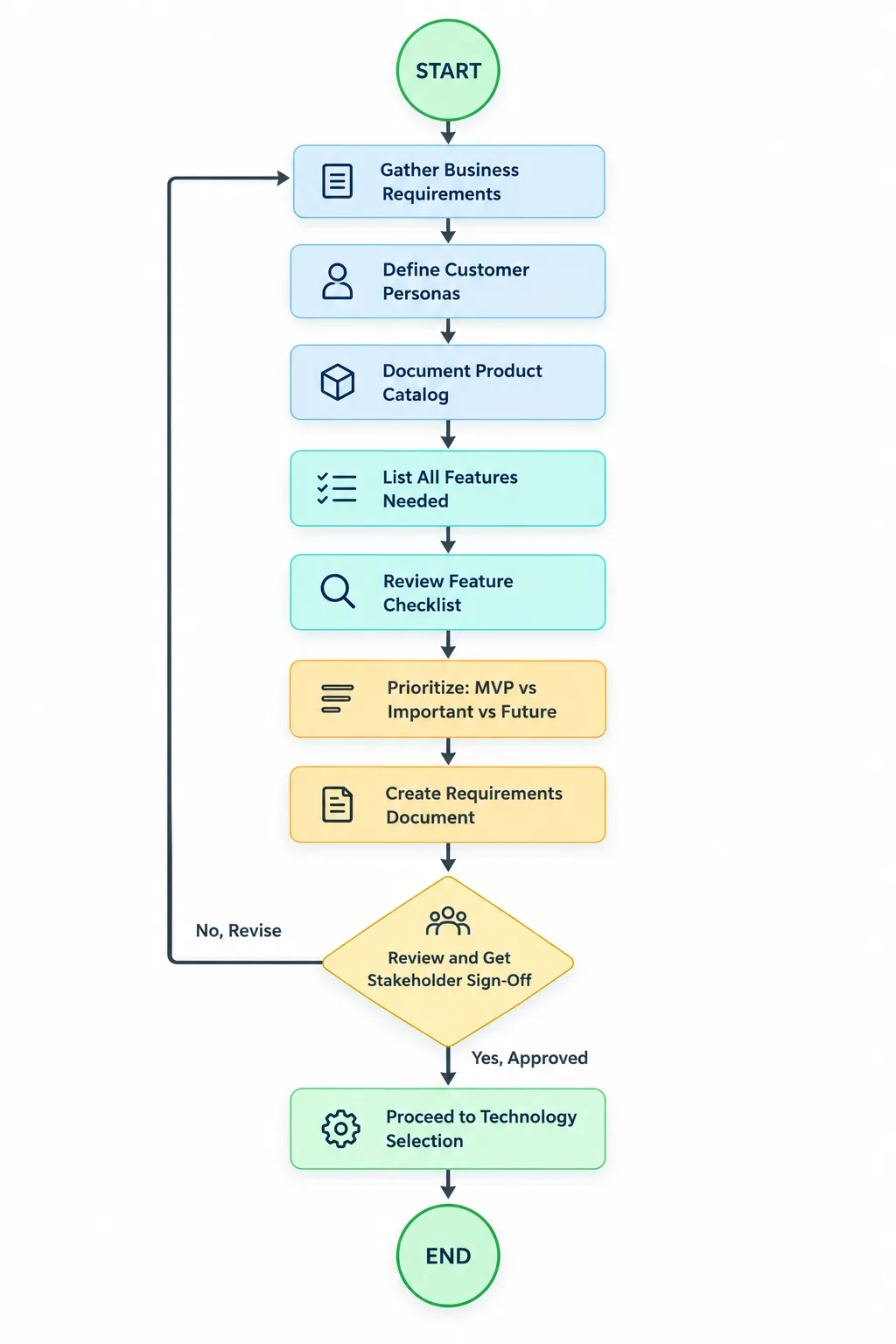
After collecting all requirements, compile them into a single organized document.
The document doesn't need to be overly formal or complex. A clear, organized list of requirements can be sufficient.
Your requirements document should include the following sections:
Business Goals
Define:
What you're trying to achieve
Why you're building the platform
Revenue targets
Timeline
Your long-term goals
Customer Personas
Document:
Who your customers are
What they need
How they shop
How they discover your business
What problems you solve for them
Product Catalog
Document:
What you're selling
Number of products
Number of SKUs
Product variants
Required product information
Pricing structure
Key Features
Separate features into three categories:
Must-Have Features
Features required for the initial launch.
Nice-to-Have Features
Useful features that can improve the experience but aren't required for launch.
Future Features
Features that can be developed after the core platform is created.
Technical Constraints
Document:
Budget
Timeline
Technology requirements
Existing systems
Required integrations
Hosting requirements
Infrastructure constraints
Operational Workflows
Document how the business will manage:
Products
Inventory
Orders
Customers
Payments
Shipping
Returns
Customer support
Success Metrics
Define how you'll determine whether the project is successful.
Possible metrics include:
Revenue
Website traffic
Conversion rate
Average order value
Customer satisfaction
Customer retention
Number of orders
Customer lifetime value
6. Use the Requirements Document Throughout Development
The requirements document should remain a reference throughout the entire development process.
Whenever the team decides whether to build a new feature, ask:
Does this feature align with our requirements and business goals?
If the answer is no, the feature may not need to be included in the current development phase.
This helps prevent unnecessary development and keeps the project focused on its actual goals.
Final Takeaway
Many projects fail not because of technical problems, but because requirements weren't properly understood before development began.
A strong requirements-gathering process takes time and effort at the start of the project, but it can prevent large amounts of wasted development time, unnecessary features, unexpected costs, and costly rework.
Investing in clear requirements before writing code is one of the most important steps in building a successful e-commerce platform.
Complete E-Commerce Feature Checklist
1. Product Features
- Product catalog with search and filtering
- Product categories and subcategories
- Product tags
- Product images from multiple angles
- Image zoom
- Product videos
- Product descriptions and specifications
- Product pricing and sale pricing
- Product reviews and ratings
- Product review summary
- Verified purchase badges
- Product recommendations
- Related products
- Product availability status
- Product variants (size, color, material, etc.)
- Variant-specific pricing
- Variant-specific images
- Variant stock tracking
- Product FAQ section
- Product comparison tool
- Wishlist / save for later
- Stock quantity display
- Low-stock indicators
- Pre-order capability
- Product SEO metadata (title, description, URL)
2. Shopping and Checkout
- Shopping cart with add/remove items
- Quantity adjustment in cart
- Cart persistence when the browser is closed
- Discount code application
- Abandoned cart recovery
- Shipping method selection
- Shipping cost calculation
- Tax calculation and display
- Order total breakdown
- Guest checkout
- Registered user checkout
- Saved addresses for registered users
- Address book management
- Separate billing and shipping addresses
- Multiple payment methods
- Secure payment processing
- Payment failure handling
- Payment retry
- Order confirmation page
- Order confirmation email
- Estimated delivery date
3. User Accounts and Authentication
- User registration
- Email verification
- Secure login
- Password reset
- Profile information management
- Saved addresses
- Order history
- Order tracking with real-time updates
- Wishlist management
- Review management
- Edit/delete your reviews
- Account settings
- Two-factor authentication
- Password strength requirements
4. Shipping and Fulfillment
- Shipping method configuration
- Shipping zone setup
- Regional shipping rules
- Flat-rate shipping
- Weight-based shipping
- Destination-based shipping
- Free shipping thresholds
- Shipping carrier integration
- Automatic shipping label generation
- Tracking number integration
- Real-time tracking updates
- Packing slip generation
- Returns management
- Return authorization system
- Return shipping labels
- Automatic inventory restocking after returns
5. Payments and Refunds
- Credit/debit card processing
- PayPal integration
- Digital wallets
- Apple Pay
- Google Pay
- Payment verification
- Payment failure notifications
- Refund processing
- Refund status tracking
- Partial refunds
- Recurring payments, if applicable
- PCI compliance measures
- Secure handling of payment data
6. Promotions and Discounts
- Percentage discounts
- Fixed-amount discounts
- Buy-one-get-one offers
- Volume discounts
- Quantity-based pricing
- Coupon code system
- Coupon usage limits
- Coupon expiration dates
- Free shipping offers
- Seasonal sales
- Flash sales
- Automatic price reductions
- Loyalty rewards
7. Customer Management
- Customer database
- Customer purchase history
- Customer information view
- Customer segmentation
- Customer communication tools
- Bulk customer actions
- Account status management
8. Admin Dashboard
- Dashboard overview
- Sales metrics
- Order metrics
- Traffic metrics
- Real-time metrics
- Performance summaries
- Critical issue alerts
- Customizable dashboards
9. Product Management
- Adding new products
- Editing product information
- Bulk product upload via CSV/spreadsheet
- Product categorization
- Bulk product editing
- Image management
- Image optimization
- Video management
- Per-product inventory tracking
- Bulk price updates
- Product status management
- Draft products
- Published products
- Archived products
- Product scheduling
- Scheduled publishing
- Bulk product deletion
10. Order Management
- Order list
- Order filtering
- Order status tracking
- Order details view
- Order status updates
- Customer communication from the order
- Refund processing
- Returns management
- Order notes
- Order printing
- Bulk order actions
- Order export
- Payment status tracking
11. Inventory Management
- Stock quantity tracking
- Inventory adjustments
- Low-stock alerts
- Out-of-stock handling
- Reserved inventory tracking
- Backorder management
- Inventory transfers between locations
- Multi-location inventory
- Inventory history
- Inventory forecasting
- Barcode tracking
- SKU tracking
12. Reviews and Ratings
- Customer review submission
- Review moderation queue
- Approve/reject reviews
- Spam review detection
- Voting on review helpfulness
- Seller replies
- Review filtering
- Review sorting
- Review photos/images
- Verified purchase indicator
13. Analytics and Reporting
- Traffic analytics
- Page analytics
- Session analytics
- User analytics
- Conversion tracking
- Sales reports
- Revenue reports
- Product performance reports
- Category performance reports
- Customer acquisition reports
- Traffic source analysis
- Device analytics
- Browser analytics
- Geographic analytics
- Search keyword analytics
- A/B testing
- Custom report builder
- Report export
- Scheduled reports
- Analytics dashboards
14. SEO and Content
- SEO title editing
- Meta description editing
- Custom URLs
- Canonical URL management
- Sitemap generation
- Robots.txt management
- H1/H2/H3 management
- Schema markup
- Product schema
- Review schema
- Open Graph tags
- Internal linking tools
- Keyword optimization suggestions
- Content management system
- Blog/guides
- Publishing blog articles
- Blog categories
- Blog tags
- Blog comment moderation
15. Email and Notifications
- Order confirmation emails
- Shipping notification emails
- Delivery confirmation emails
- Password reset emails
- Review request emails
- Abandoned cart recovery emails
- Marketing email campaigns
- Email template customization
- SMS notifications
- Push notifications
- Customer notification preferences
16. Security and Compliance
- SSL/HTTPS
- Secure user authentication
- Admin access controls
- Role-based permissions
- Two-factor authentication
- Secure password hashing
- PCI DSS compliance
- GDPR compliance
- CCPA compliance
- Data backup and recovery
- Security logging
- Suspicious activity monitoring
- Rate limiting
- DDoS protection
17. Customer Support
- Contact form
- Support email integration
- Support ticket system
- Live chat
- FAQ section
- Help documentation
- Customer communication history
- Support ticket status tracking
18. Integrations and Add-Ons
- Payment gateway integration
- Shipping carrier integration
- Email service integration
- SMS service integration
- Email marketing platform integration
- Accounting software integration
- CRM integration
- Social media integration
- Google Analytics integration
- Tax calculation service
- Backup and disaster recovery
19. Performance and Optimization
- Mobile-responsive design
- Fast page load times
- Image optimization
- Caching mechanisms
- CDN integration
- Code minification
- Database query optimization
- Search performance optimization
- Lazy loading
- Asset compression
20. Accessibility
- Mobile-friendly interface
- Touch-friendly buttons and inputs
- Keyboard navigation
- Screen reader compatibility
- Alt text for images
- Color contrast compliance
- Accessible forms
- WCAG 2.1 AA compliance
21. Internationalization
- Multi-language support
- Currency conversion
- Local pricing
- Regional tax handling
- Local shipping options
- Translated content
- Right-to-left language support
- Local payment methods
MVP vs. Important vs. Advanced vs. Future Features
One of the most common mistakes in e-commerce projects is trying to build everything at once. A founder may want a perfect store with every possible feature before launch, while a business leader may want every advanced capability from day one. This often leads to missed deadlines, higher costs, unnecessary complexity, and delayed launches.
The solution is to clearly prioritize features. Divide features into four categories:
- MVP — required for launch
- Important — high-value features added soon after
- Advanced — features added as the business grows
- Future — optional ideas that may not be worth building
1. What Is an MVP?
An MVP (Minimum Viable Product) is the smallest set of features required to launch and run a functional e-commerce business.
These are the features required to:
- Display products
- Accept customer orders
- Process payments
- Manage inventory
- Fulfill orders
- Communicate with customers
- Manage the store from an admin interface
Typical MVP Features
- Product catalog
- Basic product browsing
- Basic product search
- Product categories
- Product images
- Product descriptions
- Product pricing
- Product availability
- Shopping cart
- Quantity management
- Checkout process
- Guest checkout
- Customer accounts
- Payment processing
- Order creation
- Order confirmation
- Basic order tracking
- Basic inventory management
- Product management
- Order management
- Basic customer management
- Basic shipping configuration
- Order confirmation emails
- Shipping notification emails
- Secure authentication
- SSL/HTTPS
- Basic admin dashboard
- Basic responsive design
What Doesn't Need to Be in the MVP?
Features such as:
- Product recommendations
- Wishlists
- Loyalty programs
- Advanced analytics
- AI-powered search
- Advanced personalization
- A/B testing
- Mobile apps
- Multi-warehouse inventory
- Advanced CRM
- Augmented reality
These can provide value later, but they generally don't need to hold up the initial launch.
The goal: build a simple, fast, secure, reliable store that can actually sell products.
2. Important Features
Important features significantly improve customer experience, conversion, retention, or operational efficiency, but they aren't strictly required for launch.
They should generally be considered shortly after launch, depending on customer feedback and business priorities.
Important Features
- Product reviews and ratings
- Verified purchase reviews
- High-quality product images
- Image zoom
- Multiple product images
- Product videos
- Real-time inventory visibility
- Low-stock indicators
- Advanced order tracking
- Discount codes
- Promotional campaigns
- Free shipping thresholds
- Wishlist
- Save for later
- Related products
- Basic product recommendations
- Customer testimonials
- Best-seller indicators
- Basic analytics
- Conversion tracking
- Sales reports
- Revenue reports
- Email marketing integration
- Abandoned cart recovery
- Customer segmentation
- FAQ sections
- Contact/support forms
- Advanced shipping options
- Returns management
- Refund management
- Coupon management
- Basic SEO tools
- Sitemap generation
- Schema markup
- Social media integration
Why These Matter
These features can help:
- Increase customer trust
- Improve conversion rates
- Reduce support requests
- Increase repeat purchases
- Improve SEO
- Improve marketing performance
- Provide better business insights
3. Advanced Features
Advanced features improve efficiency, personalization, scalability, or revenue opportunities.
They typically make sense once the business has enough customers, data, orders, or operational complexity to justify them.
Advanced Features
- Personalized product recommendations
- AI-powered search
- Advanced analytics
- Custom report builder
- Advanced customer segmentation
- Customer lifetime value analysis
- Advanced CRM integration
- Multi-language support
- Multi-currency support
- Regional pricing
- Advanced tax management
- Subscription payments
- Recurring orders
- Multi-warehouse inventory
- Inventory transfers between warehouses
- Inventory forecasting
- Advanced shipping automation
- Automated shipping labels
- Advanced promotion rules
- Dynamic pricing
- Advanced loyalty programs
- A/B testing
- Advanced marketing automation
- Push notifications
- Progressive web app (PWA)
- Advanced fraud detection
- Advanced recommendation systems
- Advanced customer service automation
These features should generally be driven by an actual business requirement rather than added simply because they're technically impressive.
4. Future Features
Future features are ideas that may eventually be valuable but don't currently justify their development cost or complexity.
Some may never need to be built.
Possible Future Features
- Native mobile app
- Augmented reality product visualization
- Advanced predictive analytics
- Marketplace functionality
- Customer product customization
- Extremely advanced personalization
- Virtual shopping experiences
- AI shopping assistant
- Complex social commerce features
- Advanced virtual try-on
- Multi-vendor marketplace
- Enterprise-level automation
A feature should stay in the Future category until there's a clear business reason to move it forward.
5. How to Decide Where a Feature Belongs
Use these questions when prioritizing a feature.
Question 1 — Can we launch without it?
No → MVP
Yes → Continue evaluating
Question 2 — Will customers be significantly affected without it?
Yes → Important
No → Continue evaluating
Question 3 — Does it have a major impact on revenue or efficiency?
Yes → Important or Advanced
No → Advanced or Future
Question 4 — Are customers actually requesting it?
Yes → Consider moving it up based on demand
No → Keep it Advanced or Future
Customer demand should be measured rather than assumed.
Question 5 — Does it solve a real business problem?
Yes → Prioritize according to its impact
No → Consider postponing it
Question 6 — Is it expensive or complex to build?
If a feature requires significant infrastructure, integrations, maintenance, or development time, make sure its expected value justifies that complexity.
6. Example: An Online Electronics Store
Feature Priority Reason Product catalog MVP Required to sell products Product search MVP Customers need to find products Product images MVP Customers need to see products Shopping cart MVP Required for purchasing Checkout MVP Required to complete orders Payment processing MVP Required to accept payment Inventory management MVP Required to manage stock Order management MVP Required to fulfill orders Product reviews Important Builds customer trust Image zoom Important Improves product evaluation Wishlist Important Supports future purchases Discount codes Important Supports promotions Abandoned cart recovery Important Can recover lost sales Basic analytics Important Provides business insights Personalized recommendations Advanced Requires customer/product data AI search Advanced Adds complexity but can improve discovery Multi-warehouse inventory Advanced Useful when operations become complex Multi-language Advanced/Future Depends on target markets Mobile app Future Not required for most initial launches AR visualization Future High complexity and niche use case
7. Recommended E-Commerce Roadmap
Phase 1 — MVP / Launch
Focus exclusively on the core shopping experience.
Customer Side
- Home page
- Product catalog
- Categories
- Product detail pages
- Basic search
- Shopping cart
- Checkout
- Payment
- Customer registration/login
- Guest checkout
- Order confirmation
- Basic order tracking
Admin Side
- Dashboard
- Product management
- Category management
- Order management
- Customer management
- Inventory management
- Basic shipping management
Infrastructure
- Authentication
- Payment integration
- Email notifications
- SSL/HTTPS
- Basic security
- Responsive design
- Basic SEO
The goal: customers can discover → buy → pay → receive confirmation → receive their order.
Phase 2 — Early Improvements
Add the highest-impact Important features.
- Product reviews
- Ratings
- Wishlist
- Better product galleries
- Image zoom
- Discount codes
- Promotions
- Advanced inventory visibility
- Order tracking
- Returns
- Refunds
- Basic analytics
- SEO improvements
- Email marketing
- Abandoned cart recovery
- Customer testimonials
- Related products
The goal: improve conversion, trust, retention, and operational efficiency.
Phase 3 — Growth
Add the remaining important features and selected advanced features based on actual usage.
- Product recommendations
- Customer segmentation
- Advanced analytics
- Advanced reporting
- Loyalty program
- Advanced promotions
- Marketing automation
- Advanced shipping
- CRM integration
- Accounting integration
- Advanced inventory management
- Multi-language support
- Multi-currency support
The goal: scale the business and reduce manual work.
Phase 4 — Advanced
Introduce these only when there's a proven need.
- AI-powered search
- Personalized recommendations
- Inventory forecasting
- Multi-warehouse management
- Advanced CRM
- A/B testing
- Dynamic pricing
- Advanced fraud detection
- PWA
- Advanced automation
- Predictive analytics
The goal: improve scalability, personalization, automation, and efficiency.
Phase 5 — Future
Keep these as potential long-term opportunities.
- Native mobile app
- AR visualization
- Virtual try-on
- Marketplace functionality
- Advanced product customization
- AI shopping assistant
- Virtual shopping experiences
- Advanced social commerce
The goal: explore new business models and experiences only when the business justifies them.
8. The Core Principle
The priority shouldn't be:
"How many features can we build?"
It should be:
"What's the smallest set of features that lets us launch, learn from customers, and grow?"
A successful e-commerce project should therefore follow:
MVP → Launch → Measure → Learn → Improve → Scale
Instead of:
Build everything → Delay launch → Increase complexity → Increase cost
Creating a Project Roadmap: From Vision to Execution
A project roadmap translates your prioritized features into a timeline with clear milestones, deliverables, and dependencies.
Without a roadmap, you have no way to answer basic questions:
When will we launch?
What is the current status?
Are we on track?
What needs to happen next?
Why You Need a Roadmap
A roadmap serves multiple purposes.
For Your Team
It provides direction.
Developers know what to build. Designers know what to design. Stakeholders know what's coming. Everyone aligns around the same priorities.
For Stakeholders and Investors
It shows realism.
A well-thought-out roadmap shows that you've planned carefully and understood the scope. Vague timelines like "maybe in a few months" raise doubts. Specific milestones like "Phase 2 launches on January 15" inspire confidence.
For Yourself
It creates accountability.
You can measure whether you're hitting your goals. When unexpected problems arise, you can assess the impact and adjust accordingly.
For Customers and the Market
It sets expectations.
Announcing a roadmap, where appropriate, can build anticipation. Customers know what's coming and can plan their own work around your releases.
Elements of a Good Roadmap
A project roadmap should include the following elements.
1. Timeline
Use specific dates or date ranges for each phase or milestone.
Avoid vague descriptions like:
"Sometime in Q3."
Instead, use:
"July 15 – August 30."
2. Milestones
Milestones should be clear, measurable deliverables that show progress.
Examples:
Payment processing fully integrated and tested
Admin dashboard deployed and user access enabled
Basic product catalog live with 1000+ products
3. Features
Define the features included in each phase.
These should connect directly to the feature prioritization you created earlier.
4. Dependencies
Identify what must happen before another task or feature can begin.
Examples:
Database schema finalized → depends on completion of the entity-relationship diagram
Payment processing tested → depends on completion of the payment gateway integration
5. Resources and Effort
Include rough estimates for:
Number of people required
Development time
Design effort
Testing effort
Infrastructure requirements
6. Risks and Assumptions
Identify what could derail the timeline and what you're assuming will go smoothly.
Identifying these risks in advance helps you prepare contingency plans.
Structuring the Roadmap by Phase
Most e-commerce projects can follow a structure similar to the following.
Phase 0 — Planning and Design
Duration: 2–4 weeks
Activities
Complete requirements gathering
Create detailed design mockups
Finalize the database schema
Choose the technology stack
Set up the development environment
Deliverable
Approved specifications and design ready for development
Phase 1 — Core MVP Development
Duration: 8–12 weeks
Activities
Build the product catalog and search
Build the shopping cart
Implement checkout
Integrate payment processing
Set up the database and admin interface
Implement inventory management
Deliverable
A complete MVP ready for testing and launch
Phase 2 — Testing, Optimization, and Pre-Launch
Duration: 2–4 weeks
Activities
Comprehensive functional testing
Security testing
Performance testing
Bug fixing and optimization
Preparing for launch
Domain configuration
Hosting configuration
Backup configuration
Monitoring setup
Staff training
Soft launch to a limited audience
Pilot testing with selected users
Deliverable
A production-ready e-commerce website
Phase 3 — Launch
Duration: 1 week
Activities
Run final checks
Switch to production
Monitor the system closely
Make sure customer support is ready
Monitor orders and payments
Monitor server performance
Deliverable
A live e-commerce website
Phase 4 — Post-Launch Improvements
Duration: Weeks 1–12 after launch
Activities
Monitor performance
Fix urgent issues
Implement important features based on customer feedback
Add basic analytics and reporting
Integrate email marketing
Implement product reviews
Improve the customer experience
Deliverable
An improved e-commerce website with the key missing features
Phase 5 — Growth and Advanced Features
Duration: Months 4–12
Activities
Advanced analytics
Personalization features
Customer loyalty programs
Advanced inventory management
International support, if applicable
Advanced automation
Additional integrations
Deliverable
A feature-rich, scalable e-commerce platform
Realistic Timeline Expectations
How long should each phase actually take?
It depends on several factors.
Team Size and Experience
A full-time senior developer can build faster than a part-time junior developer.
An experienced team with established processes can also move faster than a team learning as it goes.
Technology Choice
Technology can significantly affect development time.
For example:
Building with Django or Laravel using established packages can be faster than building everything from scratch.
Using Shopify with add-ons can be faster than custom development.
Complexity
A straightforward online store with 100 products will generally require less development time than a complex multi-vendor marketplace.
Additional requirements such as:
Multiple currencies
Multiple tax jurisdictions
Multi-language support
Complex shipping rules
Multiple warehouses
Advanced integrations
can significantly increase complexity.
Constraints
Other factors can affect the timeline:
Part-time development
Stakeholder approval delays
Content availability
Design reviews
Third-party integrations
Hosting configuration
Testing requirements
Estimated Timeline: Small Team
For a small team building a straightforward B2C store using a modern framework:
Phase Estimated Duration Phase 0 — Planning 2–3 weeks Phase 1 — MVP Development 8–10 weeks Phase 2 — Testing and Pre-Launch 2–3 weeks Phase 3 — Launch 1 week Total to Launch 13–17 weeksAbout 3–4 months
Estimated Timeline: Complex Build
For a more complex build with custom design, many integrations, and strict compliance requirements:
Phase Estimated Duration Phase 0 — Planning 3–4 weeks Phase 1 — MVP Development 12–16 weeks Phase 2 — Testing and Pre-Launch 3–4 weeks Phase 3 — Launch 1–2 weeks Total to Launch 19–27 weeksAbout 4.5–6 months
Estimated Timeline: Platform-Based Build
For a simple build using a platform like Shopify:
Phase Estimated Duration Phase 0 — Planning 1–2 weeks Phase 1 — Development 2–4 weeks Phase 2 — Testing 1 week Phase 3 — Launch A few days Total to Launch 4–8 weeksAbout 1–2 months
These are estimates. Individual projects vary significantly.
The key is to be realistic about your team's capabilities and to account for the unknown.
Build in a Buffer
Always add buffer time for unexpected problems.
A common approach is to add a 20–30% buffer to your estimates.
For example:
Estimated development time: 10 weeks
With buffer: about 12–13 weeks
Why Add a Buffer?
Unexpected issues can arise:
Payment processor integration takes longer than expected
Security vulnerabilities require rework
A team member becomes unavailable
Stakeholder decisions are delayed
Third-party APIs behave unexpectedly
Requirements change
Bugs require additional development time
Good teams track these deviations.
For example:
"This task took two weeks longer than estimated because of X, Y, and Z."
Over time, this makes future estimates more accurate.
Communicating Your Roadmap
How you present the roadmap should depend on your audience.
For Your Team
Create a detailed roadmap containing:
Features
Dependencies
Tasks
Milestones
Effort estimates
Responsible team members
Deadlines
Use a project management platform everyone can access.
Update it regularly.
For Stakeholders and Investors
Create a simplified roadmap showing:
Major phases
Key milestones
Expected launch date
Major features
Business outcomes
Avoid overwhelming them with technical details.
Focus on outcomes such as:
Launch date → Key features → Expected business impact
For Customers
Share the roadmap only if it makes sense for your business.
For example, an e-commerce company might announce:
"Customer reviews are coming next month."
There's usually no need to publish your entire internal development roadmap.
Adjusting the Roadmap
Your roadmap will change.
Something may take longer than expected. New priorities may emerge. Unexpected opportunities may appear.
This is normal.
What matters is making deliberate adjustments rather than constantly flailing.
When something changes:
Update the roadmap
Determine the impact
Communicate the change
Adjust deadlines if necessary
Reassign resources when needed
Reprioritize the affected features
Don't pretend you're on track if you're not.
Regular Roadmap Reviews
Regular reviews keep everyone aligned.
Weekly Team Review
Focus on:
Current progress
Completed work
Blockers
Upcoming tasks
Delayed items
Dependencies
Monthly Stakeholder Review
Focus on:
Overall progress
Key milestones
Timeline changes
Budget/resource impact
Upcoming releases
Key risks
This allows for deliberate adjustments rather than unexpected surprises.
Roadmap Management Tools
Common tools for managing project roadmaps include:
Asana
Visual timelines, task dependencies, and team collaboration.
Good for small and medium-sized teams.
Jira
Powerful project management capabilities for technical teams, especially those using Agile methodologies.
Monday.com
Easy to use and visually oriented, with strong support for cross-functional teams.
Notion
Flexible and highly customizable for combining documentation, planning, and roadmap management.
Linear
Simple and fast, with a strong focus on engineering teams.
Gantt Charts
A classic project management approach that works especially well for visualizing dependencies and timelines.
A Simple Spreadsheet
For very small projects, a shared spreadsheet containing:
Phases
Dates
Tasks
Responsible people
Status
may be perfectly sufficient.
The Important Part
The tool matters less than the discipline of:
Updating it → Reviewing it → Using it to guide the project
A Roadmap Is a Promise and a Guide
Your roadmap should be:
Realistic
Clearly communicated
Measurable
Flexible
Regularly updated
A roadmap is not a guarantee. Unexpected problems will arise.
Instead, it represents a commitment to a planned direction while allowing the team to adjust transparently when circumstances change.
Many projects fail not because of technical problems, but because of poor planning, unclear priorities, and weak communication.
A clear roadmap protects against:
Scope creep
Project drift
Unrealistic expectations
Missed milestones
Poor communication
Stakeholder frustration
Invest the time to build your roadmap properly before development begins.
Pre-Development Checklist: Before Writing Code
Before writing any code, make sure the project's requirements, architecture, design, security, infrastructure, team responsibilities, testing strategy, and launch requirements have been clearly defined.
1. Requirements and Planning
Requirements document completed and approved
Customer personas defined
Target audience clearly identified
Business goals and success metrics documented
Competitor analysis completed
Feature prioritization completed (MVP, Important, Advanced, Future)
User stories written for core features
Use cases documented for critical flows (checkout, payment, returns)
Edge cases identified and documented
Regulatory and compliance requirements identified
Data privacy and security requirements documented
Performance and scalability targets defined
2. Technology and Architecture Decisions
Technology stack selected and approved
Frontend framework selected
Backend framework selected
Database type selected
Hosting provider selected
Payment processor(s) selected
Email service selected
File storage solution selected
Search engine selected, if applicable
CDN provider selected, if applicable
Monitoring and logging tools selected
Authentication and authorization approach defined
3. Design and User Experience
User flows documented using wireframes or flowcharts
Design mockups created for key pages
Product page
Checkout
Admin dashboard
Mobile responsiveness planned
Accessibility requirements documented
Brand guidelines defined
Design system or component library planned
Navigation structure finalized
Admin interface layout designed
Error states and edge cases designed
Loading states and transitions considered
4. Database and Data Architecture
Entity-relationship diagram (ERD) created
Database schema finalized
Table structures defined with all columns and data types
Primary keys, foreign keys, and indexes planned
Data normalization approach defined
Denormalization requirements identified
Backup and disaster recovery strategy defined
Data retention policies documented
Audit and logging requirements defined
Performance optimization strategy defined
Query optimization
Database indexing
Efficient relationships
5. Security and Compliance
Security requirements documented
Encryption standards defined
HTTPS
Data at rest
Authentication mechanism selected
Sessions
JWT
OAuth
Authorization model designed
Role-based access control
Attribute-based access control
Password policy defined
Data encryption approach defined
PCI DSS compliance requirements reviewed, if handling payment data
GDPR compliance requirements reviewed, if serving EU customers
CCPA compliance requirements reviewed, if serving California customers
Data backup and recovery procedures documented
Incident response plan drafted
Security testing approach defined
6. Infrastructure and Deployment
Hosting environments configured
Development
Staging
Production
CI/CD pipeline plan documented
Version control system configured
Git repository created
Environment configuration planned
Secrets management approach defined
Environment variables
Secrets management systems
Vaults
Database backup strategy defined
Monitoring and alerts configured or planned
Logging infrastructure planned
Load balancing strategy defined, if needed
Autoscaling policy defined, if using cloud infrastructure
Disaster recovery plan documented
7. Integrations and Third-Party Services
Payment gateway API credentials obtained and tested
Shipping carrier integration plan documented
Email service integration plan documented
Analytics service configured
Google Analytics configured, if applicable
Google Search Console configured
CDN setup plan documented
File storage service access configured
Tax calculation service integration planned, if applicable
Accounting software integration planned, if needed
Email marketing platform selected
Email marketing integration plan created
8. Documentation
API documentation template created
Database documentation started
Architecture documentation created
Development setup guide written
Local development instructions documented
Coding standards documented
Code style guide documented
Deployment procedures documented
Configuration management documentation created
Admin user guide drafted
Customer documentation planned
Help center
FAQ
Guides
9. Team and Roles
Development team assigned
Roles and responsibilities clarified
Communication plan defined
Daily meeting schedule defined
Review process defined
Code review process defined
Conflict resolution process defined
Project manager or Scrum Master assigned
QA/testing responsibility assigned
Security reviewer assigned
DevOps/infrastructure responsibility assigned
Decision-making authority clarified
Ownership of key technical and business decisions defined
10. Testing and Quality Assurance
Testing strategy documented
Unit testing approach defined
Integration test plan created
End-to-end testing approach defined
Performance test plan created
Security test plan created
Accessibility test plan created
Browser compatibility requirements documented
Device compatibility requirements documented
Test data preparation plan created
11. Deployment and Launch Preparation
Domain name registered and configured
SSL certificate requested or provisioned
Hosting account configured
Database server configured
Server configuration documented
Backup and recovery tested
Monitoring dashboards created
Alert thresholds configured
Rollback plan documented
Launch day checklist created
Post-launch monitoring plan created
12. Documentation and Knowledge Transfer
Installation and setup documentation created
API documentation template created
Database schema documentation created
Code documentation standards defined
Deployment guide created
Troubleshooting guide created
Admin user guide created
Customer support documentation created
Knowledge base structure planned
13. Business and Organization
Budget finalized and approved
Timeline and milestones agreed upon
Stakeholder communication plan defined
Risk register created
Potential project issues identified
Change request process defined
Sprint structure and length defined, if using Agile
Meeting schedule defined
Approval authorities clarified
Success metrics and KPIs defined
Post-launch support plan defined
14. Legal and Compliance
Terms of service drafted, if needed
Privacy policy drafted
Return policy documented
Shipping policy documented
Warranty policy documented, if applicable
Refund policy documented
Payment processor contract reviewed
Hosting provider contract reviewed
Insurance requirements reviewed, if applicable
Cookie consent policy drafted
Tracking and analytics policies documented
15. Communication
Team communication channels defined
Slack
Discord
Microsoft Teams
Other communication tools
Project management tool configured
Asana
Jira
Linear
Monday.com
Documentation repository configured
Notion
Wiki
Internal documentation system
Code repository access available to all developers
Stakeholder update schedule defined
Customer communication plan drafted
Support contact information finalized
Escalation procedures documented
Final Pre-Development Review
Before writing the first line of production code, the project should have:
Requirements → Architecture → Design → Database → Security → Infrastructure → Integrations → Documentation → Team → Testing → Deployment → Legal → Communication
The goal isn't to eliminate every possible unknown before development begins. The goal is to eliminate avoidable uncertainty and ensure the team has enough information to start development with a clear direction.
03. Choosing a Technology Stack for E-Commerce
Why Technology Selection Matters for E-Commerce
Choosing your technology stack is arguably the most important technical decision you'll make. The wrong choice can lock you into a platform that's expensive to maintain, hard to scale, hard to extend, or fundamentally incompatible with your business needs.
The right choice provides a foundation that supports growth, allows rapid iteration, and stays cost-effective as you scale.
Impact on Development Speed and Time to Market
Learning curves and maturity levels vary significantly between technologies. Some frameworks come with built-in tools and libraries that speed up development. Others require you to build a lot from scratch.
For example, Django comes with an admin dashboard, authentication, an ORM, and migrations built in. A team can build a functional e-commerce MVP in 8–10 weeks using Django with existing packages.
Building the same site from scratch with Node.js and Express might take 12–16 weeks because you're assembling more components yourself.
Shopify, by contrast, lets you launch an e-commerce store in 2–4 weeks because most of the infrastructure is already built. You're not writing code; you're configuring an existing platform.
If you need to launch quickly to test a market or meet a deadline, your technology choice directly affects whether you succeed or miss your window.
Impact on Costs
Your technology choice affects both development costs and ongoing operating costs.
Development Costs
A team building with a mature framework and existing packages costs less and moves faster than a team building custom infrastructure.
This translates into fewer developer hours and a lower upfront investment.
Infrastructure Costs
A platform like Shopify charges monthly fees ($29–299 depending on the plan) plus payment processing fees (2.9% + $0.30 per transaction or similar).
At scale, this can become expensive.
Custom-built sites hosted on cloud infrastructure like AWS, Google Cloud, or DigitalOcean may be cheaper at scale but require DevOps expertise.
Maintenance Costs
A site built with a framework that has a large ecosystem, such as Django or Laravel, has more third-party packages and community support, which means lower maintenance costs.
A custom solution requires more in-house expertise to maintain.
A small business might save money using Shopify ($50–100 per month) rather than hiring a developer to maintain a custom site ($5,000–10,000 per month).
A large business with high transaction volume might save money using custom infrastructure despite the higher development costs.
Impact on Scalability and Performance
Some technologies scale more easily than others.
A platform like Shopify handles scalability for you — it manages the servers, databases, and CDN. If you go from 100 to 10,000 orders per day, Shopify will handle it. You pay a bit more, but the infrastructure doesn't become your problem.
Custom-built sites require more scalability planning.
Choosing a database that scales, such as PostgreSQL or MongoDB, versus one that doesn't scale as easily, such as SQLite, is a crucial early decision.
Choosing cloud infrastructure that scales automatically, such as AWS or Google Cloud, versus fixed servers also matters.
Node.js, for example, handles high-concurrency scenarios with many simultaneous connections well, which makes it well suited to real-time features.
Django handles high-traffic scenarios very well when deployed with proper caching and load balancing.
If you expect to scale significantly, your technology choice affects whether you'll re-engineer the system in two years or whether you've chosen something that grows with you.
Impact on Search Engine Optimization (SEO)
Search engine visibility is critical to e-commerce success — most customers discover you through search.
Your technology choice affects SEO in subtle but important ways.
Frameworks with built-in SEO features, such as next-generation Django solutions and Next.js, can make SEO easier. Shopify provides basic SEO tools. Custom-built sites require explicit SEO implementation.
Technologies that support server-side rendering, such as Django, Laravel, and Next.js, provide better SEO foundations than purely client-side rendering, such as React without Next.js.
Search engines can crawl and index server-rendered content more easily.
Some technologies make it easier to implement structured data, such as:
Product schema
Review schema
Organization schema
Breadcrumb schema
These can improve search visibility when implemented correctly.
Other technologies require manually implementing JSON-LD.
For a site where organic search is your primary customer acquisition channel, your technology choice directly affects your ability to rank and your customer acquisition cost.
Impact on Security
E-commerce websites handle sensitive data, including:
Customer information
Payment details
Financial transactions
Authentication credentials
Order information
Some technologies have better security foundations than others.
Mature frameworks like Django and Laravel include built-in protections against common vulnerabilities, including:
CSRF protection
Password hashing
SQL injection prevention
Secure authentication mechanisms
Newer or lighter frameworks may require more manual security implementation.
Payment handling also involves PCI compliance (Payment Card Industry Data Security Standard).
Some platforms handle much of this responsibility for you, such as Shopify and external payment processors.
Custom solutions require more rigorous security and auditing measures.
If you store payment card data — which should generally be avoided — your technology choice and infrastructure design become critical.
Improper handling can lead to data breaches, legal consequences, financial losses, and business failure.
A secure technology foundation helps prevent costly security incidents.
Impact on Team Skills and Hiring
Your technology choice affects who you can hire.
If you're building with Django, you need Django developers.
If you use Shopify, you need people who know Shopify.
If you're building with Laravel, you need Laravel developers.
Developer availability and cost vary.
JavaScript/Node.js developers are abundant and often less expensive. Experienced Django or Laravel developers may be less common but can be highly productive.
Specialized technologies like Elixir or Rust have smaller talent pools and may have higher hiring costs.
If you already have a team with specific skills, choosing a technology they know is practical.
If you're hiring new talent, choose a technology with a large talent pool so you're not locked into a small group of expensive specialists.
Impact on Flexibility and Future Growth
Different technologies have different limitations.
A platform like Shopify is flexible for the majority of use cases but can become constraining if you need highly custom features, such as:
Complex pricing rules
Unique business logic
Highly customized workflows
Custom integrations
Specialized marketplace functionality
Django and Laravel are highly flexible and allow custom features but require more development effort.
Node.js is also flexible but moves fast and requires careful architecture.
Knowing whether your future requirements — the advanced features from your planning — are realistic with the technology you chose can prevent costly rebuilds.
Impact on Long-Term Maintenance and Support
Frameworks with large communities and commercial or institutional backing, such as Django, Laravel, and React, generally have strong documentation, community support, and ongoing security updates.
Smaller or niche frameworks may have smaller communities or may eventually receive less maintenance.
Choosing an established technology means:
Security vulnerabilities are more likely to receive timely patches.
You can find developers familiar with the technology.
Documentation and tutorials are widely available.
It's easier to find third-party libraries and integrations.
The technology is less likely to become obsolete quickly.
Evaluating Your Technology Decision
When choosing technology, consider the following factors.
1. Fit with Your Requirements
Does this technology handle everything on your requirements list?
Can it scale to your expected business size?
2. Team Expertise
Does your team — or can you hire people who — know this technology?
How steep is the learning curve?
3. Time to Market
How quickly can you build with this technology?
Do you need to launch fast?
4. Cost
What are the:
Development costs?
Hosting costs?
Infrastructure costs?
Maintenance costs?
Third-party service costs?
Compare the total cost of ownership, not just the initial development cost.
5. Scalability
Can this technology handle your expected growth?
At what point might you need to re-engineer the system?
6. Flexibility
Does this technology support the custom features you may need?
Or will you eventually run into limitations?
7. Ecosystem
How mature is the ecosystem?
Are there libraries and tools that can speed up development?
Can you hire people who already know the technology?
8. Security
Does this technology have strong security foundations?
Are security updates and patches released quickly?
9. Long-Term Viability
Is this technology likely to remain maintained and relevant over the next five years?
Or is it relatively new technology with an uncertain future?
10. Integration Capabilities
Can this technology integrate with third-party services such as:
Payment processors
Shipping carriers
Email providers
Analytics platforms
Search services
Marketing platforms
Accounting software
There's No Universally "Best" Technology
There is no universally "best" technology.
The right choice depends on your specific situation, requirements, budget, team, timeline, and expected growth.
A startup with a small team might choose Shopify or a low-code platform.
A venture-backed company building a unique marketplace might choose a custom Django or Node.js stack.
A traditional business adding e-commerce might choose WordPress/WooCommerce.
The important thing is to choose technology based on your actual requirements and constraints rather than just picking the most popular or newest technology.
The following sections compare specific technologies to help you make an informed decision based on your requirements and constraints.
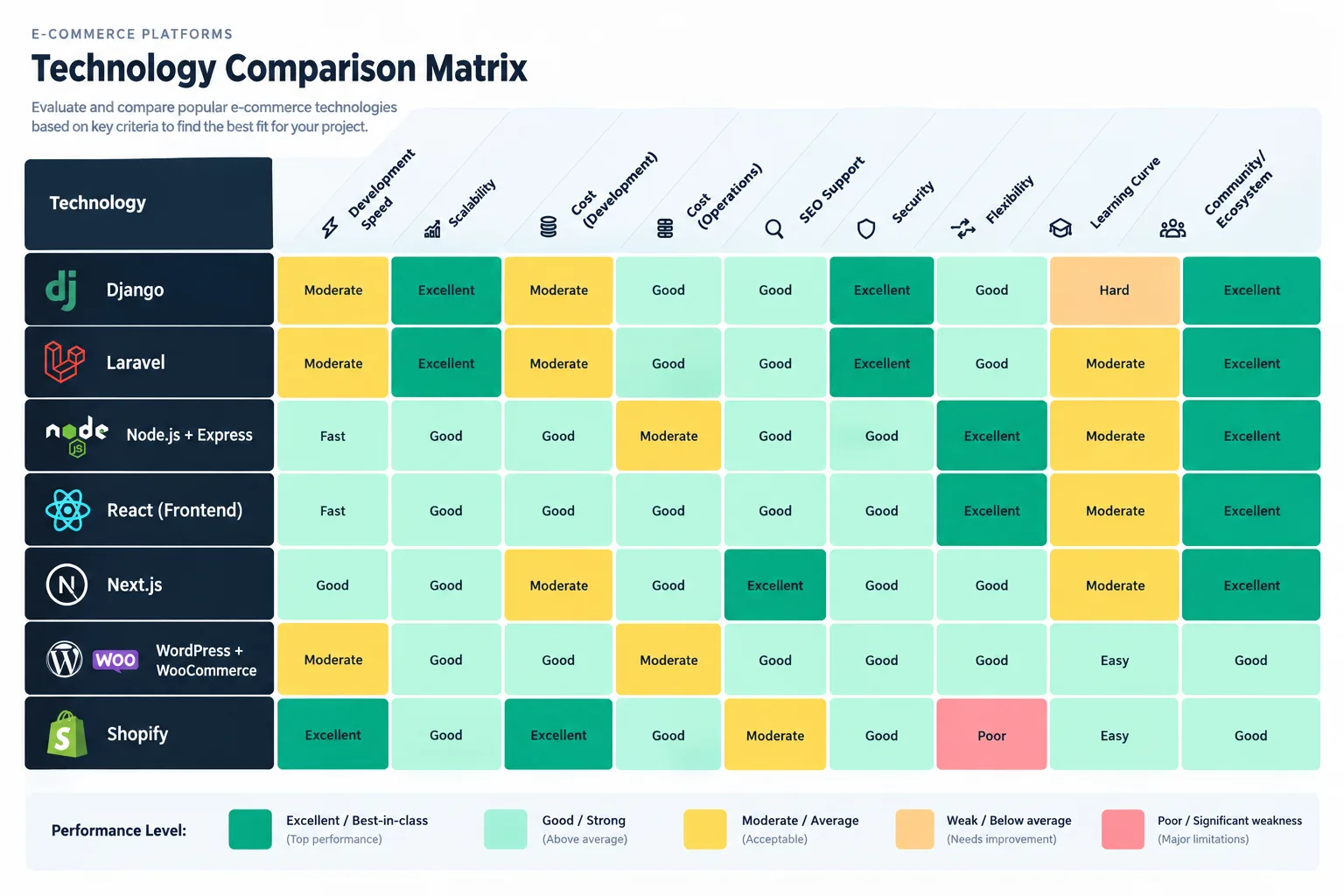
E-Commerce Technology Comparison Matrix
Create a professional technology comparison matrix / heat map for popular e-commerce technologies.
The matrix should allow users to quickly compare different technologies across important technical and business criteria. Each cell should be colored according to the technology's relative performance in that category.
Technologies
Use the following technologies as rows:
Django
Laravel
Node.js + Express
React (Frontend)
Next.js
WordPress + WooCommerce
Shopify
Evaluation Criteria
Use the following criteria as columns:
Development Speed
Scalability
Development Cost
Operating Cost
SEO Support
Security
Flexibility
Learning Curve
Community / Ecosystem
Heat Map Color Scale
Each cell in the matrix should use a background color representing the technology's relative strength in that criterion.
Color Hex Code Performance Level Dark Green#10B981 Excellent / Best in class Light Green #D1FAE5 Good / Strong Yellow #FCD34D Moderate / Average Light Orange #FED7AA Weak / Below average Light Red #FCA5A5 Poor / Major weaknessThe text inside each cell should remain highly readable against the chosen background.
Suggested Rating Matrix
Use the following as a starting point. Scores should be adjusted where necessary based on the specific context and intended use case.
Technology Development Speed Scalability Development Cost Operating Cost SEO Support Security Flexibility Learning Curve Community / Ecosystem Django 🟨 Moderate 🟩 Excellent 🟨 Moderate 🟩 Good 🟩 Good 🟩 Excellent 🟩 Excellent 🟨 Moderate 🟩 Excellent Laravel 🟩 Good 🟩 Excellent 🟨 Moderate 🟩 Good 🟩 Good 🟩 Excellent 🟩 Excellent 🟨 Moderate 🟩 Excellent Node.js + Express 🟩 Good 🟩 Excellent 🟩 Good 🟩 Good 🟨 Moderate 🟨 Moderate 🟩 Excellent 🟨 Moderate 🟩 Excellent React (Frontend) 🟩 Good 🟩 Excellent 🟩 Good 🟩 Good 🟨 Moderate 🟩 Good 🟩 Excellent 🟨 Moderate 🟩 Excellent Next.js 🟩 Excellent 🟩 Excellent 🟩 Good 🟩 Good 🟩 Excellent 🟩 Good 🟩 Excellent 🟨 Moderate 🟩 Excellent WordPress + WooCommerce 🟩 Excellent 🟨 Moderate 🟩 Good 🟩 Good 🟩 Good 🟨 Moderate 🟩 Good 🟩 Easy 🟩 Excellent Shopify 🟩 Excellent 🟩 Excellent 🟩 Good* 🟩 Good* 🟨 Moderate 🟩 Excellent 🟧 Limited 🟩 Easy 🟩 Excellent* Cost depends heavily on store size, plan, transaction volume, apps, customization requirements, and operational needs.
Design Requirements
General Layout
Use a clean, modern, professional layout designed specifically for technology comparison.
Background: White
Primary text: Black / near-black
Secondary text: Dark gray
Technology column: Slightly darker or contrasting background
Matrix cells: Colored according to the heat map scale
Borders: Thin, subtle borders
Typography: Professional sans-serif font
Spacing: Comfortable padding and consistent row height
Alignment: Technology names left-aligned; rating cells centered
Header Row
The evaluation criteria should appear across the top of the matrix.
Because the criteria names are relatively long, use one of the following approaches:
Rotate the column headers by about 45 degrees
Use vertically oriented headers
Use abbreviated labels with tooltips
Increase column width where sufficient space is available
Technology names should remain horizontal and easy to read.
Technology Column
The first column should visually distinguish the technology names from the rating cells.
For example:
Technology
Django
Laravel
Node.js + Express
React
Next.js
WordPress + WooCommerce
Shopify
Use a slightly darker background for this column while maintaining strong contrast and readability.
Legend
Place a clear legend above or below the matrix.
Performance Level
Dark Green — Excellent / Best in class
Light Green — Good / Strong
Yellow — Moderate / Average
Light Orange — Weak / Below average
Light Red — Poor / Major weakness
The legend should use exactly the same colors as the matrix cells.
Visual Design Guidelines
The matrix should look like a professional technology decision-making tool rather than a simple spreadsheet.
Recommended Characteristics
Clean white canvas
Strong typographic hierarchy
Minimal visual clutter
Consistent cell dimensions
Rounded outer container corners
A subtle border around the matrix
Very light shadows
Clear separation between technology names and criteria
Strong color contrast
Consistent color meaning throughout the matrix
Responsive layout for smaller screens
Important Interpretation Notes
The heat map represents general comparative characteristics, not absolute measurements.
A technology's performance can vary significantly depending on:
Developer experience
Project architecture
Hosting infrastructure
Traffic volume
Number of products
Number of integrations
Custom business requirements
Third-party services
Development practices
Caching and CDN configuration
Database architecture
Security implementation
For example, React is fundamentally a frontend library rather than a complete e-commerce platform, so its rating should be interpreted in the context of frontend development.
Similarly, Shopify is a hosted e-commerce platform, while Django, Laravel, Node.js, and Next.js can be components of custom application architectures. The comparison should therefore be treated as a technology selection reference, not a direct one-to-one platform benchmark.
Purpose of the Matrix
The primary goal is to provide a quick visual comparison of popular e-commerce technologies.
The matrix should help project teams evaluate:
How quickly each technology can be developed
How well each scales
Development and operating cost considerations
SEO capabilities
Security foundations
Flexibility for custom requirements
How difficult each is to learn
Ecosystem and developer availability
The matrix should support technology selection based on specific project requirements, team capabilities, budget, timeline, and long-term goals rather than presenting a single technology as universally best.
04. Backend Frameworks: Building Your E-Commerce Engine
Django: The Full-Featured Framework for E-Commerce
What Is Django?
Django is a Python-based web framework created in 2005 and maintained by the Django Software Foundation.
It's described as "batteries-included" because it comes with many built-in features rather than requiring you to assemble components from different libraries.
Django includes:
ORM (Object-Relational Mapping): Interact with databases using Python objects instead of writing SQL.
Admin interface: Allows non-technical staff to manage application data.
Authentication and authorization: Built-in systems for users, permissions, and access control.
Form handling and validation: Tools for processing and validating user input.
Security features: Including CSRF protection and password hashing.
Database migrations: Tools for managing database schema changes.
For a Python developer, starting a Django project means getting a solid foundation right away.
Django's philosophy emphasizes convention over configuration. There's usually a recommended way to accomplish common tasks, which can speed up development for developers who follow those conventions.
Django's Advantages for E-Commerce
1. Strong Foundation and Built-In Features
Django comes with:
Admin interface
Authentication
ORM
Database migrations
Form handling
Validation
Security features
This means less code from scratch.
A Django development team can focus on business logic and customer-facing features rather than rebuilding core infrastructure.
2. Excellent ORM
Django's ORM makes it easy to:
Define models as Python classes
Query data
Manage relationships
Optimize database access
Reduce common SQL-related errors
Developers can write Python code instead of manually writing SQL for many common operations.
3. Massive Ecosystem
Django has a large, mature community.
Third-party packages exist for many common needs, including:
REST API development with Django REST Framework
Stripe integrations
PayPal integrations
Image optimization
Caching
Email handling
Analytics
Search
Authentication
Background tasks
This ecosystem can significantly speed up development.
4. Strong Security Foundations
Django includes protection against common web vulnerabilities, including:
CSRF (Cross-Site Request Forgery)
XSS (Cross-Site Scripting)
SQL injection
Weak password storage
Session-related security issues
Password hashing, session management, and permission systems are built into the framework.
Django also has an established security process and publishes security updates regularly.
For an e-commerce website handling sensitive customer information, these security foundations are valuable.
5. Great for Server-Side Rendering
Django can render HTML on the server, providing a strong foundation for SEO.
Search engines can crawl and index server-rendered content without relying entirely on client-side JavaScript.
Django works well with template systems such as its built-in template engine and Jinja2.
This is especially useful for:
Product pages
Category pages
Search pages
Landing pages
Blog content
6. Scalability
Django can scale well when designed properly.
Companies like Instagram, Spotify, and Pinterest have used Django in their technology stacks at large scale.
With the appropriate:
Caching
Database optimization
Load balancing
Horizontal scaling
CDN usage
Monitoring
Django can support high-traffic applications.
Database choice also matters. PostgreSQL is a popular choice for Django applications and can scale substantially when configured properly.
7. Good for Rapid Development
Django's batteries-included approach and mature ecosystem allow teams to build features quickly.
An experienced Django team can build an e-commerce MVP in around 8–10 weeks, depending on the requirements, team size, integrations, and project complexity.
8. Powerful Admin Interface
One of Django's major advantages for e-commerce is its built-in admin interface.
Business users can manage:
Products
Categories
Inventory
Orders
Customers
Promotions
Content
without needing an entirely separate management system.
The admin interface is also highly customizable.
This can significantly reduce the amount of custom admin development required.
Django's Disadvantages and Limitations
1. Steeper Learning Curve
Django has many concepts to understand, including:
Models
Views
URLs
Forms
Migrations
Signals
Middleware
Templates
Authentication
Admin customization
For someone completely new to programming, Django can be more complex than simpler frameworks.
For someone who already understands Python and basic web development, however, Django is generally more approachable.
2. Monolithic Architecture
Django applications can become giant monoliths if not carefully structured.
At very large scale, this can make:
Testing
Deployment
Development
Scaling
Team coordination
more complex.
Microservice architectures are possible, but they require deliberate architectural decisions and additional operational complexity.
3. Python Performance
Python is generally slower than compiled languages like Go or Rust for CPU-intensive workloads.
However, typical e-commerce applications spend significant time waiting for:
Database operations
Network requests
External APIs
File storage
Cache operations
Therefore, Python's performance is usually sufficient for many web applications when the system is properly optimized.
4. Requires Python Hosting
Django requires hosting that supports Python.
You can't deploy a typical Django application on static hosting like GitHub Pages.
You generally need:
A VPS
A platform as a service
A cloud platform
Containers
Another Python-compatible hosting environment
This introduces more operational complexity compared with static websites.
5. Not Ideal for Real-Time Applications
If real-time functionality is a core requirement — for example:
Live notifications
Real-time inventory updates
Real-time chat
Live collaboration
Django's traditional request-response architecture may require additional components.
Django can support real-time functionality using technologies like Django Channels, but this adds complexity.
For some heavily real-time applications, Node.js and WebSocket architectures may be more natural.
6. Database Scaling Requires Planning
Django applications generally use relational databases.
For very large systems, a single database can eventually become a bottleneck.
Advanced techniques such as:
Read replicas
Database partitioning
Sharding
Caching layers
Specialized data stores
may become necessary.
These approaches require additional architectural work.
Performance Characteristics
Django applications can be very fast when properly optimized.
Several areas require particular attention.
Database Queries
Django's ORM can generate inefficient queries if used incorrectly.
A common problem is the N+1 query problem, where additional database queries are repeatedly executed inside a loop.
Django provides tools such as:
select_related()
prefetch_related()
to reduce unnecessary database queries.
Caching
Caching is important for high-traffic e-commerce applications.
Redis is commonly used for:
Frequently accessed data
Sessions
Caching
Background task infrastructure
Django provides strong caching support.
Static Files
CSS, JavaScript, images, and other static assets should generally be served through a CDN or dedicated static file infrastructure rather than directly through the Django application server.
Django provides tools for managing static files.
High-Traffic Applications
With the right architecture, caching, database optimization, load balancing, and infrastructure, Django can support high request volumes.
Actual performance depends heavily on:
Application architecture
Database queries
Hardware
Caching
Traffic patterns
Third-party services
Deployment configuration
SEO Considerations
Django provides a strong foundation for e-commerce SEO.
Server-Side Rendering
Django renders HTML on the server, allowing search engines to receive complete page content directly.
This provides a more straightforward SEO foundation compared with applications that rely entirely on client-side rendering.
URL Structure
Django's URL routing makes it easy to create clean, descriptive URLs.
For example:
example.com/products/blue-running-shoesinstead of relying on less descriptive or hash-based URLs.
Metadata Control
Django templates can be used to control:
Page titles
Meta descriptions
Canonical URLs
Open Graph metadata
Other SEO-related information
Structured Data
Product pages can implement structured data such as:
Product schema
Review schema
Breadcrumb schema
Organization schema
JSON-LD can be generated dynamically using Django templates or application logic.
Sitemaps and Robots.txt
Django provides tools for generating XML sitemaps.
Developers can also manage robots.txt and other search-engine-related configuration.
Important SEO Limitation
Django doesn't automatically make a website SEO-friendly.
Developers still need to implement SEO best practices correctly.
Django provides the tools and structure; the development team must use them effectively.
Security Considerations
Django has strong security foundations.
CSRF Protection
Django includes built-in middleware to help protect against Cross-Site Request Forgery (CSRF) attacks.
XSS Protection
Django's template system provides automatic escaping that helps reduce the risk of Cross-Site Scripting (XSS) vulnerabilities.
SQL Injection Prevention
Django's ORM uses parameterized database queries for normal ORM operations, helping protect against SQL injection.
Password Security
Django's authentication system supports secure password hashing mechanisms, including algorithms such as:
PBKDF2
Argon2
bcrypt
depending on the configured password hasher.
HTTPS
Django applications can be deployed securely over HTTPS with proper server and application configuration.
Security Is Not Automatic
Django's built-in security features don't eliminate the need for secure development practices.
Developers still need to:
Validate user input
Use HTTPS
Keep dependencies updated
Configure permissions correctly
Protect sensitive information
Secure API endpoints
Configure production settings correctly
Monitor for security vulnerabilities
Django provides the tools, but developers must use them correctly.
Scalability
Django can scale effectively when properly designed.
Horizontal Scaling
Multiple instances of a Django application can run behind a load balancer to handle increased traffic.
Caching
Redis or Memcached can reduce database load and improve response times.
Database
PostgreSQL is a popular database choice for Django applications.
Proper:
Indexing
Query optimization
Connection management
Database configuration
are important as traffic increases.
CDN
Static files and images should generally be served through a CDN to reduce application server load and improve global performance.
Monitoring
Tools such as:
New Relic
Datadog
Django Debug Toolbar
can help identify performance issues and bottlenecks.
Large-Scale Architecture
At very large scale, an organization may eventually introduce:
Microservices
Specialized search engines
Custom caching layers
Read replicas
Distributed data stores
Background processing systems
However, Django can still remain the core application framework for large platforms when properly designed.
Development Complexity
Django has a learning curve, but it's well documented.
Important concepts include:
Models
Database schemas represented as Python code.
Views
Request handlers responsible for application logic and responses.
URL Routing
Maps incoming URLs to views.
Templates
Used to generate HTML.
Forms
Handle user input and validation.
Admin Interface
Provides an administrative interface for managing application data.
Migrations
Manage database schema changes over time.
For someone with Python experience, learning the core Django concepts may take about 1–2 weeks.
For someone completely new to web development, the learning process may take about 4–6 weeks or more, depending on prior programming experience and study time.
Hosting Requirements
Django requires a server or platform that supports Python.
VPS (Virtual Private Server)
Examples include:
DigitalOcean
Linode
AWS EC2
With a VPS, you typically manage the operating system, Python environment, application deployment, web server, security configuration, and updates.
Platform as a Service (PaaS)
Examples include:
Heroku
PythonAnywhere
Railway
These platforms abstract away much of the underlying server management.
Cloud Platforms
Django can also run on:
AWS
Google Cloud
Microsoft Azure
Applications can be deployed using containers such as Docker or other cloud-native approaches.
Hosting Costs
Hosting costs vary widely based on traffic, resources, architecture, provider, and managed services.
A small VPS might start at around $5–20 per month, while managed platforms and production environments can cost significantly more.
Database hosting may also be separate, such as managed PostgreSQL through AWS, DigitalOcean, or another provider.
Actual costs should be calculated based on the expected workload rather than using a fixed monthly estimate.
Maintenance and Updates
Django releases new versions regularly.
Django also provides Long-Term Support (LTS) releases with extended security support.
Upgrading Django is generally manageable when projects:
Follow recommended Django practices
Keep dependencies updated
Avoid deprecated packages
Read upgrade documentation
Test upgrades before deploying to production
Third-party packages also require maintenance.
Popular packages are usually actively maintained, while inactive or niche packages can become outdated.
When a Beginner Should Use Django
If you're learning web development with Python and want to build an e-commerce application, Django can be a strong choice for learning and development.
The batteries-included approach means you don't have to make hundreds of decisions about which libraries to use.
The admin interface also lets you manage application data without immediately building an entire custom management system.
Django's documentation is extensive and widely used.
However, Django assumes that you have — or are willing to learn — Python fundamentals.
If you're completely new to programming, learning Python first may make learning Django easier.
When a Professional Team Should Use Django
Professional teams should consider Django when:
You have Python experience on your team.
You need to launch relatively quickly.
You're building a traditional e-commerce platform with a catalog, cart, checkout, and management system.
You want strong security foundations.
You want server-rendered pages and a strong SEO foundation.
You're comfortable with server-based hosting and DevOps.
You want a framework that can support growth from small to large applications.
You value built-in features over selecting each component individually.
When Not to Use Django
Consider other technologies if:
Real-time functionality is a core part of the business.
Your team has no Python experience and you can't reasonably hire Django developers.
You need to launch in just 2–4 weeks and a hosted platform would meet your requirements.
You're building a mostly static website or a simple marketing site.
Your requirements conflict strongly with Django's conventions.
You're building a highly latency-sensitive, CPU-intensive application where another technology is better suited to the workload.
Django for E-Commerce: Real-World Applicability
Django has been used in large-scale web applications and provides a solid foundation for custom e-commerce platforms.
Its ecosystem includes mature tools and integrations for areas such as:
Payment processing
Stripe integration
Image processing
Inventory management
Authentication
APIs
Search
Caching
Background tasks
Django can support projects ranging from small stores to large e-commerce platforms when the architecture, database, infrastructure, and operations are appropriately designed.
A custom e-commerce application built by a team with Python experience can use Django as its core framework while adding specialized services when needed.
Final Assessment
Django is especially well suited to teams that want a custom, secure, flexible, maintainable e-commerce application without having to build every core web development component from scratch.
Its biggest strengths are:
Built-in functionality
Strong security foundations
An excellent ORM
A powerful admin interface
A mature ecosystem
Server-side rendering
Flexible architecture
A strong Python ecosystem
Good scalability when properly engineered
Its main trade-offs include:
A larger learning curve than simpler platforms
More infrastructure responsibility than hosted solutions like Shopify
Extra work for real-time functionality
The need for careful architecture as applications become very large
For a custom e-commerce project where the team has Python experience and wants significant control over the application, Django provides a strong foundation.
Laravel and PHP: The Developer-Friendly Backend Framework
What Is Laravel?
Laravel is a PHP web framework created in 2011 by Taylor Otwell. PHP is one of the oldest and most widely used web languages, powering roughly 77% of all websites with a known server-side programming language (according to W3Techs). Laravel modernizes PHP development with elegant syntax, powerful tools, and a focus on developer experience.
Laravel draws heavy inspiration from Ruby on Rails and brings similar philosophies to PHP: convention over configuration, a focus on productivity, and beautiful, expressive code. While PHP is known for legacy, messy code (the old PHP of the 1990s), modern Laravel is clean, maintainable, and fully capable of powering large platforms.
Laravel includes Eloquent (an ORM similar to Django's ORM), migrations for schema versioning, an excellent routing system, a templating engine (Blade), authentication and authorization, and a command-line tool (Artisan) that speeds up development.
Laravel's Advantages for E-Commerce
Excellent Developer Experience
Laravel prioritizes beautiful, readable code. Developers typically find Laravel enjoyable to work with. The syntax is expressive and often reads close to natural English. This improves code quality and team satisfaction.
Mature, Battle-Tested Ecosystem
Laravel has been around for more than 12 years and powers millions of websites. The ecosystem is mature, with excellent third-party packages. Major platforms built with Laravel include Slack, Netflix, TripAdvisor, and many e-commerce stores.
Powerful Eloquent ORM
Eloquent is a highly expressive ORM that makes writing database queries intuitive. Relationships (one-to-many, many-to-many) are simple and readable. Query optimization is easier than with many other ORMs.
Built-In Authentication and Authorization
Laravel includes out-of-the-box authentication (login, registration, password reset) and authorization (permissions and roles). This saves significant development time on features every e-commerce site needs.
Excellent for Server-Side Rendering
Like Django, Laravel renders HTML on the server, which is good for SEO. The Blade templating engine is powerful and intuitive. Product pages, category pages, and dynamic content are rendered server-side, making content easily crawlable by search engines.
Large Talent Pool
PHP developers are plentiful and generally less expensive than specialists in niche languages. Finding Laravel developers is easier than finding Django developers. This matters for hiring and team scaling.
Strong Hosting Ecosystem
PHP hosting is ubiquitous and cheap. Shared hosting ($5-15 per month), managed WordPress hosting ($20-50 per month), and cloud platforms all support PHP. This means lower operating costs and more hosting options than Python.
Rapid Development
Laravel's batteries-included approach and mature ecosystem support rapid development. An experienced Laravel team can build an e-commerce MVP in 8-10 weeks, similar to Django.
Comprehensive Documentation
Laravel's documentation is excellent: clear, comprehensive, and regularly updated. Learning Laravel is easier than learning many other frameworks.
Modern PHP Features
Laravel takes advantage of modern PHP (7.4+, 8.0+), which brought major improvements: type declarations, named arguments, attributes, and more. Modern PHP is a capable language despite its reputation.
Laravel's Disadvantages and Limitations
Slightly Lower Performance Than Compiled Languages
Like Python, PHP is interpreted rather than compiled. While modern PHP is fast, it's slower than compiled languages like Go or Rust. However, for typical web applications, PHP's performance is acceptable.
Smaller Community Than Django or Node.js
While Laravel has a large community, it's smaller than Django's or Node.js's. Finding specialized expertise (such as Laravel + Elasticsearch integration) may be harder than with more common technologies.
Less Suited to Real-Time Features
Like Django, Laravel's traditional request-response model isn't ideal for real-time features. You can add real-time functionality (using tools like Laravel Echo with WebSockets), but it requires additional implementation.
Requires PHP Hosting
You need web hosting that supports PHP. While very common, it's another operational consideration. You can't deploy to static hosting.
Mixed Perception of PHP
Although modern PHP is excellent, PHP has a poor reputation from legacy code and outdated practices. Some developers dismiss PHP without acknowledging modern improvements. This can affect hiring and team morale.
Learning Curve for Non-PHP Developers
If your team has no PHP experience, there's a learning curve. However, PHP is relatively easy to learn — easier than Python or Java for many people.
Performance Characteristics
Modern Laravel applications can be very fast. Key considerations:
- Eloquent query optimization: Like Django's ORM, Eloquent can generate inefficient queries if you're not careful. Eager loading (
with,load) prevents N+1 query problems. - Caching: Redis and Memcached integration is excellent. Session caching and application-level caching significantly improve performance.
- Database: Both PostgreSQL and MySQL work well. Query optimization and proper indexing are essential.
For a properly optimized Laravel application, performance is comparable to Django. Both can handle thousands of requests per second.
SEO Considerations
Laravel is excellent for SEO:
- Server-side rendering: HTML is rendered on the server, so search engines get full content.
- URL routing: Laravel's routing makes clean URLs trivial (
example.com/products/blue-running-shoes). - Blade templates: Implementing metadata (title, description), structured data (product schema), and SEO best practices is straightforward.
- Sitemap and Robots.txt: Easy to implement.
However, like Django, SEO isn't automatic. Good SEO requires implementing best practices, which Laravel supports but doesn't enforce.
Security Considerations
Laravel includes strong security features:
- CSRF protection: Middleware automatically includes CSRF tokens in forms.
- XSS protection: Blade templates auto-escape output by default.
- SQL injection prevention: Eloquent uses parameterized queries.
- Password hashing: Uses bcrypt or Argon2 by default.
- Authentication: A built-in authentication system with secure password handling.
- Authorization: Policies and gates control what authenticated users can do.
However, security requires developer diligence. The framework's tools must be used correctly.
Scalability
Laravel scales well:
- Horizontal scaling: Multiple Laravel instances behind a load balancer handle increased traffic.
- Caching layers: Redis and Memcached reduce database load.
- Database optimization: PostgreSQL scales well with proper indexing and query optimization.
- CDN: Static assets via CDN.
- Queues: Laravel includes queue systems for background jobs, preventing slow operations from blocking requests.
Laravel is widely used by platforms like Slack, so it's proven for large applications.
Development Complexity
Laravel has concepts to learn:
- Routes (URL mapping)
- Controllers (request handlers)
- Models (database objects)
- Migrations (schema versioning)
- Views (template files using Blade)
- Eloquent relationships
- Authentication and authorization
- Middleware
For a PHP developer, this typically takes 1-2 weeks. For someone new to web development, 3-4 weeks.
Hosting Requirements
PHP hosting is abundant:
- Shared hosting: Cheap ($5-15 per month) but limited. Good for learning or small sites.
- Managed hosting: Services like Kinsta, Forge, or Laravel Forge handle deployment, scaling, and updates. Cost: $50-200+ per month depending on scale.
- Cloud platforms: AWS, Google Cloud, Azure with containers or serverless. More control but more complexity.
- VPS: Digital Ocean, Linode. More affordable than managed hosting but requires more setup.
PHP hosting is generally cheaper than Python hosting because it's ubiquitous.
Database hosting: MySQL or PostgreSQL on managed services or separate servers.
Ecosystem and Packages
Laravel has an excellent ecosystem:
- Laravel Sanctum: API authentication
- Laravel Passport: OAuth 2.0 implementation
- Stripe and PayPal packages: Payment integration
- Laravel Queue: Background job processing
- Laravel Broadcasting: Real-time features
- Spatie packages: Popular Laravel utilities
- Statamic, Filament: Admin panels and CMS
For e-commerce, packages exist for payments, inventory, shipping, and more.
When a Beginner Should Use Laravel
If you're learning web development and want to build e-commerce, Laravel is an excellent choice. PHP is relatively easy to learn. Laravel's documentation is excellent. The community is helpful. The barrier to entry is low.
If you're coming from a PHP background (WordPress, legacy PHP), Laravel is the natural upgrade.
When a Professional Team Should Use Laravel
Professional teams should consider Laravel when:
- You have PHP experience or can hire PHP developers (easier and cheaper than other specialties).
- You need rapid development (8-12 weeks to MVP).
- You're building traditional e-commerce.
- You want strong security and SEO foundations.
- You value developer experience and code readability.
- Cost is a factor (PHP hosting is cheaper than the alternatives).
- You're comfortable with server-based hosting.
- You want a framework that scales.
When Not to Use Laravel
Consider alternatives if:
- Real-time features are core to your application.
- Your team has no PHP experience and can't hire.
- You need to launch in 2-4 weeks (use a platform).
- You have extremely high performance requirements for CPU-intensive operations (use compiled languages).
- Your team strongly prefers a different language ecosystem.
Laravel vs. Django: The Comparison
Both are excellent for e-commerce:
- Developer experience: Laravel often wins here. Developers find Laravel code more readable and enjoyable.
- Performance: Nearly identical when optimized.
- Scalability: Both scale well. Django may scale slightly better at extremely large scale.
- Hosting costs: Laravel is typically cheaper (PHP hosting is ubiquitous and cheap).
- Hiring: Laravel developers are easier to find and typically cheaper.
- SEO: Both are excellent for server-side rendering.
- Security: Both have strong foundations.
- Ecosystem: Both have mature ecosystems. Laravel's is slightly smaller but sufficient.
- Real-world applicability: Both are production-ready and used by large platforms.
The choice between Django and Laravel often comes down to team preference and expertise. If your team knows Python, choose Django. If it knows PHP, choose Laravel. Either will serve you well.
Laravel for E-Commerce: When to Choose It
Choose Laravel for e-commerce when:
- Your team has PHP experience.
- Cost is an important factor.
- You want rapid development.
- You value elegant, readable code.
- You want a large talent pool to hire from.
- You're building a traditional, product-based e-commerce website.
- You want strong server-side rendering for SEO.
- You prefer Laravel's community and philosophy.
Laravel is perfectly suited to building e-commerce from small stores to large multi-vendor platforms. The ecosystem supports all the necessary features.
Node.js and Express: JavaScript on the Backend
What Are Node.js and Express?
Node.js is a JavaScript runtime that lets you run JavaScript outside the browser, on servers. Created in 2009 by Ryan Dahl, Node.js brought JavaScript to backend development. Before Node.js, JavaScript was exclusively a frontend language.
Express is a simple, flexible web framework built on Node.js. It's the most popular Node.js framework and provides routing, middleware, templating, and other core tools for building web applications. Express is lightweight — you assemble components (authentication, validation, database drivers) from different packages instead of getting everything built in like with Django or Laravel.
Node.js uses a non-blocking, event-driven I/O model. This means it handles many concurrent connections efficiently. When code needs to wait (a database query, reading a file), Node.js doesn't block — it handles other requests while waiting. This architecture is excellent for I/O-intensive applications like web servers.
Advantages of Node.js and Express for E-Commerce
JavaScript Everywhere
With Node.js, you can write JavaScript on both the frontend and the backend. This means a full-stack JavaScript team can build both client-side and server-side code. This can reduce context switching and simplify hiring (one language across the stack).
Excellent for Real-Time Features
Node.js handles WebSockets and real-time features exceptionally well. Live inventory updates, instant notifications, and live chat are natural with Node.js. If real-time capability is central to your business, Node.js is a strong choice.
High Concurrency and Performance
The non-blocking I/O model means Node.js handles many concurrent connections efficiently. For high-traffic scenarios with many simultaneous users, Node.js often performs better than traditional request-response models.
Rich Ecosystem
npm (Node's package manager) has millions of packages. Whatever you need — payment processing, image optimization, database drivers, email — there's usually a package. However, this abundance means choosing high-quality packages matters (not all packages are well maintained).
Rapid Development
Express is simple, and assembling components with packages is fast. Experienced Node.js developers can build quickly. Full-stack JavaScript teams may build especially fast (sharing code between frontend and backend).
Modern JavaScript Features
Node.js natively uses modern JavaScript (ES6+, async/await). These features make asynchronous code (critical to Node.js's non-blocking model) readable and maintainable.
Serverless-Friendly
Node.js is popular for serverless architectures (AWS Lambda, Google Cloud Functions). If you want to reduce operations and scale automatically, Node.js is excellent.
Good Performance Out of the Box
Node.js is fast. For I/O-bound applications (most web applications), it performs very well without intensive optimization.
Disadvantages and Limitations of Node.js and Express
Callback Complexity (Callback Hell)
Asynchronous programming in JavaScript can get complicated. Nested callbacks (callback hell) can make code hard to read. Modern async/await mitigates this, but it requires careful structure.
Less Comprehensive Than Django or Laravel
Express is simple. You need to choose and integrate components for authentication, validation, error handling, and more. This provides flexibility but requires more decisions and integration work. Projects can become fragmented if not carefully structured.
Single-Threaded Event Loop
Node.js runs on a single thread (although multiple processes can share the load). CPU-intensive operations block the event loop. For heavy computation, you need worker threads or separate processes. This is fine for most e-commerce, but CPU-heavy operations (large-scale image processing, complex calculations) are less ideal.
Newer Ecosystem
While Node.js is 14 years old, its ecosystem is newer and more fragmented than Django's or Laravel's. Some packages are less mature. Package quality varies — not all popular packages are well maintained.
Requires More Decisions
With Express, you decide the authentication library, the validation library, the ORM or query builder, the templating engine, error handling, logging, and more. Django and Laravel make many of these decisions for you. For experienced teams, this is flexibility. For less experienced teams, it's decision paralysis.
Client-Side Rendering by Default
Express naturally leads to client-side rendering (building SPAs with React). Client-side rendering is worse for SEO than server-side rendering. You can do server-side rendering with Node.js (using Next.js), but it's not the default pattern. This requires deliberate architecture for good SEO.
Performance Characteristics
Node.js excels in I/O-intensive and concurrent scenarios:
Concurrent connections: Node.js handles thousands of concurrent connections with a single process. Django or Laravel might need multiple processes/servers for the same load.
I/O operations: Database queries, API calls, and file operations are handled efficiently thanks to non-blocking I/O.
CPU operations: If heavy processing is required, Node.js struggles. You need worker threads or separate processes.
For typical e-commerce (I/O-bound), Node.js's performance is excellent. At scale with proper caching and optimization, Node.js handles very high traffic.
However, for simple requests (no complex logic, just database reads), Django or Laravel might be slightly faster because of lower overhead. The difference is usually negligible.
SEO Considerations
Node.js with Express has SEO challenges:
Client-side rendering problem: Express naturally encourages building SPAs with client-side rendering (React, Vue). This is bad for SEO because search engines don't fully execute JavaScript.
Solution 1 - Server-Side Rendering (SSR): Using Next.js or a similar framework provides SSR, making content crawlable. This requires more setup than Django or Laravel.
Solution 2 - Hybrid approach: Render on the server initially, then hydrate with client-side JavaScript. Next.js handles this well.
Metadata control: With proper setup, controlling title tags, meta descriptions, and structured data is possible but requires deliberate implementation.
If SEO is critical (and it usually is for e-commerce), use Next.js rather than plain Express for server-side rendering.
Security Considerations
Node.js security requires diligence:
No built-in CSRF protection: Express doesn't include CSRF middleware by default. You must add it (the csurf package).
No built-in password hashing: You must choose and implement it (bcrypt, Argon2 packages).
Dependency management: With millions of packages, dependency security is critical. Audit dependencies regularly with npm audit.
Asynchronous errors: Improper error handling in async code can leave errors unhandled. This requires careful structure.
Common vulnerabilities: SQL injection (with raw queries) and XSS (if output isn't escaped) are possible if you're not careful. Using ORMs and templating engines helps.
Node.js is secure when developers follow best practices, but it requires more explicit implementation than Django or Laravel.
Scalability
Node.js scales excellently:
Horizontal scaling: Multiple Node.js processes behind a load balancer handle increased traffic.
Clustering: Node.js's cluster module lets multiple processes share a single port.
Non-blocking I/O: Handles many concurrent connections without blocking.
Database: PostgreSQL or MongoDB work well. Optimization matters.
Caching: Redis integration is common and effective.
Queues: Background job processing with Bull, RabbitMQ, or similar.
Node.js handles very high traffic when properly designed. Companies like Netflix use Node.js at scale.
Development Complexity
Node.js requires understanding:
Asynchronous programming: Callbacks, promises, async/await. This is fundamental to Node.js.
Express basics: Routing, middleware, request/response handling.
Package selection: Evaluating and choosing high-quality packages for each concern.
Middleware: Understanding the Express middleware chain and custom middleware.
Error handling: Proper error handling in async code.
For a JavaScript developer, Node.js is natural. For someone with no JavaScript experience, learning JavaScript and Node.js concepts takes 2-4 weeks.
Hosting Requirements
Node.js hosting is common:
PaaS: Heroku, Render, Railway. Simple deployment but less control and higher cost at scale.
Cloud: AWS, Google Cloud, Azure with containers (Docker) or serverless (Lambda, Cloud Functions).
VPS: Digital Ocean, Linode. More control, moderate cost.
Serverless: AWS Lambda, Google Cloud Functions. Pay per execution, automatic scaling.
Node.js hosting is generally more expensive than PHP hosting but cheaper than some Python options.
Database hosting: Managed PostgreSQL or MongoDB services.
Ecosystem and Packages
The npm package system is vast. Popular e-commerce-related packages:
Express.js: Web framework Sequelize or TypeORM: ORMs Passport: Authentication Stripe, PayPal SDKs: Payment processing Multer: File uploads Nodemailer: Email Redis client: Caching Bull: Job queues Next.js: Server-side rendering
Package quality varies. Popularity doesn't always mean good maintenance. Community vetting matters.
TypeScript Integration
Many Node.js projects use TypeScript (typed JavaScript). TypeScript adds type safety, which improves code quality and catches errors early. However, it adds complexity. Many successful Node.js projects don't use TypeScript.
When a Beginner Should Use Node.js
If you're learning web development with JavaScript and want to build e-commerce, Node.js is possible but challenging. Node.js's asynchronous model is unintuitive for beginners. However, if you're already comfortable with JavaScript, Node.js is accessible.
A full-stack JavaScript developer (who knows React or Vue on the frontend) benefits from Node.js because it's the same language. Context switching is eliminated.
When a Professional Team Should Use Node.js
Professional teams should consider Node.js when:
You have JavaScript experience (especially full-stack).
Real-time features are important.
You need to handle very high concurrency.
You want serverless/auto-scaling architectures.
You're comfortable assembling components (not batteries-included).
You're willing to implement server-side rendering (Next.js) for SEO.
You want rapid development with a modern JavaScript team.
You're building an SPA-heavy application where client-side code is complex.
When Not to Use Node.js
Consider alternatives if:
You need traditional server-side rendering as the default (use Django, Laravel, or Next.js).
Your team has no JavaScript experience.
You need absolute beginner-friendliness and comprehensiveness (use Django or Laravel).
You have heavy CPU-intensive operations.
You prefer explicit structure (Django/Laravel) over flexible assembly (Node.js).
You want the easiest path to launch (use a platform like Shopify).
Node.js vs. Django vs. Laravel
Comparison:
Real-time features: Node.js wins decisively.
Developer experience: Laravel > Django > Node.js (Laravel code is often more readable; Node.js requires more decisions).
SEO (without extra work): Django and Laravel > Node.js (server-side rendering is the default).
SEO (with proper setup): All equal (use Next.js with Node.js).
Performance: Node.js is slightly better for high concurrency; Django and Laravel are sufficient for most cases.
Scalability: All three scale well. Node.js shines under high concurrent load.
Ease of hiring: Laravel > Django > Node.js (Laravel developers are more abundant and cheaper; JavaScript developers are plentiful but frontend-focused; Node.js backend expertise is more specialized).
Ecosystem: Node.js (abundance of choice) > Laravel > Django (community size).
Node.js for E-Commerce: When to Choose It
Choose Node.js for e-commerce when:
Your team is JavaScript-focused (full-stack developers).
Real-time features are important to your business.
You expect very high concurrent traffic (although Django and Laravel handle normal traffic well).
You want serverless or auto-scaling architecture.
You're building a complex SPA where client-side logic is significant.
You're willing to use Next.js for proper server-side rendering and SEO.
You want maximum flexibility in choosing components.
Node.js is perfectly suited to small to large e-commerce. The ecosystem supports all the necessary features. Success depends on architectural choices and team expertise.
Complexity trade-off: Node.js gives you flexibility but requires more architectural decisions. Django and Laravel provide more structure but less flexibility.
05. Frontend and Full-Stack Options: Beyond Backend Frameworks
React: Building Interactive E-Commerce Frontends
What Is React?
React is a JavaScript library for building user interfaces, created by Facebook in 2011. Unlike Django, Laravel, or Node.js, React is frontend only. It runs in the browser and handles the visual interface and user interactions.
React is component-based. You build reusable components (like ProductCard, ShoppingCart, or CheckoutForm) and compose them into complex interfaces. This component-based approach promotes code reuse and maintainability.
React uses a virtual DOM (a JavaScript representation of the actual DOM) to efficiently update only the parts of the page that changed. When state changes, React detects which DOM elements need updating and updates only those, not the whole page. This is faster than naive DOM manipulation.
Important: React is frontend only. You still need a backend API to handle data, business logic, and database operations. A typical e-commerce architecture using React would be a React frontend + a Django/Laravel/Node.js backend + a database.
React's Advantages for E-Commerce
Excellent User Experience
React enables highly interactive, responsive interfaces. Adding items to the cart can update instantly without a page reload. Filters can be applied without refreshing. Form validation can happen in real time. These interactions build a smooth, modern user experience that encourages conversions.
Large Ecosystem and Community
React has the largest community of any frontend framework. Thousands of third-party libraries exist: state management (Redux, Zustand), routing (React Router), server-side rendering (Next.js), animation, form handling, and more.
For e-commerce specifically, libraries exist for product galleries, shopping carts, checkout flows, and payment processing.
Component Reusability
Building components once and reusing them across pages reduces code duplication. A ProductCard component used on the product list, the home page, and search results is built once and used everywhere.
Developer Productivity
The React developer ecosystem is large. Finding developers is easier than with other frontend frameworks (although still relatively hard compared with plain JavaScript). Learning resources are extensive.
Modern JavaScript and Features
React natively uses modern JavaScript (ES6+). Developers write expressive, maintainable code using modern language features.
Excellent for Complex, Dynamic Interfaces
If your e-commerce website needs complex interactions (interactive product builders, virtual try-ons, real-time inventory updates), React excels. The component model and state management make complex UIs manageable.
Powerful Tooling
Tools like Create React App, Vite, and Next.js make setting up React projects straightforward. Bundling, transpilation, and development servers are handled automatically.
Great for SPAs (Single-Page Applications)
React is the de facto standard for building SPAs — applications where navigation happens client-side without full page reloads. For highly interactive applications, SPAs provide excellent user experiences.
React's Disadvantages and Limitations
SEO Problems (Without Next.js)
React applications render client-side. This means the browser receives mostly empty HTML, then JavaScript loads and renders the content. Search engines may not fully execute JavaScript, missing product information, descriptions, and content.
For e-commerce, where search engines drive significant traffic, this is a major problem. The solution is Next.js (which adds server-side rendering to React), but that's an additional framework on top of React.
Requires a Separate Backend
React doesn't include backend functionality. You need a separate backend API (Django, Laravel, Node.js, etc.). This adds complexity: two separate codebases to maintain, API design decisions, and potential security issues at the API boundary.
Steeper Learning Curve
React requires understanding JavaScript concepts (functions, closures, asynchronous programming) and React-specific concepts (components, state, hooks, virtual DOM). For someone new to programming, React is hard.
Bundle Size and Performance
React applications require shipping JavaScript to the browser. Large React bundles increase load time. Code splitting and lazy loading help, but client-side rendering is inherently slower than server-rendered HTML.
JavaScript Required
Users who disable JavaScript can't use React applications (although this is rare now). More importantly, search engines, monitoring tools, and performance analysis tools sometimes struggle with JavaScript-heavy applications.
Decision Fatigue
React itself is simple. State management decisions (Redux? Zustand? Context?), routing, form handling, and data fetching fall to you. This provides flexibility but requires many decisions.
Community and Package Quality
While React's community is large, package quality varies. Popularity doesn't always mean good maintenance. Evaluating packages requires care.
Performance Considerations
A React application's performance depends on implementation:
- JavaScript bundle size: Shipping large JavaScript bundles increases initial load time. Code splitting and lazy loading help. For mobile users on slow networks, JavaScript-heavy sites suffer.
- Server-side rendering (with Next.js): Properly implemented SSR provides fast initial page load and good SEO. However, it adds complexity.
- Client-side rendering: The initial HTML is minimal; JavaScript renders the content. This is slower for the initial load but enables very fast subsequent interactions. Good for logged-in users but bad for first-time visitors and SEO.
- Caching: Client-side caching (in memory or localStorage) can improve perceived performance.
For e-commerce, performance is critical. A slow site loses conversions. React can be very fast when properly optimized, but it requires deliberate optimization effort.
SEO Considerations
Pure React (client-side rendering) is problematic for SEO:
- No server-side content: Search engines see empty HTML and may not fully execute JavaScript to see content. Product descriptions, titles, and content may not be indexed.
- No meta tags: You can't set unique title tags and meta descriptions for different pages in pure client-side rendering.
Solution: Use Next.js, which provides server-side rendering (SSR) for e-commerce pages. Product pages, category pages, and other SEO-critical pages are rendered on the server, providing crawlable content and unique metadata.
With Next.js, React can have excellent SEO.
Security Considerations
React (frontend) security concerns:
- Sensitive data in JavaScript: Never put API keys, passwords, or sensitive logic in frontend code. Browsers expose all JavaScript.
- API security: React communicates with a backend API. The API must be secure. Authentication, authorization, and data validation happen on the backend, not the frontend (frontend validation is for user experience only).
- XSS prevention: React auto-escapes output by default, preventing XSS attacks. However, using
dangerouslySetInnerHTMLbypasses this protection.
Frontend security is mostly about not exposing sensitive data. The backend API is where real security happens.
When to Use React
Use React when:
- You're building a highly interactive application with complex client-side logic.
- User experience and responsiveness matter more than initial load speed.
- Most of your users are returning (logged-in) users who benefit from fast interactions.
- You're willing to use Next.js for server-side rendering (for SEO and initial load performance).
- You have a dedicated backend API (Django, Laravel, Node.js, etc.) and can maintain two codebases.
- Your team has JavaScript experience.
- You're building a SPA (single-page application).
- You don't care about users without JavaScript (increasingly reasonable).
When Not to Use React
Avoid React if:
- SEO is critical and you won't use Next.js.
- Your team has no JavaScript experience.
- You need rapid prototyping (consider a simpler tool).
- You want an all-in-one solution (use Django, Laravel, or a platform).
- You're building a simple, static site.
- Performance is critical and you can't optimize the JavaScript bundle.
- Your backend is just a simple API you don't control (you're integrating with third-party APIs).
React for E-Commerce Frontends
React is excellent for e-commerce frontends when paired with a suitable backend:
- Product browsing: Interactive filtering, sorting, and search with instant feedback.
- Product page: Image galleries, variant selection, quantity input, real-time inventory updates.
- Shopping cart: Add/remove items and quantity updates without a page reload.
- Checkout: Multi-step checkout with real-time validation and previews.
- Account pages: Order history, wishlists, saved addresses, real-time order tracking.
- Admin dashboard: Complex data visualization, multi-step workflows, real-time updates.
However, critical pages (product page, category page) should be server-rendered using Next.js for SEO. The rest can be pure React SPAs for users already on the site.
React + Next.js: The Best Approach for E-Commerce
Next.js is built on React and adds server-side rendering, static generation, and other features critical for e-commerce:
- Server-side rendering (SSR): Product pages, category pages, and search results are rendered on the server, providing complete HTML that search engines can crawl.
- Static generation (SSG): High-traffic pages can be pre-rendered and cached, providing excellent performance.
- Image optimization: Built-in image optimization improves performance and Core Web Vitals.
- API routes: Build simple backend endpoints without a separate backend.
- File-based routing: URL structure emerges naturally from the file structure.
With Next.js, React becomes very well suited to e-commerce. SEO problems are solved, and initial load performance improves significantly.
React Alone vs. React + Next.js
React alone (pure SPA):
- Pros: Fast interactions after load, complex client-side logic possible
- Cons: Poor SEO, slow initial load, requires a separate backend
React + Next.js:
- Pros: Great SEO (SSR), fast initial load (SSG), built-in optimization, can include API routes
- Cons: Slightly more complex setup, server resources required for SSR
For e-commerce, React + Next.js is almost always better than React alone.
Learning Curve and Developer Skills
Learning React requires JavaScript knowledge. Concepts to understand:
- Components (functional, class)
- JSX (JavaScript + XML syntax)
- State and props
- Hooks (
useState,useEffect,useContext) - Conditional rendering
- Lists and keys
- Event handling
- Forms
- API integration
For someone with JavaScript experience, learning React takes 2-4 weeks. For someone new to programming, 6-8 weeks.
Hosting and Deployment
React applications can be deployed to:
- Static hosting: GitHub Pages, Netlify, Vercel (for pure SPAs, but they require a separate backend for API calls).
- Platforms: Vercel (excellent for Next.js), Netlify, AWS Amplify.
- Server: Traditional VPS or cloud (required for SSR in Next.js).
Vercel is particularly popular for Next.js because it's optimized for the framework.
React in the E-Commerce Ecosystem
React is the dominant frontend framework. Many e-commerce platforms support React integrations:
- Shopify provides React libraries and headless commerce APIs.
- Stripe, PayPal, and other payment processors have React components and libraries.
- Analytics tools (Google Analytics, Segment) have React-specific integrations.
The ecosystem is mature and well supported.
React Alone vs. Full-Stack Frameworks
Comparison:
- React alone: Flexibility and an interactive user experience, but requires assembling the backend + frontend + decisions.
- Django + React: The backend handles business logic, and React handles the UI. Clean separation. Requires two codebases.
- Laravel + React: Same as Django + React.
- Next.js: Bridges the React frontend and backend, providing full-stack capability. Simplifies the two-codebase problem.
For e-commerce, many teams choose Next.js (full-stack JavaScript) or a backend framework + React frontend.
React for E-Commerce: The Recommendation
Use React (with Next.js) when:
- Your team has JavaScript experience.
- You want a modern, interactive e-commerce experience.
- You're willing to maintain server-side rendering for SEO.
- You want a component-based, reusable approach to the UI.
- Your business justifies the extra complexity.
For many modern e-commerce builds, React + Next.js is an excellent choice. However, it adds complexity compared with an all-in-one framework like Django or Laravel alone.
Evaluate your team's expertise and business needs before committing to React.
Next.js: The Full-Stack React Framework for Modern E-Commerce
What Is Next.js?
Next.js is a React framework created by Vercel that adds backend capabilities to React. It's a full-stack framework — you write both the frontend (React components) and the backend (API routes) in a single codebase.
Unlike pure React (frontend only), Next.js includes:
- Server-side rendering (SSR): Pages are rendered on the server, sending complete HTML to browsers. This solves React's SEO problem.
- Static generation (SSG): Pages can be pre-rendered at build time and served as static files, providing excellent performance.
- Incremental static regeneration (ISR): Pages can be regenerated incrementally after deployment, keeping static pages fresh.
- API routes: Backend endpoints live in the same codebase as the frontend (in an
api/folder). No separate backend repository is needed. - File-based routing: URLs are derived from the file structure. Create
pages/products/[id].jsand you automatically get/products/:idroutes. - Image optimization: Built-in image optimization improves performance and Core Web Vitals.
- Middleware: Custom logic runs on requests before they reach routes.
Next.js brings modern, full-stack capability to React without needing a separate Django or Laravel backend.
Next.js's Advantages for E-Commerce
Solves React's SEO Problem
Server-side rendering means search engines receive complete HTML with product information, descriptions, and metadata. E-commerce pages are fully crawlable and indexable. This is a huge advantage over pure client-side React.
Each product page can have unique title tags, meta descriptions, and structured data — critical for SEO.
Excellent Performance
Static generation (SSG) lets product pages be pre-rendered at build time. These are served as static files, providing CDN-like speed without CDN complexity.
Incremental static regeneration (ISR) lets pages be regenerated periodically (for example, every hour), keeping inventory and prices fresh while maintaining performance.
Server-side rendering is still fast because Next.js optimizes rendering, caching, and asset delivery.
Image Optimization
Next.js's Image component automatically optimizes images: responsive sizing, modern formats (WebP, AVIF), lazy loading, and proper aspect ratios. This significantly improves Core Web Vitals and performance.
Full-Stack Simplicity
With API routes, you don't need a separate backend. Product endpoints, cart operations, and checkout logic live in the api/ folder. One codebase, one deployment, simpler architecture.
For small to medium e-commerce sites, this eliminates the complexity of maintaining two separate systems.
Excellent Developer Experience
Fast development with hot module replacement (changes reflect immediately). File-based routing reduces configuration. Built-in optimization means less manual tuning.
For React developers, the learning curve is minimal — it's React with extra features.
Modern React Features
Uses the latest React features and best practices. Hooks, functional components, and modern patterns are native.
Flexible Deployment
Next.js deploys to Vercel (optimized hosting) but also works on traditional VPS, cloud platforms, or even serverless.
Large Ecosystem
As the most popular React framework, Next.js has a large ecosystem of libraries and integrations for e-commerce features.
Incremental Adoption
You can start with simple pages and add complexity gradually. SSR and SSG can be mixed — some pages pre-rendered, others rendered on demand.
Built-In Optimization
Font optimization, CSS optimization, and script loading strategies happen automatically. Performance is excellent without intensive manual optimization.
Next.js's Disadvantages and Limitations
Less Comprehensive Than Django or Laravel
Next.js doesn't include admin interfaces, user authentication systems, or an ORM. You assemble these from packages. For complex applications, you'll add libraries for authentication (NextAuth.js), database queries (Prisma, Drizzle), and more.
Server Resources Required for SSR
While static generation is cheap, server-side rendering requires server resources. Pages rendered on demand consume server CPU and memory. At extremely large scale, SSR costs exceed simple static hosting.
However, Next.js's caching and optimization strategies reduce this. With proper architecture, SSR is cost-effective.
Database Decoupling
API routes can't directly access databases the way Django or Laravel models can. You need a database driver (Prisma, Drizzle, a direct SQL client) and write raw queries or use an ORM.
This is more manual than Django's ORM but more flexible than being forced into one approach.
Single Language (JavaScript)
The entire stack is JavaScript. If your team prefers Python or PHP, Next.js isn't a fit.
Learning Curve for Non-React Developers
If your team doesn't know React, learning React + Next.js is more work than learning Django or Laravel.
Smaller Than Django/Laravel for Backend Features
While Next.js's ecosystem is large, it's smaller than Django's or Laravel's for backend-specific features (complex permission systems, advanced admin interfaces, etc.).
For building complex administrative dashboards, Django's admin interface might save more time.
Deployment Complexity Compared to Pure Frontend
While simpler than managing a separate frontend and backend, deploying Next.js is more complex than deploying pure React to static hosting or pure Node.js.
Vercel hosting simplifies this, but cost scales with usage (they charge for Serverless Functions and ISR).
Performance Characteristics
Next.js with proper optimization is very fast:
- Static generation (SSG): Pre-rendered pages are served as static files. Performance is excellent (millisecond response times).
- Server-side rendering (SSR): Rendered on demand. Performance depends on server resources and page complexity. With caching, still very fast.
- Incremental static regeneration (ISR): The best of both worlds — static performance with periodic freshness.
- Image optimization: Automatic optimization significantly improves Core Web Vitals (LCP, CLS).
- Client-side navigation: After the initial load, page-to-page navigation uses client-side transitions, providing SPA-like responsiveness.
For e-commerce, Next.js's performance is excellent. The combination of SSG for product pages, ISR for inventory updates, and SSR for dynamic pages provides speed and freshness.
SEO Considerations
Next.js is excellent for SEO:
- Server-side rendering: Complete HTML is sent to search engines. Content is immediately crawlable.
- Metadata management: The
next/headandnext/imagecomponents make managing title tags, meta descriptions, and images straightforward. - Structured data: Product schema, review schema, and other structured data are easy to implement.
- Sitemaps and Robots.txt: Can be generated dynamically.
- Canonical URLs: Easy to implement to avoid duplicate content.
- Open Graph and Twitter tags: Automatic for social media sharing.
- Performance signals: Core Web Vitals improvements from image optimization directly affect SEO.
Next.js eliminates React's SEO disadvantage and provides excellent SEO foundations.
Security Considerations
Next.js security considerations:
- API route security: Endpoints in
api/must be secured like any API. Authentication, authorization, and input validation are your responsibility. - Environment variables: Sensitive data (database credentials, API keys) goes in environment variables, not code.
- Authentication: NextAuth.js is a popular library for secure authentication. You can also implement custom authentication.
- Database queries: Direct database access requires protection from SQL injection. Use prepared statements or ORMs (Prisma, Drizzle).
- Server-side logic: Logic that runs on the server is secure by default (API keys and database credentials aren't exposed). Logic that runs on the client must not rely on security.
Next.js doesn't include built-in CSRF protection like Django or Laravel. You need middleware or NextAuth.js.
Overall, Next.js is secure when developers follow best practices, but it requires more explicit implementation than all-in-one frameworks.
Scalability
Next.js scales well:
- Static pages: Static files scale effortlessly. A CDN can serve millions of requests per second.
- Serverless functions: API routes can run on serverless platforms (AWS Lambda, Vercel Functions) that scale automatically.
- Database: Scaling depends on the database (PostgreSQL, MongoDB, etc.), not Next.js.
- Caching: A Redis caching layer handles high traffic.
For e-commerce, Next.js scales to very high traffic levels with proper database architecture and caching.
Development Complexity
Next.js requires understanding:
- React fundamentals: Components, state, hooks.
- Pages and routing: File-based routing, dynamic routes, catch-all routes.
- Data fetching:
getStaticProps(SSG),getServerSideProps(SSR), incremental static regeneration. - API routes: Creating backend endpoints.
- Deployment concepts: Understanding the trade-offs of SSG vs. SSR vs. ISR.
- Authentication: Setting up user authentication (using NextAuth.js or custom).
- Database: Connecting to a database and running queries.
For a React developer, this typically takes 2-4 weeks to understand fully. For someone new to web development, 6-10 weeks.
Hosting and Deployment
Next.js has excellent hosting options:
- Vercel: Owned by Next.js's creators. Optimized hosting with automatic deployment. Excellent developer experience. Cost scales with usage.
- Traditional VPS: AWS EC2, Digital Ocean, Linode. Full control, more manual setup.
- Cloud platforms: AWS, Google Cloud, Azure with containers or serverless.
- Serverless: AWS Lambda, Google Cloud Run. Auto-scaling but more complex.
Vercel is the default choice for Next.js because it handles deployment, caching, and optimization automatically.
Database Hosting
Next.js needs a database:
- Managed PostgreSQL: AWS RDS, DigitalOcean, Heroku. Easy to use, reasonable cost.
- MongoDB: Cloud-hosted MongoDB Atlas.
- Firebase/Supabase: Database + authentication + real-time features. Easier setup for smaller projects.
Prisma and Drizzle (ORMs) work well with Next.js, simplifying database interactions.
Ecosystem and Packages
Popular e-commerce packages with Next.js:
- NextAuth.js: Authentication
- Prisma: Database ORM
- Stripe, PayPal SDKs: Payment integration
- next-image-export-optimizer: Image optimization
- Tailwind CSS: Styling (often paired with Next.js)
- React Query: Data fetching and caching
- Redux, Zustand: State management
- Formik, React Hook Form: Form handling
The ecosystem is large and very well suited to e-commerce.
TypeScript Integration
Next.js has excellent TypeScript support. Many Next.js projects use TypeScript. It adds type safety without significant overhead.
Next.js vs. React: Key Differences
Pure React (SPA):
- Pros: Instant client-side routing, complex user experience possible
- Cons: Poor SEO, slow initial load, requires a separate backend
Next.js:
- Pros: Great SEO (SSR/SSG), fast initial load, full-stack, one codebase
- Cons: Server resources required for SSR, slightly more complex deployment
For e-commerce, Next.js is almost always better than pure React because SEO is critical.
Next.js vs. Django/Laravel: The Comparison
Next.js:
- Pros: One codebase, excellent SEO out of the box, fast initial setup
- Cons: Less comprehensive, smaller backend ecosystem, JavaScript only, less mature admin interfaces
Django/Laravel:
- Pros: Comprehensive (admin, authentication, ORM), larger backend ecosystem, better for very complex backends
- Cons: Requires a separate frontend, less integrated, more setup for a modern user experience
For traditional e-commerce (catalog, cart, checkout), both work well. Choose based on:
- Team expertise: React developers? Next.js. Python developers? Django. PHP developers? Laravel.
- Complexity: Very complex admin needs? Django/Laravel. Modern, interactive user experience? Next.js.
- Scale: Extreme backend complexity? Django/Laravel. Traditional e-commerce at any scale? Next.js works well.
When to Use Next.js
Use Next.js when:
- You want full-stack JavaScript (frontend and backend in one language).
- SEO is critical (and it is for e-commerce).
- You want rapid development with one codebase.
- You're building a modern, interactive e-commerce website.
- Your team has React experience.
- You want an excellent developer experience.
- You prefer frontend-first development (build the frontend, add the backend gradually).
- You want a framework that scales from small projects to large platforms.
When Not to Use Next.js
Consider alternatives if:
- Your team has no JavaScript experience.
- You need a very mature backend ecosystem (complex authentication, admin interfaces, permissions).
- You're building a simple static site (use a simpler tool).
- You want comprehensiveness with minimal decisions (use Django or Laravel).
- Your backend and frontend are completely separate (microservices). Next.js blurs this line.
Next.js for E-Commerce: A Strong Recommendation
Next.js is an excellent choice for e-commerce. It solves React's SEO problem, provides full-stack capability, and enables rapid development. The ecosystem has mature packages for payments, authentication, and other e-commerce features.
For a team with JavaScript experience and modern technology preferences, Next.js is arguably the best choice for e-commerce in 2024. It bridges the gap between the simplicity of platforms like Shopify and the flexibility of custom Django/Laravel builds.
The learning curve is moderate (if you know React, Next.js is easy; if not, you're learning React + Next.js concepts). The payoff in productivity and SEO is large.
Next.js has displaced pure React as the dominant framework for building e-commerce frontends. It's a mature, production-ready choice used by companies of all sizes.
WordPress + WooCommerce: The Ready-Made E-Commerce Platform
What Is WordPress + WooCommerce?
WordPress is a content management system (CMS) created in 2003, originally for blogging. It has evolved into a general-purpose website builder. WooCommerce is a free e-commerce plugin for WordPress that turns a WordPress site into a functional online store.
Unlike Django, Laravel, or Next.js (which are frameworks you build with), WordPress + WooCommerce is a pre-built platform. You don't write code to build it; you configure it through a web interface, install plugins, and choose themes.
WordPress runs on PHP and stores data in MySQL. WooCommerce handles products, inventory, shopping carts, orders, and payments. Functionality is extended through plugins (thousands exist) rather than writing custom code.
This is a "no-code" or "low-code" approach: you get a working e-commerce website with minimal technical knowledge.
WordPress + WooCommerce's Advantages for E-Commerce
Ease of Setup
WordPress sites can be set up in minutes. Hosting providers (Bluehost, SiteGround, Kinsta) often offer one-click WordPress installation. Adding WooCommerce is a single plugin installation. Non-technical users can build functional e-commerce sites.
No Coding Required
You don't need developers or programming knowledge to build a WordPress + WooCommerce site. Drag-and-drop page builders (Elementor, Divi) let you design without code. This dramatically lowers barriers to entry.
Low Starting Cost
WordPress hosting is cheap ($5-15 per month for basic). WooCommerce is free. Many high-quality plugins are free or inexpensive. For a self-funded business, WordPress + WooCommerce costs far less than hiring developers.
Massive Ecosystem
WordPress powers 43% of all websites (according to W3Techs). This dominance means:
- A huge plugin ecosystem (58,000+ free plugins)
- A massive developer community
- Tons of documentation and tutorials
- Easy to find freelancers or agencies
For e-commerce specifically, plugins exist for payments, shipping, inventory, email, and nearly anything you need.
Easy Customization Without Coding
Page builders, theme customization, and plugin settings let you customize without touching code. Want to change colors? Use the theme customizer. Want to add a custom field? Install a plugin. Want to automate email? Use a plugin.
This accessibility is WordPress's greatest strength for non-technical users.
SEO-Friendly by Default
WordPress was originally built for blogging and has excellent SEO foundations. Plugins like Yoast SEO and Rank Math provide guidance and automation for SEO best practices. Title tags, meta descriptions, sitemaps, and structured data are handled easily.
WooCommerce provides good SEO for product pages. Product pages are crawlable and indexable and can have unique metadata.
Familiar Interface
Millions of people know WordPress. Many already have existing WordPress sites. The interface is familiar, reducing the learning curve.
Extensive Documentation and Support
Because of WordPress's popularity, documentation is abundant. Questions usually have answers. Forums, YouTube tutorials, and courses are plentiful.
Built-In Media Library
WordPress has an excellent media library for managing images. Folders, tags, and search make organizing assets easy.
WordPress + WooCommerce's Disadvantages and Limitations
Performance Problems at Scale
WordPress + WooCommerce can be slow, especially with many plugins installed. Each plugin adds code and database queries. A site with 50+ plugins can be slow.
Optimization requires:
- Caching plugins (WP Super Cache, W3 Total Cache)
- A CDN (Cloudflare, BunnyCDN)
- Image optimization plugins
- Database cleanup
- Good hosting
Performance is possible but requires maintenance effort and optimization plugins.
Plugin Dependence and Conflicts
Functionality depends on plugins. Conflicts between plugins are common. When plugins aren't updated together, conflicts arise. Troubleshooting can be hard for non-technical users.
Version compatibility issues: WooCommerce updates, plugins aren't updated right away, conflicts happen. Managing dependencies is an ongoing task.
Security Vulnerabilities
WordPress's popularity makes it a target for attacks. Outdated plugins, poorly coded plugins, and unpatched vulnerabilities are common security issues.
Security requires:
- Regular updates to WordPress, plugins, and themes
- Security plugins (Wordfence, Sucuri)
- Strong passwords and user management
- Regular backups
- Monitoring
WordPress is secure when properly maintained, but the burden falls on site owners.
Customization Limits
While customization is easy for simple changes, complex customizations require coding. If you need unique business logic (complex pricing rules, custom workflows, integrations), you hit limits. You either hire a developer (expensive) or use workarounds and plugins (inelegant).
At some point, WordPress + WooCommerce becomes more expensive than custom development because you're fighting the platform.
Technical Debt Accumulation
Over time, old plugins, code from multiple plugin developers, and accumulated customizations create technical debt. Migrations (moving to new hosting, upgrading major versions) become painful.
Flexibility Limits
WordPress's architecture (page templates, post types, taxonomies) is optimized for blogs and simple sites. Complex e-commerce systems sometimes feel forced into WordPress's structure.
Database Performance at Scale
WordPress doesn't scale the way custom-built databases do. At very high traffic or with huge product catalogs (millions of items), WordPress struggles. Optimization becomes complex.
Hosting Limitations
WordPress sites require PHP hosting. Shared hosting often limits resources. As traffic grows, you need better hosting, which raises costs.
Vendor Lock-In
Switching away from WordPress means rebuilding your site elsewhere. Content, customizations, and plugin-specific data may not migrate cleanly. This lock-in makes migration painful.
Variable Plugin Quality
Not all plugins are well coded or actively maintained. Poor plugins can introduce security vulnerabilities, conflicts, or performance problems. Evaluating plugin quality requires care.
Limited Admin Interface Customization
WooCommerce's admin interface is good but isn't as customizable as Django's. If you need a highly customized admin experience, you may hit limits.
Performance Characteristics
WordPress + WooCommerce performance depends heavily on setup:
- Unoptimized: Can be slow. Large product catalogs and heavy plugin loads lead to page loads taking seconds.
- Properly optimized: With caching, a CDN, and lightweight plugins, it can be very fast. Page loads under 2-3 seconds are achievable.
Comparison:
- Django/Laravel/Next.js (optimized): Can be faster, especially for complex queries.
- WordPress (optimized): Good enough for most e-commerce. Not as fast as heavily optimized custom builds, but sufficient.
For typical e-commerce (up to 10,000-100,000 products, thousands of daily visitors), WordPress performs well. At extremely large scale, custom builds have advantages.
SEO Considerations
WordPress + WooCommerce is very good for SEO:
- Crawlability: Product pages are server-rendered and crawlable by search engines.
- Metadata control: Easy to set unique title tags, meta descriptions, and metadata for each product.
- Plugins: Yoast SEO and Rank Math provide SEO guidance and automation.
- Structured data: Product schema and review schema are handled automatically.
- URL structure: Clean URLs are the default.
- Sitemaps: Generated automatically.
- Performance: With optimization, Core Web Vitals are achievable.
WordPress is actually excellent for SEO. Many successful e-commerce sites rank well on WordPress + WooCommerce.
Security Considerations
WordPress security requires diligence:
- Updates: Keep WordPress, plugins, and themes updated. This is critical and ongoing.
- Plugins: Poorly coded plugins introduce vulnerabilities. Evaluate plugins carefully.
- Passwords: Use strong passwords and limit admin access.
- Backups: Regular automated backups are essential. If compromised, you need clean backups to recover.
- Security plugins: Wordfence or Sucuri adds additional monitoring and protection.
- HTTPS: Essential and usually simple to set up.
With proper maintenance, WordPress can be secure. However, security failures are common with WordPress sites.
Scalability
WordPress doesn't scale as easily as custom builds:
- Database: Scaling reads is possible (caching), but writes still hit the database. Very high write load (high order volume) can strain the database.
- Code: Plugin code quality varies. Some plugins don't scale well.
- Hosting: Shared hosting isn't scalable. Managed WordPress hosting (Kinsta, WP Engine) scales better but costs more.
For most e-commerce (up to thousands of daily orders), WordPress scales well. At extremely large scale (high-frequency trading, millions of daily orders), custom builds scale better.
Customization Complexity
- Simple customizations (changing colors, adding text, rearranging sections): Easy, no coding required.
- Medium customizations (a new product field, an automated workflow): Possible with plugins or minor code changes.
- Complex customizations (unique business logic, complex integrations): Hard and expensive. Require hiring developers or extensive plugin configuration.
If you need custom features beyond what plugins provide, WordPress becomes expensive.
Development Complexity
WordPress + WooCommerce can be used without programming knowledge. However:
- Basic understanding: Understanding WordPress concepts (posts, pages, post types, taxonomies, plugins) helps.
- Troubleshooting: If something breaks, understanding WordPress helps diagnose the problem.
- Advanced customization: Requires PHP, JavaScript, and WordPress-specific knowledge.
For non-technical users: WordPress is accessible. Setting up a store is possible without coding.
For technical users: WordPress can feel constraining. You can extend it with custom code, but the learning curve differs from building from scratch.
Hosting and Deployment
WordPress hosting options:
- Shared hosting: $5-15 per month. Limited resources, unsuitable for high traffic.
- Managed WordPress hosting: $30-300+ per month. Kinsta, WP Engine, DreamPress. Handles updates, backups, security, and scaling.
- VPS or cloud: Digital Ocean, AWS. More control but more management responsibility.
Cost is typically lower than custom development hosting because WordPress hosting overhead is minimal.
Ecosystem and Plugins
Popular e-commerce plugins for WordPress + WooCommerce:
- WooCommerce: Core e-commerce functionality (free)
- Elementor: Page builder for product page customization
- Yoast SEO, Rank Math: SEO optimization
- Stripe, PayPal plugins: Payment processing
- ShipStation: Shipping management
- Google Shopping Feed: Product feed for Google
- Subscription plugins: For recurring/subscription payments
- Inventory management plugins: Track inventory across channels
- Email automation: Klaviyo, Mailchimp integrations
The ecosystem is mature and comprehensive.
When to Use WordPress + WooCommerce
Use WordPress + WooCommerce when:
- You're non-technical or have a small budget.
- You want to launch quickly (days to weeks, not months).
- You need a straightforward product catalog (hundreds to thousands of products).
- You're comfortable installing plugins to extend functionality.
- You don't need highly custom business logic.
- You want SEO out of the box.
- You want easy content marketing (blogging, guides) alongside your store.
- You value WordPress's familiar interface.
- You have low to moderate traffic (thousands to tens of thousands of daily visitors).
When Not to Use WordPress + WooCommerce
Consider alternatives if:
- You need complex custom functionality (unique pricing, workflows, integrations).
- You expect millions of products or very high traffic.
- Security is paramount and you can't maintain updates and monitoring.
- You want the best absolute performance at scale.
- You plan to migrate eventually (vendor lock-in is painful).
- You have a large development team that would be more productive with a framework.
- Your requirements are very unique and don't fit the WordPress model.
WordPress + WooCommerce vs. Custom Builds
WordPress:
- Pros: Fast setup, no coding, low cost, good SEO, large ecosystem
- Cons: Plugin dependencies, less customizable, potential performance issues, security requires vigilance
Custom (Django, Laravel, Next.js):
- Pros: Full control, optimal performance, custom logic possible, cleaner architecture
- Cons: Slower development, requires developers, higher cost, more responsibility for everything
When to choose each:
- Small budget, need to launch fast? WordPress.
- Custom requirements, large budget, technical team? Custom build.
- Moderate complexity, need customization? Depends on the nature of the customization.
WordPress + WooCommerce in the E-Commerce Landscape
WordPress + WooCommerce powers roughly 30-40% of all e-commerce sites. It's very popular for small and medium businesses. Major brands use it too, though often with significant customization.
WordPress + WooCommerce is entirely viable for building a successful e-commerce business. Many multi-million-dollar stores run on WooCommerce.
The cost advantage of WordPress is substantial for self-funded businesses. You can launch for $100-500 per month rather than hiring developers.
WordPress + WooCommerce: A Realistic Assessment
Strengths:
- Fast deployment
- Low upfront cost
- Accessible to non-technical users
- Good SEO
- Large community
- Easily extensible
Weaknesses:
- Performance requires optimization and plugins
- Security requires ongoing maintenance
- Complex customization is expensive
- Vendor lock-in makes migration difficult
- Scalability limits at extremely large scale
For most small and medium e-commerce businesses, WordPress + WooCommerce is a practical, cost-effective choice. It gets you to market quickly without requiring significant technical investment.
As your business grows and you need custom features or performance improvements, you may eventually migrate to a custom build. But that's a problem for future you — for now, WordPress + WooCommerce lets you validate your business model quickly and cheaply.
E-Commerce Technology Comparison
Development Speed
Technology Time to MVP Notes Django 8-10 weeks Comprehensive, lots of built-in features Laravel 8-10 weeks Similar to Django, elegant syntax Node.js + Express 10-14 weeks More manual assembly, more decisions React (alone) 12-16 weeks Frontend only, requires backend + decisions Next.js 8-12 weeks Full-stack, SSR/SSG adds capabilities WordPress + WooCommerce 2-4 weeks Configuration-based, not coding Shopify 1-2 weeks Hosted platform, minimal setupScalability and Performance
Technology Rating Notes Django Excellent At scale with proper architecture (Instagram, Spotify use it) Laravel Excellent At scale with proper optimization (Slack uses it) Node.js + Express Excellent For high concurrency (handles many simultaneous connections) React (alone) Depends on backend React is frontend only Next.js Excellent With SSG and ISR (static generation scales without limit) WordPress + WooCommerce Moderate Optimizable but hits limits at extremely large scale Shopify Excellent Scaling is Shopify's responsibilityCost (Development)
Technology Level Notes Django Moderate Developers required, Python talent readily available Laravel Moderate Developers required, PHP talent plentiful and cheaper Node.js + Express Moderate to high More decisions means more development time React (alone) Moderate to high Frontend + separate backend = more code Next.js Moderate Full-stack reduces total code, good developer productivity WordPress + WooCommerce Low to none Non-technical setup possible, plugins instead of developers Shopify Low to none Configuration-based, no development requiredCost (Operations)
Technology Monthly Cost Notes Django $50-500 Depending on scale Laravel $30-300 PHP hosting is cheap Node.js + Express $100-1000+ Depending on architecture React (alone) Depends on backend Plus hosting costs Next.js $50-500+ Vercel or traditional hosting WordPress + WooCommerce $20-200+ For managed hosting Shopify High at scale $29-299 per month + 2.9% + $0.30 per transactionSEO Support
Technology Rating Notes Django Excellent Server-side rendering, easy metadata control, good for search Laravel Excellent Server-side rendering, easy metadata control, good for search Node.js + Express Good if SSR is implemented Otherwise poor due to client-side rendering React (alone) Poor Client-side rendering, SEO disadvantage without Next.js Next.js Excellent SSR/SSG, built-in optimization, product schema support WordPress + WooCommerce Excellent SEO plugins, good defaults, easy optimization Shopify Good Built-in SEO tools, customization limitsSecurity Foundations
Technology Rating Notes Django Strong Built-in CSRF, XSS, SQL injection protection Laravel Strong Built-in CSRF, XSS, SQL injection protection Node.js + Express Moderate Requires explicit implementation, third-party libraries React (alone) Depends on backend Frontend security is limited Next.js Moderate Good defaults, API routes need explicit security, NextAuth.js available WordPress + WooCommerce Moderate Common attack target, requires vigilant updates Shopify Strong PCI compliance handled, security responsibility reducedFlexibility and Customization
Technology Level Notes Django Very high Write any custom logic, full control Laravel Very high Write any custom logic, full control Node.js + Express Very high Full flexibility, minimal constraints React (alone) High for UI Component-based, very flexible for the frontend Next.js High Write custom API routes, extend as needed WordPress + WooCommerce Moderate to high Plugins for most, coding for complex needs Shopify Low to moderate Limited by apps and themes, limited customizationLearning Curve (For New Developers)
Technology Level Notes Django Moderate Need Python, understanding Django concepts Laravel Moderate PHP is easier to learn, Laravel conventions help Node.js + Express Moderate to high JavaScript, asynchronous programming is hard React (alone) Moderate JavaScript required, JSX and hooks to learn Next.js Moderate React + Next.js concepts, not very steep WordPress + WooCommerce Low No coding required for basic setup Shopify Very low Point and click, no technical knowledge neededCommunity and Ecosystem Size
Technology Size Notes Django Very large 18+ years, 58,000+ packages on PyPI, huge community Laravel Large 12+ years, 50,000+ packages on Packagist, very active Node.js + Express Huge Millions of npm packages, largest ecosystem React (alone) Huge Millions use React, thousands of libraries Next.js Large and growing Quickly became the dominant React framework WordPress + WooCommerce Huge WordPress powers 43% of websites, 58,000+ plugins Shopify Large Growing app ecosystem, good documentationHosting Requirements
Technology Requirement Django Python hosting required (VPS, cloud, managed platforms) Laravel PHP hosting (very common, cheap, widely available) Node.js + Express Node.js hosting or serverless React (alone) Static hosting possible (GitHub Pages, Netlify, Vercel) Next.js Traditional hosting or Vercel (SSR requires server resources) WordPress + WooCommerce PHP hosting (ubiquitous, the cheapest option) Shopify Shopify hosting (no management needed)Real-Time Features
Technology Support Django Possible but requires extra work (Django Channels) Laravel Possible but requires extra work (Laravel Broadcasting) Node.js + Express Natural and efficient (Node.js native WebSockets) React (alone) Requires backend support Next.js Possible with API routes + WebSockets WordPress + WooCommerce Limited (not built for real-time) Shopify Not supportedBest for Use Case
Technology Best Suited For Django Custom e-commerce, complex backends, strong security required, Python team Laravel Custom e-commerce, elegant code preferred, PHP team, cost-conscious Node.js + Express Real-time features required, JavaScript team, high concurrency React (alone) Interactive frontend, not suited to e-commerce on its own Next.js Modern e-commerce, JavaScript team, SEO critical, full-stack preferred WordPress + WooCommerce Small business, low budget, fast launch, non-technical Shopify Very fast launch, minimal technical knowledge, extended shopping cartTypical Project Timeline to Launch
Technology Timeline Django 13-17 weeks (3-4 months) for a custom build Laravel 13-17 weeks (3-4 months) for a custom build Node.js + Express 14-18 weeks (3-4.5 months) for a custom build React (alone) 16-20 weeks (4-5 months) with a separate backend Next.js 12-16 weeks (3-4 months) for a full-stack build WordPress + WooCommerce 4-8 weeks (1-2 months) with plugins Shopify 1-2 weeks with a basic themeLong-Term Maintenance
Technology Burden Django Ongoing (updates, security patches, dependency management) Laravel Ongoing (updates, security patches, dependency management) Node.js + Express Ongoing (more dependencies, more updates) React (alone) Ongoing + backend maintenance Next.js Ongoing (Vercel handles some if you host there) WordPress + WooCommerce High (plugin updates, security patches, constant vigilance) Shopify Minimal (Shopify handles most of it)Ownership and Control
Technology Level Django Full ownership, full control Laravel Full ownership, full control Node.js + Express Full ownership, full control React (alone) Full ownership (frontend), backend ownership depends Next.js Full ownership, full control WordPress + WooCommerce Ownership but limited by the plugin system Shopify Platform ownership, limited customization controlVendor Lock-In Risk
Technology Risk Django None (open source, you own everything) Laravel None (open source, you own everything) Node.js + Express None (open source, you own everything) React (alone) None (open source, you own everything) Next.js Low (open source but Vercel hosting is proprietary) WordPress + WooCommerce Moderate (plugin dependencies, migration is hard) Shopify High (full lock-in, migration rebuilds the entire site)Best Team Composition
Technology Team Django Python developers (1-3 for an MVP) Laravel PHP developers (1-3 for an MVP) Node.js + Express JavaScript/Node.js developers (2-4 for full-stack) React (alone) React developers + a separate backend team Next.js Full-stack JavaScript developers (1-2 for an MVP) WordPress + WooCommerce Non-technical business owner (possible) or a WordPress developer Shopify Non-technical business owner (no developers needed)Typical Total Cost to Launch
Technology Cost Django $20,000-80,000 (developer time + infrastructure) Laravel $20,000-80,000 (developer time + infrastructure) Node.js + Express $30,000-100,000 (more development decisions) React (alone) $40,000-120,000 (frontend + separate backend) Next.js $25,000-80,000 (full-stack reduces some overhead) WordPress + WooCommerce $2,000-10,000 (developers or freelancers + setup) Shopify $1,000-5,000 (minimal setup cost)Hosting Considerations for Each Technology Stack
Your technology choice determines where and how your e-commerce website is hosted. Hosting decisions affect cost, performance, security, and operational burden. Understanding hosting implications before choosing technology prevents costly surprises later.
Hosting Basics
Before diving into specific technologies, understand the hosting options:
- Shared hosting: Multiple websites share a single server and its resources. Very cheap ($5-15 per month) but limited. Suitable for WordPress, not for resource-intensive custom builds.
- VPS (Virtual Private Server): You have a virtual server with dedicated resources. Moderate cost ($10-50 per month) and flexibility. You manage the server, install software, and handle updates.
- Managed cloud platforms: Services like Heroku, Railway, or Fly.io manage servers for you. You push code and they handle deployment, scaling, and maintenance. Higher cost ($50-500+ per month) but lower operational burden.
- Cloud infrastructure (IaaS): AWS, Google Cloud, Azure give you complete control over virtual machines, databases, and networking. Flexible and scalable but more responsibility. Cost varies widely.
- Serverless: Pay per execution rather than per server. AWS Lambda, Google Cloud Functions, Vercel Functions scale automatically. Good for variable traffic but more expensive at scale.
- Managed services: For databases, email, CDN, and other services, managed options (AWS RDS, Heroku Postgres, SendGrid) handle operations for you.
Django Hosting Considerations
Django requires Python hosting. Options:
- Shared hosting: Typically unsuitable. Django requires specific server configuration. Some shared hosts support Django poorly or not at all.
- VPS with Python: Digital Ocean, Linode, Vultr. Install Python, Django, and a database, and manage everything. $5-20 per month for a basic setup, but requires server administration knowledge.
- Managed Django hosting: Heroku has built-in Django support ($7-50+ per month). Others like PythonAnywhere ($5-50 per month) specialize in Python. Simple deployment but higher cost.
- Docker + cloud: Build a Docker container with Django and deploy to AWS ECS, Google Cloud Run, or similar. Scalable and flexible but a more complex setup.
- Database: PostgreSQL is recommended. Options include AWS RDS ($15+ per month), Heroku Postgres, managed services, or self-hosting on your own VPS.
- CDN: Use Cloudflare (free tier available) or AWS CloudFront for static files and images.
Cost: $50-300+ per month depending on scale and whether you use managed services.
Operational burden: Moderate (especially with managed platforms like Heroku that handle deployment).
Laravel Hosting Considerations
Laravel requires PHP hosting, which is ubiquitous and cheap:
- Shared hosting: Laravel works on shared hosting. Many hosts specifically support Laravel. $5-15 per month. Suitable for small sites but not high traffic.
- Managed Laravel hosting: Services like Laravel Forge ($10 per month) pair with your own VPS on Digital Ocean, Linode, or AWS. Forge handles deployment, SSL, and server management. A popular choice for Laravel developers.
- Traditional VPS: Install PHP, Laravel, and a database on a VPS. More manual but gives you complete control.
- Cloud platforms: Heroku supports Laravel. Google Cloud and AWS can run Laravel in containers.
- Database: MySQL or PostgreSQL. Managed options are cheaper than self-hosting ($10-50 per month typically).
- CDN: Cloudflare (free) or AWS CloudFront for static assets.
Cost: $20-150+ per month (Laravel Forge on Digital Ocean is popular and affordable).
Operational burden: Low to moderate (Forge automates a lot; you still manage the database and CDN).
Node.js Hosting Considerations
Node.js has many hosting options:
- Shared hosting: Usually unavailable. Most hosts are optimized for PHP, not Node.js.
- VPS: Digital Ocean, Linode, Vultr. Install Node.js and your application, and manage everything. $5-20 per month but requires server knowledge.
- Managed Node platforms: Heroku ($7-50+ per month), Railway, Render. Simple deployment, auto-scaling.
- Serverless: AWS Lambda, Google Cloud Functions, Vercel Functions. Pay per execution. Good for low-traffic applications or variable traffic patterns.
- Docker: Containerize your Node.js application and deploy on AWS ECS, Kubernetes, or other orchestration platforms.
- Database: PostgreSQL, MongoDB, or managed services.
- CDN: Cloudflare or AWS CloudFront.
Cost: $50-300+ per month (similar to Django, perhaps slightly higher).
Operational burden: Moderate (Node.js platforms like Vercel simplify deployment).
React (Frontend Only) Hosting Considerations
Pure React applications are static files after being built. Hosting is simple and cheap:
- Static hosting: GitHub Pages, Netlify, Vercel, Surge. Deploy the built React application (HTML, CSS, JS) to static hosting. $0-50 per month.
- CDN: Static hosting includes a CDN by default. Files are served from edge locations worldwide.
- Separate backend: Your backend API (Django, Laravel, Node.js) is hosted elsewhere. React communicates with the backend through API calls.
Cost: $0-20 per month for the React frontend (a free tier is often available); backend hosting is separate.
Operational burden: Low (static files are simple to host and scale without limit).
The catch: Static hosting doesn't help with the backend API. Your backend still needs proper hosting and management.
Next.js Hosting Considerations
Next.js can be deployed several ways:
- Vercel: Owned by Next.js's creators. Optimized for Next.js with automatic deployment, caching, and ISR. $0-200+ per month (free tier available, pay as you go).
- Traditional server: Deploy Next.js on a VPS or cloud platform running Node.js. Requires a Node.js server.
- Docker: Containerize Next.js and deploy on cloud platforms.
- Serverless: Deploy Next.js on AWS Lambda or similar (a more complex setup).
- Static export: For static-only Next.js sites (no server-side features), deploy to static hosting.
- Database: Separate database hosting (PostgreSQL, MongoDB).
- CDN: Built into Vercel; otherwise use Cloudflare or AWS CloudFront.
Cost: $20-200+ per month (Vercel pricing is usage-based; Vercel is recommended and simplifies a lot).
Operational burden: Low with Vercel (deployment and scaling are handled); moderate if self-hosting.
Advantage: Next.js on Vercel combines the ease of static hosting with the capabilities of dynamic servers. Strongly recommended.
WordPress + WooCommerce Hosting Considerations
WordPress + WooCommerce needs PHP hosting:
- Shared hosting: Inexpensive WordPress hosts like Bluehost, SiteGround, Dreamhost. $5-15 per month. Works well for small sites. Often includes automatic WordPress installation and one-click WooCommerce.
- Managed WordPress hosting: Kinsta, WP Engine, DreamPress specialize in WordPress. $30-300+ per month. They handle updates, backups, security, and optimization. Recommended for e-commerce.
- WP-specific services: Services like WordPress.com managed hosting, though limited for e-commerce.
- Self-hosted VPS: Install WordPress yourself on a VPS. The cheapest but requires administration.
- Database: MySQL or MariaDB usually included with hosting.
- Backups: Critical for e-commerce. Managed hosts handle this; self-hosting requires manual setup.
- CDN: Cloudflare (free) is strongly recommended for WordPress performance.
- SSL: Most hosts include free SSL (Let's Encrypt).
Cost: $20-200+ per month depending on traffic and whether you use managed hosting.
Operational burden: Moderate to high (updates, plugin management, and security require ongoing attention; managed hosts reduce the burden).
Shopify Hosting Considerations
Shopify is fully hosted. No hosting decisions are needed:
- Shopify hosting: Shopify manages all servers, databases, scaling, and security. You pay for plans ($29-299 per month) + payment processing fees.
- No server management: Shopify handles infrastructure, updates, security, backups, and uptime.
- No database management: Shopify manages your data.
- No deployment: Changes are live as soon as they're saved.
- Automatic scaling: Traffic spikes are handled by Shopify's infrastructure.
- Built-in CDN: Images and assets are served globally.
Cost: Plan fee ($29-299 per month) + 2.9% + $0.30 per transaction (or lower rates with higher plans). At scale, transaction fees add up.
Operational burden: Minimal (Shopify does everything).
The trade-off: You pay for convenience. At high transaction volumes, Shopify becomes expensive compared with self-hosted solutions.
Hosting Cost Comparison
Starting stage (100-1,000 orders per month):
- Django/Laravel/Node.js (self-hosted VPS): $30-80 per month
- Next.js on Vercel: $0-50 per month (often the free tier)
- WordPress on managed hosting: $50-100 per month
- Shopify: $100-150 per month
Growth stage (10,000-50,000 orders per month):
- Django/Laravel/Node.js: $200-500+ per month (scaling servers, database optimization)
- Next.js: $100-500 per month (depends on traffic)
- WordPress: $200-500+ per month (needs better hosting)
- Shopify: $500-2,000+ per month (transaction fees add up)
At scale (100,000+ orders per month):
- Custom builds: Can be cheaper than Shopify due to lower transaction fees
- Shopify: Becomes very expensive; merchants often migrate away from it
Database Hosting
Every option except Shopify requires separate database hosting:
- Managed database services: AWS RDS, Google Cloud SQL, DigitalOcean Managed Databases. $15-100+ per month. Handle backups, redundancy, and security.
- Self-hosted database: On your own VPS. The cheapest but requires administration and backup responsibility.
- PostgreSQL vs. MySQL: Both are free and open source. PostgreSQL is more advanced; MySQL is widely supported. Performance is similar for most applications.
- Database cost scales with data: At small scale, databases are cheap. As data grows, costs increase.
For e-commerce, proper database hosting is essential. Database failure means lost orders and lost data. Invest in reliable database hosting.
Static Files and CDN
All options require hosting images and static assets:
- CDN (Content Delivery Network): Cloudflare (free tier available), AWS CloudFront, BunnyCDN. Caches images and static files globally. Significantly improves performance.
- S3-compatible storage: AWS S3, DigitalOcean Spaces, Linode Object Storage. Store images separately from your web server. $5-50+ per month depending on storage and bandwidth.
- Serving from the web server: Possible but not recommended at scale. Uses server resources and is slower.
For e-commerce with product images, proper asset hosting (CDN + object storage) is essential.
Email Hosting
E-commerce websites send many emails. Don't send from your application server:
- Email services: SendGrid, Mailgun, AWS SES. Reliable delivery, tracking, and analytics. $10-100+ per month. Essential for order confirmations, notifications, and marketing.
- Server mail: Technically possible but unreliable. Emails may be flagged as spam. Not recommended.
- Email + marketing automation: Klaviyo, Mailchimp integrate with e-commerce. Higher cost but valuable for marketing.
Backup and Disaster Recovery
Hosting decisions should include backups:
- Managed hosting backups: Managed platforms (Heroku, managed WordPress hosts) handle automatic backups.
- Database backups: Essential. Automated daily backups to separate storage (AWS S3, DigitalOcean Spaces). Your responsibility with self-hosting.
- Full site backups: Regular snapshots of your entire site in case of disaster.
- Recovery testing: Periodically test that you can recover from backups. Untested backups are useless.
For e-commerce, data loss means lost customer orders and revenue. Backups aren't optional.
Monitoring and Alerts
Set up monitoring regardless of your hosting choice:
- Uptime monitoring: Services like Pingdom and UptimeRobot alert you if your site goes down. Catch problems quickly.
- Performance monitoring: Tools like New Relic and Datadog track performance metrics and alert on slowdowns.
- Error tracking: Sentry and Rollbar capture application errors and alert your team.
- Log monitoring: Centralized logging (ELK stack, Datadog) helps diagnose problems.
E-commerce sites can't afford downtime. Monitoring is essential.
Choosing Hosting Based on Technology
- Django or Laravel: Use managed platforms (Heroku) for simplicity or a VPS for cost. Digital Ocean + Heroku Postgres + Cloudflare is common.
- Node.js: Vercel for Next.js (strongly recommended), Heroku for Express, or a traditional VPS.
- WordPress: Managed WordPress hosting (Kinsta, WP Engine) balances cost and convenience.
- React (pure SPA): Vercel or Netlify for the frontend; manage the backend API separately.
- Shopify: No hosting decision; everything is included.
General Recommendation
For custom e-commerce builds:
- Use managed platforms (Heroku, Vercel, managed DB) at first. The cost is higher but operations are simpler.
- As you scale and understand your needs, optimize by moving to a VPS or more granular cloud services.
- Always invest in monitoring, backups, and a CDN regardless of scale.
For WordPress:
- Use managed WordPress hosting (Kinsta, WP Engine) for stress-free operations.
- Add Cloudflare (free) for performance.
- Set up automated backups immediately.
For Shopify:
- All hosting is managed. Focus on design and marketing.
- Watch transaction fees and migration if/when costs become prohibitive.
Hosting isn't a one-time decision. As your business grows, revisit hosting options. What works at 1,000 orders per month may not work at 100,000.
Making Your Final Technology Decision
You've learned about Django, Laravel, Node.js, React, Next.js, WordPress + WooCommerce, and Shopify. You understand the hosting implications. Now: which one do you choose?
There's no universally "best" technology. The right choice depends on your specific situation. Use this framework to decide.
Step 1: Answer These Questions
1. What's your budget?
- Very limited ($0-5,000)? WordPress or Shopify.
- Moderate ($5,000-30,000)? WordPress, Laravel, or Shopify.
- Ample ($30,000+)? Any option.
2. What's your timeline?
- Need to launch in 1-2 weeks? Shopify.
- Need to launch in 1-2 months? WordPress or Shopify.
- Can wait 3-4 months? Custom builds (Django, Laravel, Next.js).
3. Do you have a technical team?
- No developers available? WordPress or Shopify.
- Have Python developers? Django.
- Have PHP developers? Laravel.
- Have JavaScript developers? Next.js or Node.js.
- No preference? Any (hire accordingly).
4. How technically complex is your business?
- Simple (products, cart, checkout)? Any option.
- Moderately complex (custom pricing, workflows)? Django, Laravel, or Next.js.
- Very complex (unique logic, integrations)? Custom build (Django, Laravel).
5. How important is SEO?
- Critical (you depend on search traffic)? Django, Laravel, Next.js, or WordPress.
- Nice to have? Any option (Shopify has basic SEO).
6. Do you need real-time features?
- Yes (inventory updates, chat, notifications)? Node.js or Next.js.
- No? Any option.
7. How much do you value ongoing control?
- Full ownership is essential? Custom builds (Django, Laravel, Next.js).
- Comfortable with some lock-in? WordPress, Shopify.
8. What's your expected scale?
- Small (100-1,000 orders per month)? Any option.
- Medium (10,000 orders per month)? Django, Laravel, Next.js, or WordPress.
- Large (100,000+ orders per month)? Custom builds (Django, Laravel) are likely cheaper than Shopify.
Step 2: Match Your Answers to Technology
If budget is very limited and the timeline is tight: → Shopify or WordPress + WooCommerce
If you have Python developers and want custom control: → Django
If you have PHP developers and want elegant code: → Laravel
If you have JavaScript developers and want full-stack: → Next.js (recommended)
If you have JavaScript developers and want real-time features: → Node.js + a custom frontend
If you have no developers and want flexibility: → WordPress + WooCommerce (use freelancers for customization)
If you want the fastest, easiest launch: → Shopify
If you want the best balance of speed, control, and modernity: → Next.js (if you have a JavaScript team)
Step 3: Reality Check
After matching, ask yourself:
- Can we afford this? (development time, hosting, ongoing maintenance)
- Can we build this? (do we have, or can we hire, the necessary talent?)
- Is this the best use of our time and money? (should we use a platform and focus on marketing instead?)
- Will this work at our expected scale? (will we hit limits in two years?)
- Do we understand the hosting implications? (are we ready for the operational complexity?)
If you answer "no" to any of these, reconsider.
Decision Tree: Quick Reference
Start
├─ Need to launch in 1-2 weeks?
│  └─ Yes → Shopify
│  └─ No → Continue
├─ Do you have a technical team available?
│  └─ No → WordPress or Shopify
│  └─ Yes → Continue
├─ Need extreme customization or unique logic?
│  └─ Yes → Django or Laravel (custom build)
│  └─ No → Continue
├─ Do you prefer the modern full-stack approach?
│  └─ Yes → Next.js (if you have a JavaScript team)
│  └─ No → Continue
├─ Do you have Python developers?
│  └─ Yes → Django
│  └─ No → Continue
├─ Do you have PHP developers?
│  └─ Yes → Laravel
│  └─ No → Continue
└─ Default → WordPress + WooCommerce (flexible, cost-effective)
Common Scenarios
Scenario 1: Self-funded startup, no developers
- Use WordPress + WooCommerce
- Hire freelance WordPress developers for customization
- Launch in 4-8 weeks with an investment of $5,000-15,000
- Evaluate a custom build if needs exceed WordPress's capabilities
Scenario 2: Well-funded startup, experienced team
- Use Django or Laravel for custom control
- Hire experienced developers in your chosen technology
- Plan for a 3-4 month timeline
- Invest $50,000-150,000 in the initial build
- Plan for ongoing maintenance and team growth
Scenario 3: Small business with JavaScript developers
- Use Next.js for the modern full-stack approach
- Build custom API routes + a Next.js frontend
- Launch in 8-12 weeks
- Scale easily with additional JavaScript developers
- A good balance of control and developer productivity
Scenario 4: Established business, no current developers
- Use Shopify to launch quickly
- Hire a marketing and growth team instead of developers
- Focus on customer acquisition, not building infrastructure
- Scale as the business grows; migrate later if needed
Scenario 5: High traffic expected, complex requirements
- Use Django or Laravel for proven scalability
- Hire an experienced team (3-5 developers)
- Build for scale from day one (caching, CDN, database optimization)
- Invest $100,000-200,000+ in the initial build
- A long timeline (6+ months) but superior performance at scale
What Not to Do
Don't choose technology because:
- "It's trendy" (trends change; fundamentals matter)
- "Everyone uses it" (the wrong reason; needs matter)
- "I want to learn it" (learning should be secondary to business needs)
- "It's the newest" (newest doesn't mean best)
Choose technology because:
- Your team has experience with it
- It fits your timeline and budget
- It handles your complexity requirements
- You understand the hosting and operations implications
- It lets you validate your business model quickly
The Most Important Decision: Speed vs. Control
This is the real trade-off in technology selection:
Speed (Shopify, WordPress): Fast launch, validate the business model quickly, minimal operational burden.
- Best for: Validating ideas, MVPs, capital constraints
Control (Django, Laravel, Next.js): More flexibility, custom features, better long-term, more operational burden.
- Best for: Unique business models, long-term vision, ample resources
Many successful companies start with Shopify or WordPress, validate their model, then move to custom builds when complexity justifies the investment.
Starting with the fastest, easiest option (validating the market) is often smarter than spending months on a custom build (risking wasted effort if the market doesn't want your product).
Closing Thoughts
Your technology choice matters, but it isn't destiny. You can migrate later. What matters most is:
- Choosing something good enough for your current needs
- Launching and getting real customers
- Making decisions based on actual data, not assumptions
Many successful e-commerce companies started with "suboptimal" technology choices. They succeeded because they focused on customers, not technology.
Pick a technology, make a decision, and move forward. Analysis paralysis (endlessly comparing options) is the real enemy, not the technology choice.
Once you've chosen your technology stack, you're ready for the next phase: architecting your application and designing your database. That's where the real technical work begins.